18_EN
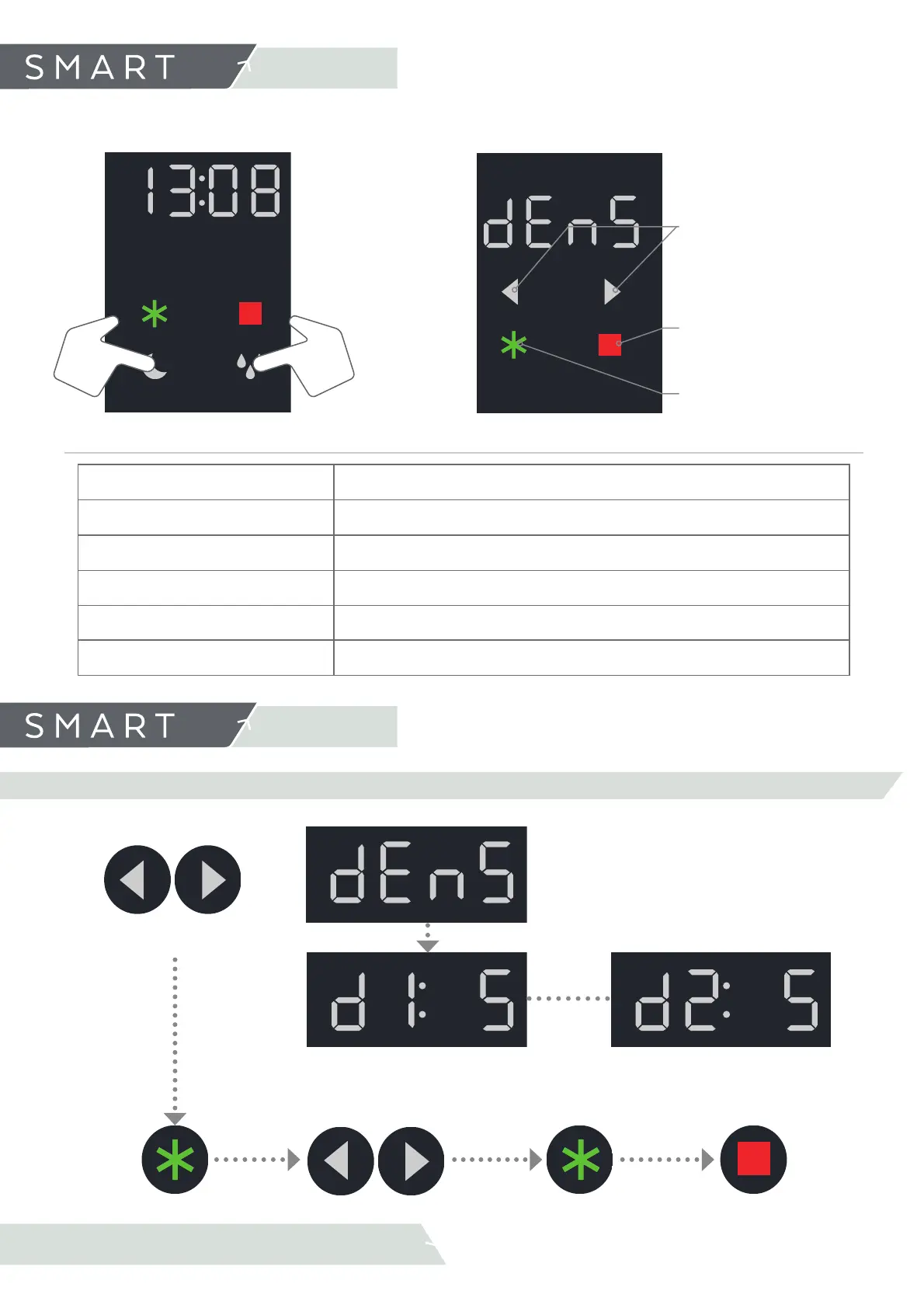
The arrow keys will be
lighted
6.1 Access User’s Menu
6. Settings
MENU ACCESS: Press simultaneously STANDBY and DEFROST and release.
·Move through parameters
list.
·Reduce or increase select
parameter value in the
user’s menu.
·Exit the selected
parameter.
·Exit the user menu.
·Select and save parameter
CONSISTENCY
Set slush consistency
AUTOMATIC MODES
Programme automatic modes (STANDBY, SLUSH).
DATE
Set date.
TIME
Set time.
PIN
Set a password for the Bluetooth connection.
LED
Set light parameters
EDITABLE PARAMETERS:
BROWSE THROUGH
THE USER’S MENU:
6.2 User’s menu settings
6. Settings
6.2.1 SLUSH THICKNESS (SET SLUSH CONSISTENCY)
Slush Consistency
Left Bowl
Slush Consistency
Right Bowl
Change bowl selection.
d1
or d2
Confi rm
selection
Increase/Decrease
Consistency
Confi rm
selection
Press twice to exit the user
menu



 To Next Page