1
2 3 4 5 6 7 8 9 10
EN_19
Hardness also depends on the product used and the proportion of sugar and total dissolved solids.
CONSISTENCY VALUES: THE VALUES RANGE FROM 1 TO 10
More liquid
Consistency
Harder
Consistency
Default value
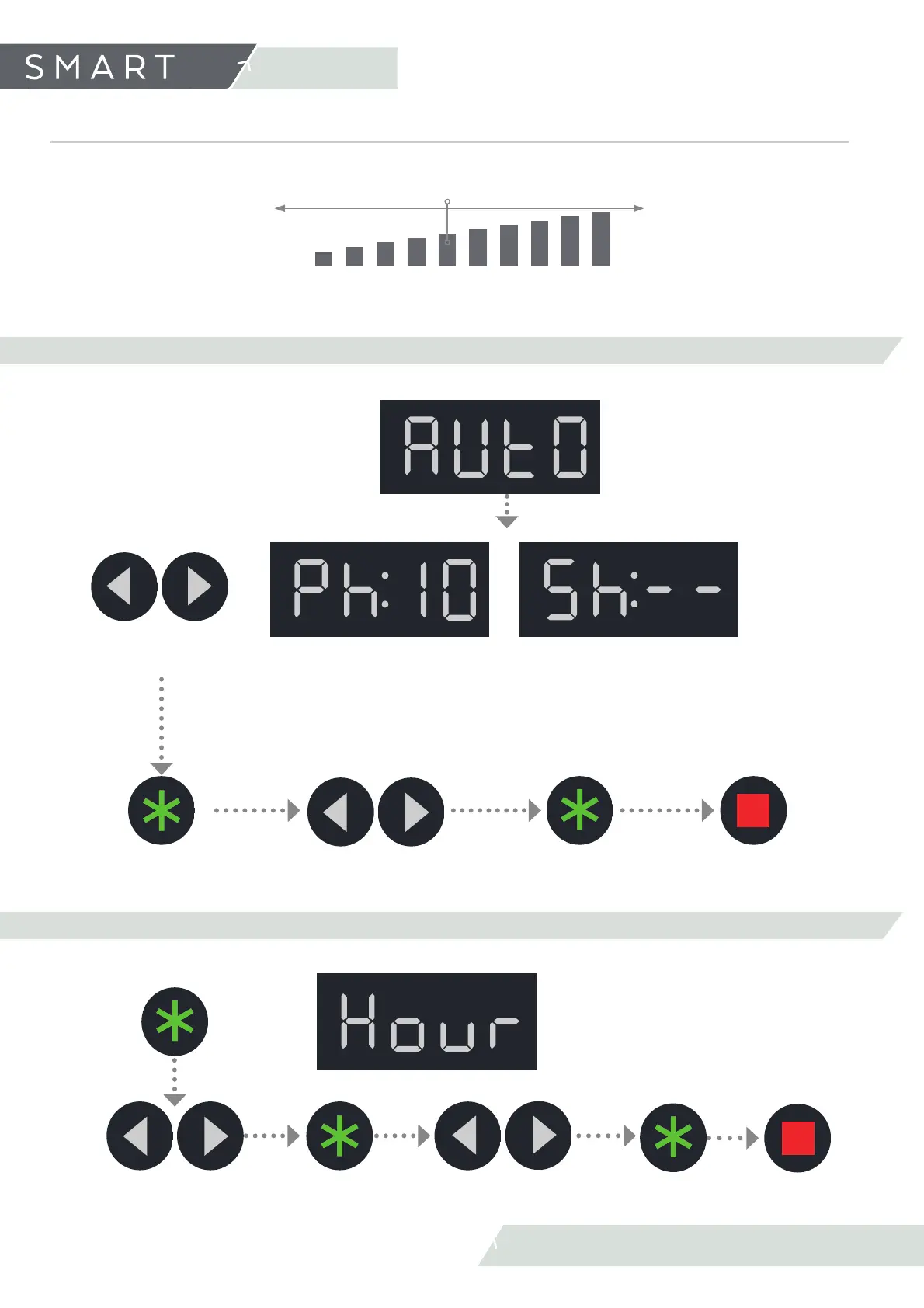
6.2.2 AUTO FUNCTIONS PROGRAMME AUTOMATIC MODES
Change function selection.
(SLUSH, STANDBY)
Confi rm
selection
Increase/Decrease
time
Confi rm
selection
Press twice to exit the
user menu
This means we do not have to
set the Standby mode manually
at closing time.
AUTOMATIC SLUSH
ACTIVE:
Programme SLUSH
production
Programme
STANDBY
Hour that the machine starts to auto-
matically produce slush.
Hour that the machine starts automa-
tically the STANDBY mode.
On the time selection screen the two dashes indicate automatic function off .
AUTOMATIC STANDBY
ACTIVE:
This means we do not have to
start production manual.
Confi rm
selection
Increase/Decrease
hours
Confi rm
selection
Press twice to exit the
user menu
6.2.3 TIME (SET TIME)
Increase/Decrease
minutes
6. Settings
6.2 User’s menu settings
Confi rm
selection



 To Next Page