Vante ® Model 4160
10
2.2. Startup
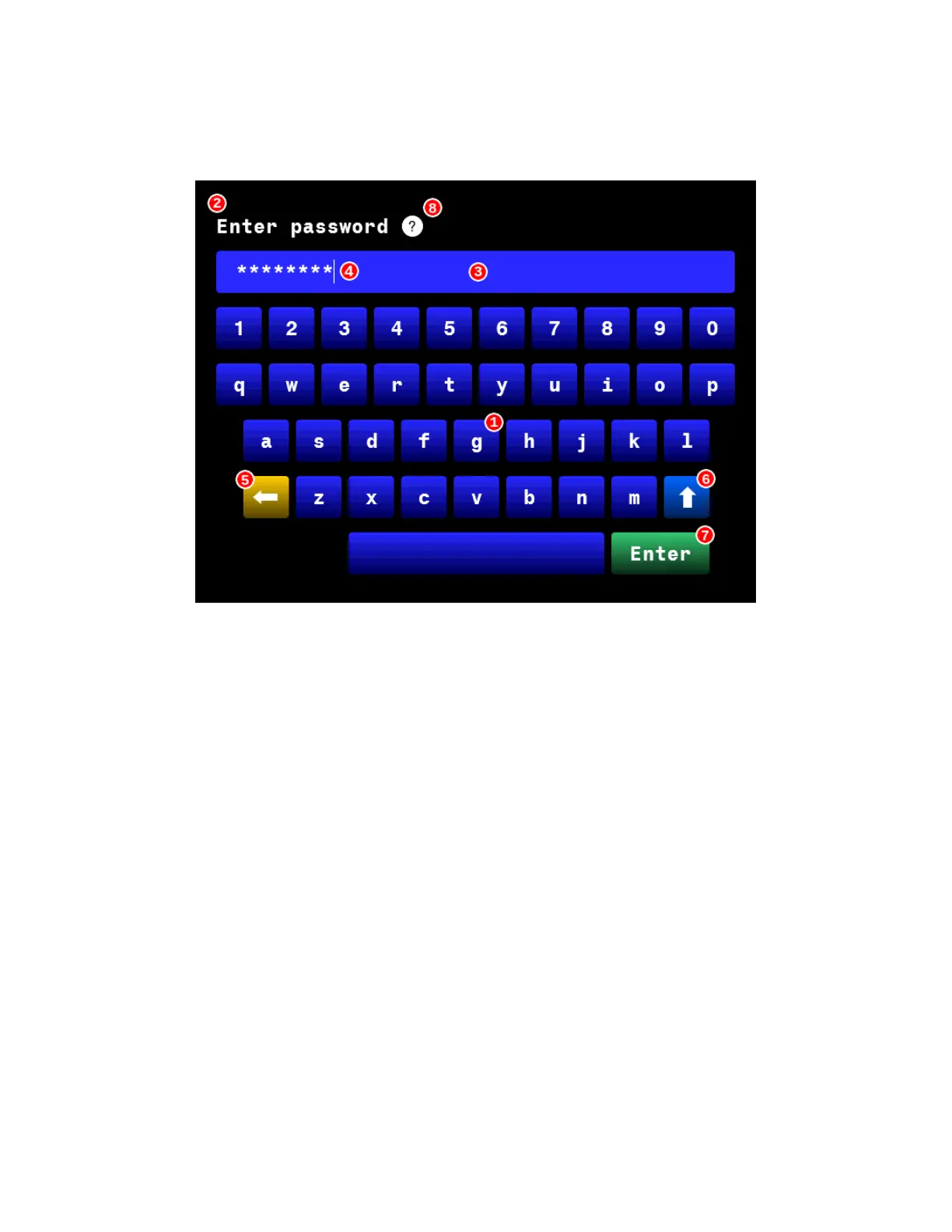
2.2.1. Authentication: when the generator/controller powers on, the first screen to
appear is the authentication screen. See Figure 2.1.
Figure 2.1 Authentication screen diagram
2.2.2. The 4160 system features 2 access levels: operator and administrator. Enter
either password using the touchscreen as follows:
NOTE: The default administrator password for the 4160 system is 0000000#.
1. Character keys work like keys on a keyboard.
2. The prompt at the top of the screen instructs the user.
3. The entry field displays content.
NOTE: When entering a password, the content field masks the characters in the password
with asterisks.
4. The cursor indicates the entry position for the next character. Touch the
entry field to move the cursor position.
5. The backspace key deletes one character at a time from the entry field.
6. The shift key switches between the lowercase/number keyboard and the
uppercase/symbol keyboard.
7. The Enter key completes the content entry and initiates the next software
process.


 To Next Page