Vante ® Model 4160
12
2.3. Run Cycle
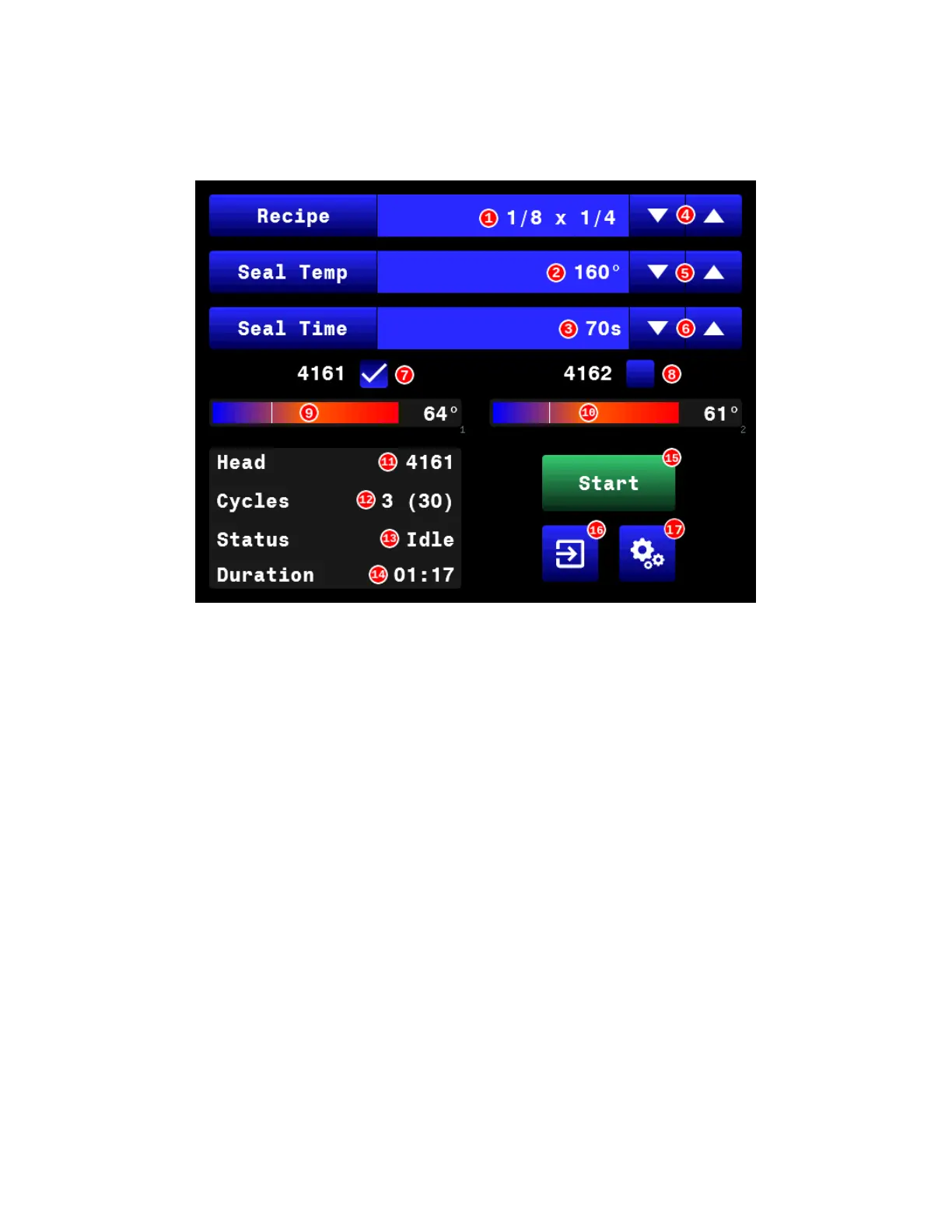
2.3.1. The generator/controller displays information about the run cycle on the main
control screen. See Figure 2.3.
Figure 2.3 Main control screen
2.3.2. The main control screen contains the following controls:
1. Recipe: this field displays the name of the active recipe. Touch the field to
change the name of the active recipe.
2. Seal Temp: this field displays the target temperature for the sealer.
3. Seal Time: this field displays the duration, in seconds, that heat will be
applied to the sealing head.
4. Recipe selection buttons: use the ▼ and ▲ buttons to scroll through all
the recipes stored in the generator/controller hard drive. The recipe shown
in the display field is the active recipe.
5. Seal temperature adjustment buttons: use the ▼ and ▲ buttons to
adjust the target temperature for the recipe.
6. Seal time adjustment buttons: use the ▼ and ▲ buttons to adjust the
heat duration time for the recipe.
7. 4161 checkbox: touch the box to check or uncheck. Use the checkmark to
enable the recipe for use with a 4161 sealing head (i.e. thin-wall product
processing).
8. 4162 checkbox: touch the box to check or uncheck. Use the checkmark to
enable the recipe for use with a 4162 sealing head (i.e. thick-wall product
processing).


 To Next Page