16
5 COMMISSIONING AND OPERATION
NOTICE
Loss of warranty /
Damage to property if the battery is replaced independently
Damage to the Vaporizer due to improper opening.
• Have the battery replaced exclusively by our Service Center
5.4 Battery
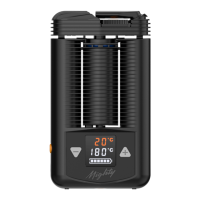
5.4.1 Basic Explanation of the Battery Charge Display
full battery: display of all six charging status fields
battery almost empty: Slowly flashing battery frame
The battery charge of the new product has a level of up to 80%.
5.4.2 Charging the Battery
X Fully charge the battery before rst use.
X Connect the Vaporizer to a USB Charger or computer using the USB-C
Cable supplied.
5.4.3 Explanation of the Battery Charge Display during Charging
(depending on the Charger used)
X Comply with Chapter 9.3 “Technical Requirements for suitable Chargers,”
page 32 regarding various chargers.
5.4.3.1 Charging with the USB Charger
X Connect the Vaporizer to the USB Charger.
Ö Vibration and lighting up of the display.
Ö Ascending flashing charge status fields.
Ö As soon as the battery is fully charged, all six charge status fields are
visible.
5.4.3.2 Quick Charge (if supported by the Charger)


 To Next Page