17
X Connect the Vaporizer to the USB-C Supercharger.
Ö Vibration and lighting up of the display.
Ö Ascending quickly flashing charge status fields.
Ö As soon as the battery is fully charged, all six charge status elds are
visible.
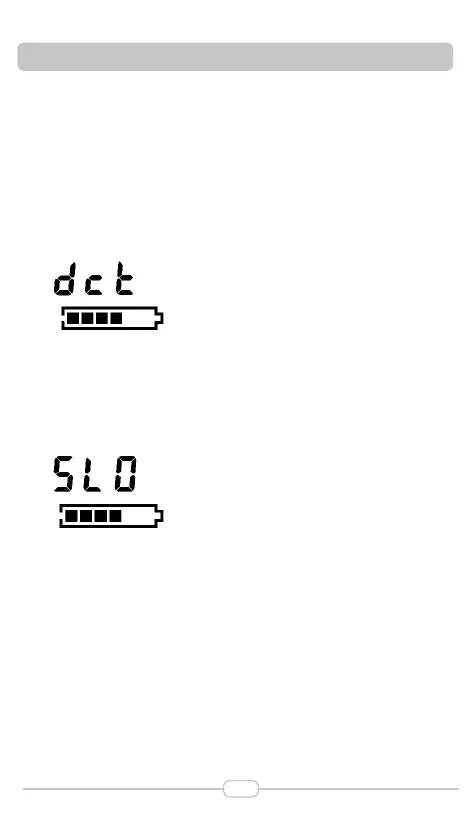
Ö If the connected charger also supports pass-through operation, “dct” ap-
pears on the second line of the display for three seconds after connection
(see Chapter 5.5 “Mains Operation”,page 17).
5.4.3.3 Charging with a low Power Charger
5 COMMISSIONING AND OPERATION
X Connect the Vaporizer to the USB Charger.
Ö Vibration and lighting up of the display.
Ö Display indication in the second line: “SLO”.
X Use a more powerful charger.
5.4.4 End of Charging Process
X When the charging process is nished, rst disconnect the USB-C Cable
from the mains supply and then from the Vaporizer.
5.5 Mains Operation (only possible with USB-C Supercharger)
When using the optionally available USB-C Supercharger, the Vaporizer can
also be operated with a completely discharged battery.
Ö Irrespective of whether the Vaporizer is switched on or off, “dct” is shown
on the second line of the display for three seconds after connecting the
USB-C Supercharger.
Ö The battery is not charged during this.
Ö The Vaporizer switches off when the mains supply is disconnected if the
battery is completely discharged.


 To Next Page