21
5 COMMISSIONING AND OPERATION
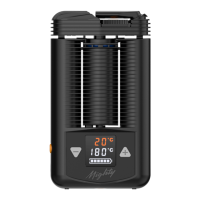
X Press the plus button briey.
Ö Increasing the setpoint value in 1 °C (1 °F) steps.
X Press the minus button briey.
Ö Reducing the setpoint value in 1 °C (1 °F) steps.
X Press the plus or minus button permanently.
Ö Continuous increase or decrease of the target value.
Ö Display of the current temperature (actual temperature) on the display in
the upper line.
5.8.5 Booster Temperature
X Switch on the Vaporizer.
X Double-click on the orange ON/OFF switch.
X Press the plus or minus button.
Ö Permanent adjustment of the booster temperature offset (value range
1 °C to 170 °C (1 °F to 306 °F)).
Ö A double vibration and a slowly ashing setpoint temperature display sig-
nal that the booster temperature has been reached.
Ö Booster mode ends automatically 90 seconds after the booster tempera-
ture has been reached; the set temperature is then the basic temperature
again.
5.8.6 Superbooster Temperature
X Switch on the Vaporizer.
X Click the orange ON/OFF switch three times.
X Press the plus or minus button.
Ö Permanent adjustment of the booster temperature offset (value range
1 °C to 170 °C (1 °F to 306° F)), as the superbooster temperature offset is
xed.
Ö A double vibration and a quickly ashing setpoint temperature display sig-
nal that the superbooster temperature has been reached.
Ö Superbooster mode ends automatically 90 seconds after the booster
temperature has been reached; the set temperature is then the basic tem-
perature again.
5.8.7 Celsius/Fahrenheit
X Press the plus and minus buttons simultaneously.
Ö Display changeover from Celsius to Fahrenheit and vice versa.


 To Next Page