37
Vasa SwimErg User’s Manual
August 2022
PART 3 - Maintenance & Troubleshooting
Vasa Inc. www.vasatrainer.com 1(800)488-VASA
AA batteryAA battery
+
+
AA battery
PORT
PORT
ANT +
Figure B
battery
compartment
Figure A
FLYWHEEL
(LEFT SIDE)
SWIMERG
FRONT COVER
remove four screws with
5/32” allen wrench
Figure C
VACUUM
AIR INLET
Vacuum Left & Right
side of ywheel
DRIVE
SHAFT
(LEFT SIDE)
Grease BOTH
sides
VACUUM
AIR OUTLET
IMPORTANT:
The PM is a sealed unit. DO NOT take apart. Any attempt to disassemble will void
warranty.
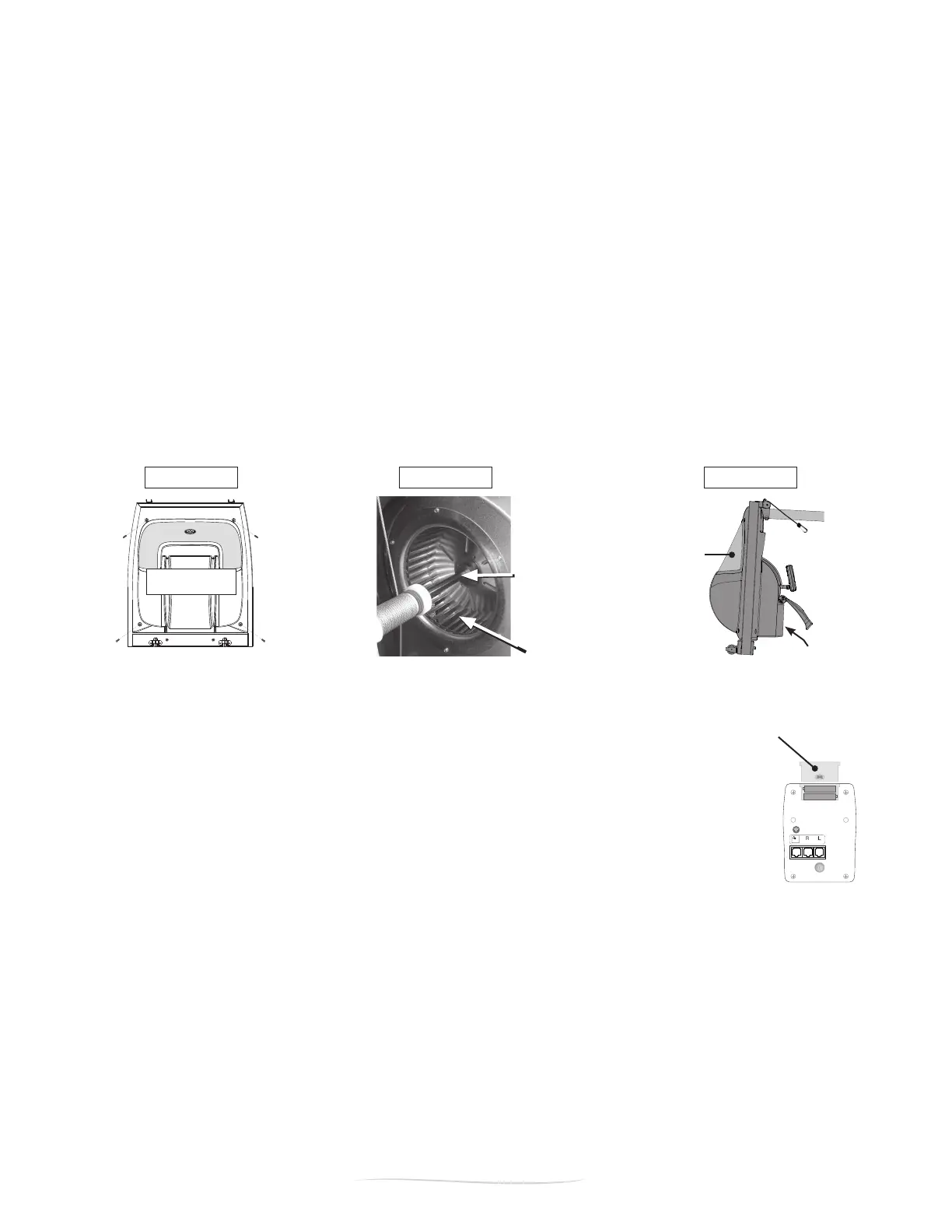
DRIVE SHAFT, FLYWHEEL, AIR INLET & OUTLET MAINTENANCE
As part of the Vasa SwimErg maintenance program, we suggest regular maintenace of a few parts inside
the front end assembly. This will require removal of the front cover. Locate the four screws in the upper
and lower corners on the front cover of the front end assembly (Figure A). Use the 5/32” allen wrench to
remove the four screws.
1. Locate the Flywheel (Figure B). Vacuum both the right and left side of the fan to remove any dust that
may have built up. Perform this step more or less frequently based on your environment.
2. HUMID, OUTSIDE or POOL SIDE ENVIRONMENTS: Locate the Drive Shaft (Figure B). Inspect the left
andrightsidestoseeifitisgettingdryordiscolored.Ifso,applylithiumgreasetoprotectthenish.
3. Locate the Air Inlet & Air Outlet (Figure C). Vacuum the perforated metal areas to remove any dust
buildup.
4. Replace the plastic cover. Slide it into position then replace the four screws in each corner. Tighten with
5/32” allen wrench.
VASA SWIMERG POWER METER (PM) MAINTENANCE
BATTERY REPLACEMENT
The batteries in the Vasa SWIMERG POWER METER (PM) typically last about 600 working
hours.If“LOCELL”appearsinthetopeldofthePM,thebatteriesneedtobereplaced.To
change the batteries, open the battery compartment on the back of the PM (Figure A). The
PMtakestwo“AA”batteries.
NOTE: Static discharge may cause the PM to inadvertently turn on. This will reduce the
life of the batteries as the PM will remain on for 5 minutes until the Battery Save feature is
activated.
BATTERY SAVE FEATURE
Thereisa5minutetime-outfeatureonyourPM.Ifthereisno“activity”themonitorwillpowerdown
after5minutes(“activity”includesinputsfrompullingonthedrivecord,pushingbuttons,orserial
communications with a computer). Any workout information will be cleared from the memory as soon as
the monitor shuts off.


 To Next Page