Shift
Setup
Review
Display
METERS
SPM
/100M
WATTS
Shift
Setup
Review
Display
METERS
SPM
/100M
WATTS
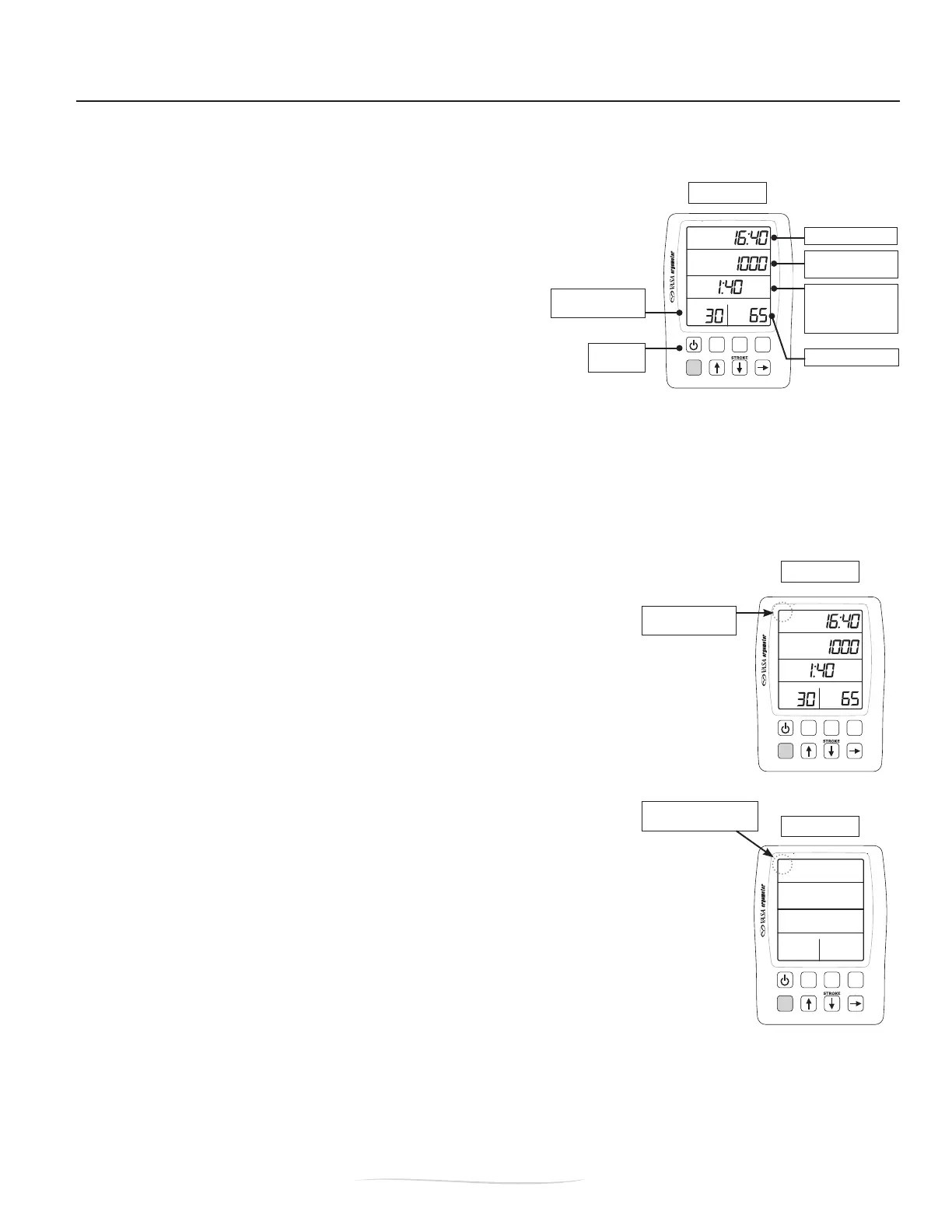
ELAPSED TIME
ACCUMULATED
DISTANCE
PACE
/ 100M(SWIM)
/ 500M*(KAYAK/SUP)
STROKE POWER
ON/OFF
button
STROKES PER
MINUTE
Shift
Setup
Review
Display
METERS
SPM
K
/100M
WATTS
48:40
8000
3:00
30
95
19
Vasa SwimErg User’s Manual
August 2022
Figure A
Figure C
Figure B
KAYAK/SUP Display
shows “K” here
Swim Display
is blank here
PART 2 - Using the SwimErg
2.3. POWER METER - GENERAL OPERATION
The Power Meter (PM) gives you the opportunity to get instant feedback on your performance. Having
reliable information on your performance will allow you to:
• monitor progress
• create repeatable performance testing & training
• set up workouts based on time & distance
• perform intervals or distance training
• simulate races
• analyze imbalance (right and left power)
Specicsonhowthepowermetercalculatesdatacanbefoundattheendofthissection.
INITIALIZE THE POWER METER
Each time after you install the connection cables, you must:
• power OFF (by pushing the ON/OFF button)
• wait two seconds
• power ON
This process will allow for the PM to communicate accurately with the SwimErg. If you see irregular
readings, repeat the initialize steps above.
VIEWING OPTIONS: SWIM VS. KAYAK/SUP
There is a SWIM VIEW (default) and KAYAK/SUP VIEW on the Power Meter
that provides relative data based on the sport.
The upper left corner of the top screen denotes the view:
Swim View = no display/blank (Figure B)
KAYAK/SUPView=“K”displayed(FigureC)
To change between views:
Step 1: Begin with the power meter OFF.
Step 2: Hold SHIFT and then press ON/OFF. Release buttons and wait
forLCDtestsequencetonish.
Step 3: Hold SHIFT and then press ON/OFF so it will display a series of
numbers. Release buttons.
Step 4: Hold the SHIFT and press SETUP button. Release buttons. The display will turn
off.
Step 5: Turn ON for the new view.
The Power Meter will remain in the selected view (Swim or KAYAK/SUP) for all future
workouts until you change it back. Repeat the sequence above if you want to change to
the other view.
*PACING NOTE: In the KAYAK/SUP View, the Power Meter will calculate PACE/500M. Swim View is always
displayed in PACE/100M.


 To Next Page