EasyManua.ls Logo

VAT 61232-KEGJ-0002 - User Manual

VAT 61232-KEGJ-0002
69 pages
Print Icon
To Next Page IconTo Next Page
Loading...
Installation, Operating & Maintenance Instructions
Series 612 DN 40 (I.D. 1.5”), RS485
VAT Vakuumventile AG, CH-9469 Haag, Switzerland
Tel +41 81 771 61 61 Fax +41 81 771 48 30 CH@vatvalve.com www.vatvalve.com
289917EA
2011-07-07
1/69
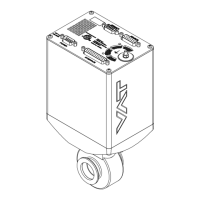
Butterfly Pressure Control Valve
with RS485 interface
This manual is valid for the valve ordering number(s):
61232-KEGJ-0002
configured with firmware 612P.1E.65
The fabrication number is indicated on each product as per the label
below (or similar):
made in Switzerland
Fabrication No.:
612
. .
. . . .
. . . . / . . . .
. . . . . .
Fabrication number
sample picture
Explanation of symbols:
Read declaration carefully before you start any other
action!
Keep body parts and objects away from the valve
opening!
Attention!
Hot surfaces; do not touch!
Loaded springs and/or air cushions are potential
hazards!
Wear gloves!
Disconnect electrical power and compressed air
lines. Do not touch parts under voltage!
Read these «Installation, Operating & Maintenance Instructions» and the enclosed «General
Safety Instructions» carefully before you start any other action!

Questions and Answers

  • J
    John HuntAug 31, 2025
    Why pressure reading is wrong on VAT Control Unit?
    • J
      Jonathan MitchellAug 31, 2025
      To fix a pressure reading that is wrong or negative on your VAT Control Unit, check the electrical connections, verify the valve version and configuration, perform ZERO after reaching base pressure, and verify the sensor supply voltage. The issue may stem from unconnected sensors, an incorrect sensor version, an unperformed ZERO, or insufficient sensor power.
  • S
    Samuel JohnsonAug 25, 2025
    Why is the VAT 61232-KEGJ-0002 Control Unit pressure reading wrong or negative?
    • B
      Bruce ColemanAug 25, 2025
      If the pressure reading on your VAT Control Unit is incorrect or negative, check the sensor connections according to the electrical connection guidelines. For a 2-sensor version, verify the configuration. Perform ZERO after reaching the base pressure, and ensure the sensor power supply provides sufficient power.
  • M
    mccoymarkSep 23, 2025
    What to do if the VAT 61232-KEGJ-0002 display shows «E 20» (fatal error - limit stop of valve unit not detected)?
    • M
      Margaret GrahamSep 23, 2025
      If the VAT Control Unit display shows «E 20», it indicates a fatal error where the limit stop of the valve unit is not detected. This could be due to a clamp coupling screw that is not fastened. Tighten the screw, referring to chapter «Maintenance» for details.
  • J
    Jon SavageSep 5, 2025
    What does it mean if VAT 61232-KEGJ-0002 Control Unit display shows «E 40» and position is 009999?
    • M
      Michael JonesSep 5, 2025
      If the display shows «E 40» and the position is 009999, it indicates a fatal error where a motor driver failure has been detected. To resolve this: - Replace the control and actuating unit according to «Maintenance procedure».
  • M
    mendezkevinSep 10, 2025
    Why does ZERO not work on my VAT 61232-KEGJ-0002?
    • C
      codygonzalezSep 10, 2025
      If the VAT Control Unit ZERO does not work, OPEN the VALVE and bring the chamber to base pressure before performing ZERO. If ZERO is disabled, enable it, referring to «Valve configuration» for details.
  • D
    Dawn ArnoldSep 3, 2025
    Why VAT 61232-KEGJ-0002 CLOSE VALVE does not work?
    • J
      Jessica MorganSep 3, 2025
      If the CLOSE VALVE function isn't working, it might be because safety mode is active or maintenance mode is active. To solve this: - Provide power to the motor to allow for operation. - Refer to “Display shows «M C»” in this table.
  • A
    Amanda WoodAug 29, 2025
    Why PRESSURE CONTROL does not work on VAT 61232-KEGJ-0002?
    • K
      Kimberly RodriguezAug 29, 2025
      To resolve the issue of PRESSURE CONTROL not working on your VAT Control Unit, ensure that power is supplied to the motor. Select PRESSURE CONTROL mode and perform LEARN. The problem may be due to safety mode being active, PRESSURE CONTROL not being selected, or LEARN not being completed.
  • K
    Katie BergerSep 12, 2025
    What to do if the VAT Control Unit does not respond to DeviceNet® commands?
    • N
      Nancy FarmerSep 12, 2025
      If the VAT Control Unit doesn't respond to DeviceNet® commands, check if the node number and baud rate are correct. If not, proceed according to the «Setup procedure, DeviceNet® CONFIGURATION».
  • C
    craigreedSep 7, 2025
    What to do if VAT Control Unit display shows «E 40»?
    • N
      Nicole YatesSep 7, 2025
      If the display shows «E 40» on your VAT Control Unit, indicating a fatal error related to motor driver failure, replace the control and actuating unit according to «Maintenance procedure».
  • V
    Virginia GallegosAug 27, 2025
    What does error E21 mean on VAT 61232-KEGJ-0002 display?
    • C
      Christopher AcostaAug 27, 2025
      If your VAT Control Unit displays 'E 21' and the position '009999' (fatal error - rotation angle of valve plate limited during power up), check if the valve plate is centric adjusted, if the valve unit is heavily contaminated or if the valve plate is mechanically obstructed. Adjust the valve plate according to the maintenance procedure, clean the valve unit, and resolve any obstructions. Reset the control unit by cycling the power off and on, or send a reset command locally via the service port with CV/CPA/Service Box2.

VAT 61232-KEGJ-0002 Specifications

General IconGeneral
BrandVAT
Model61232-KEGJ-0002
CategoryControl Unit
LanguageEnglish

Related product manuals