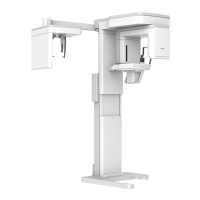
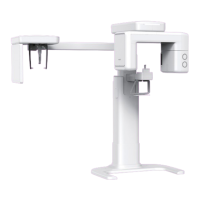
1. Imaging System Overview
Green X (PHT-75CHS) User Manual 7
English
No. Item Description
11
Canine beam guide
adjuster
Adjust the canine beam guide back and forth.
12
Temple Supports
OPEN/CLOSE Knob
Adjusts the Temple Supports for patient positioning.
13 Chinrest The place to rest the chin.
14 Temple Supports
Supports the patient’s head by holding the temples.
It is used in PANO and CBCT modes.
15
X-ray Detector for
PANO/CBCT
Xmaru1314CF for PANO/CBCT imaging sensor
16
LED Lamp
Displays the status of X-ray exposure.
Green: Standby
Yellow: In operation (X-ray on)
17
X-ray Generator The X-ray tube where the X-ray is produced.
18 Vertical Frame
Holds the Rotating Unit.
It can be controlled with the Column UP/DOWN
switch.
19 Rotating Unit
Rotates around the patient's head while the image
is being acquired.
(Its movement is different according to the scan
mode.)
20
Enclosed Component
Storage
The place where Bites, Chinrest Assembly, and the
other components can be stored.
21 Main Power Switch Turns on/off the main power of the equipment.


 To Next Page