54 © 2009 VBrick Systems, Inc.
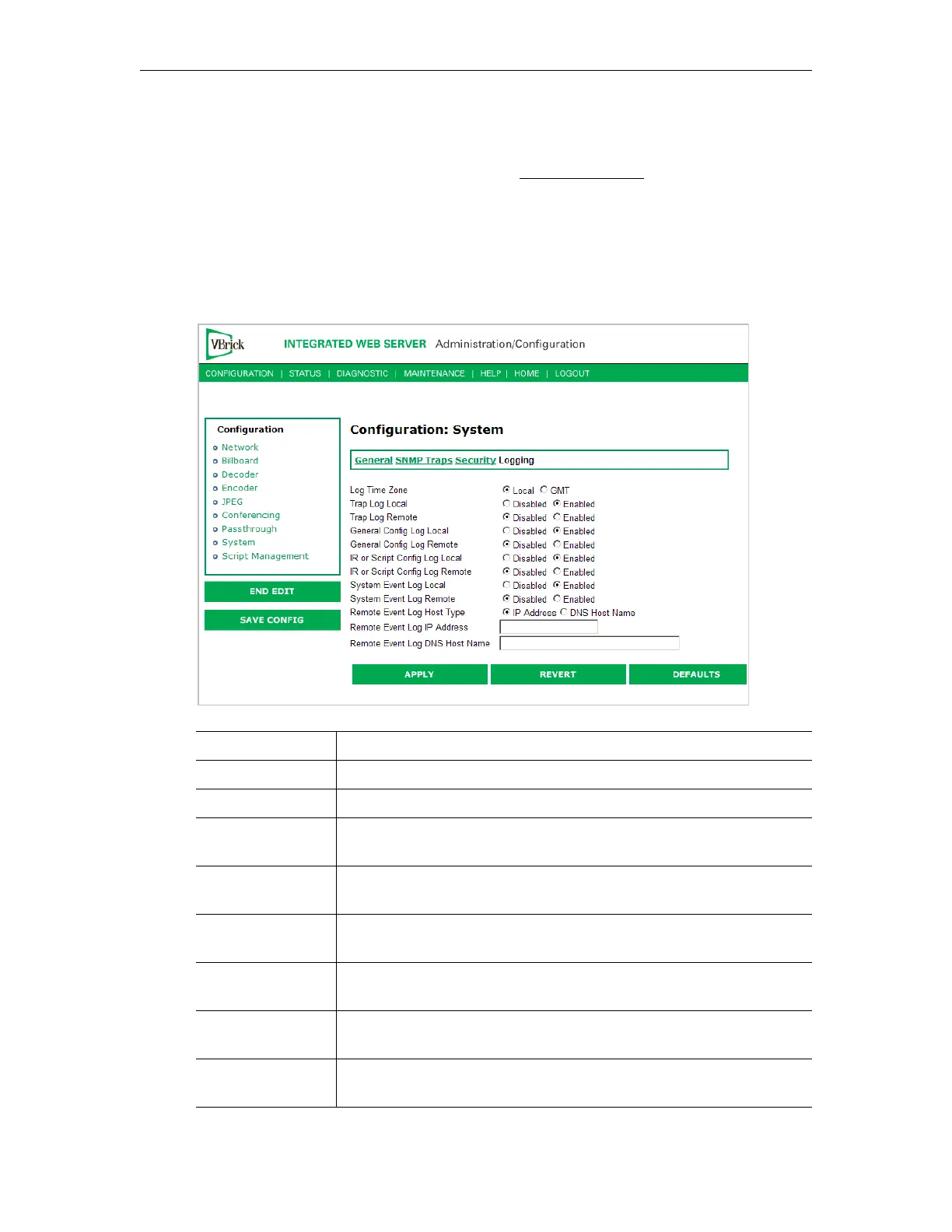
Configuration: System > Logging
Certain log events are captured and can be viewed locally. This local log is saved in volatile
memory and hold the most recent 20 entries. See Status: System Log on page 75 for examples
of log information. To save log information indefinitely, it is recommended that remote
logging be utilized. Remote servers generally offer ample storage and offer the additional
benefit of collecting log information from several VBricks simultaneously. When logging
externally, specify either the IP address or hostname a server that is configured to receive
SNMP traps on port 162 into the Remote Event Log IP Address or Remove Event Log DNS
Host Name fields.
Log Time Zone Specifies the time zone (Local or GMT) that is used for logged events.
Trap Log Local If Enabled, displays trap events in the local log.
Trap Log Remote If Enabled, sends trap event notices to a remote host.
General Config
Log Local
If Enabled, displays configuration changes in the local log.
General Config
Log Remote
If Enabled, sends configuration change notices to a remote host.
IR or Script Config
Log Local
If Enabled, displays IR or script-generated configuration changes in
the local log.
IR or Script Config
Log Remote
If Enabled, sends IR or script-generated configuration changes to a
remote host.
Remote Event Log
Host Type
Identify remote event log server by host name.
Remote Event Log
IP Address
Identify remote event log server by IP address.


 To Next Page