System Status
VBrick MPEG-4 Appliance Admin Guide 69
Audio
Closed Caption
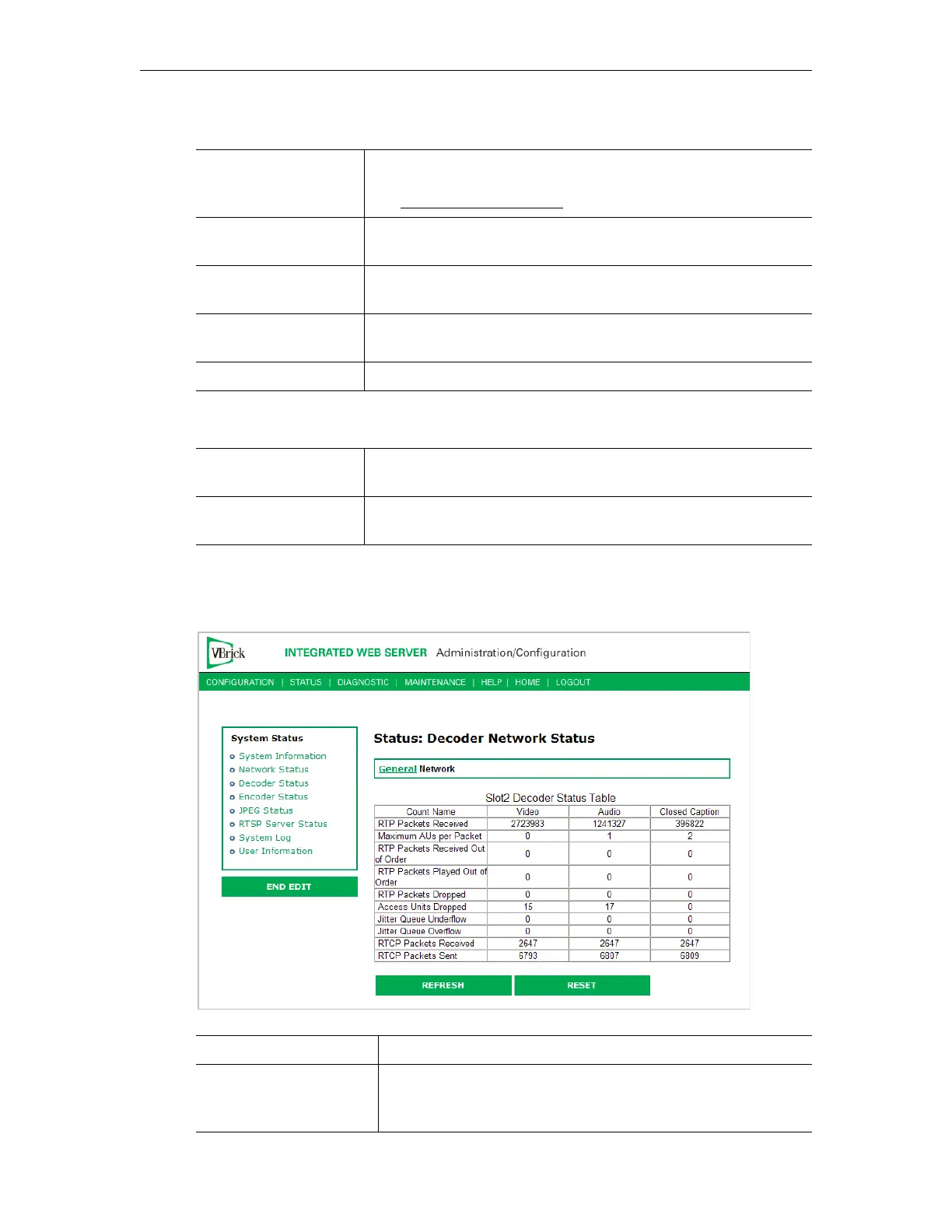
Status: Decoder Status > Network
This status window provides packet statistics for the connection.
Audio Format The format for the audio stream this decoder is receiving in the
format:
xxx/<Stereo, Mono> where xxx is the Sample Frequency
(see Audio Template Settings
). For example: 48000/Stereo
Target Audio Bit Rate The estimated audio bit rate from the encoder for the audio
stream this decoder is receiving.
Measured Audio Bit
Rate
The measured bit rate for the audio stream being played by this
decoder.
Audio Frames
Decoded
The number of frames decoded for the audio stream being played
by this decoder.
Bad Audio Frames The number of audio frames that could not be decoded.
Measured CC Bit Rate Reports the measured bit rate for the closed caption stream
displayed by the decoder.
CC Frame Rate Reports the frame rate for the closed caption stream displayed by
the decoder
RTP Packets Received The number of RTP packets received.
Maximum AUs per
Packet
Maximum access units per RTP packet. The video maximum is
0 or 1; the audio maximum varies by source; the closed caption
maximum is set in the encoder.


 To Next Page