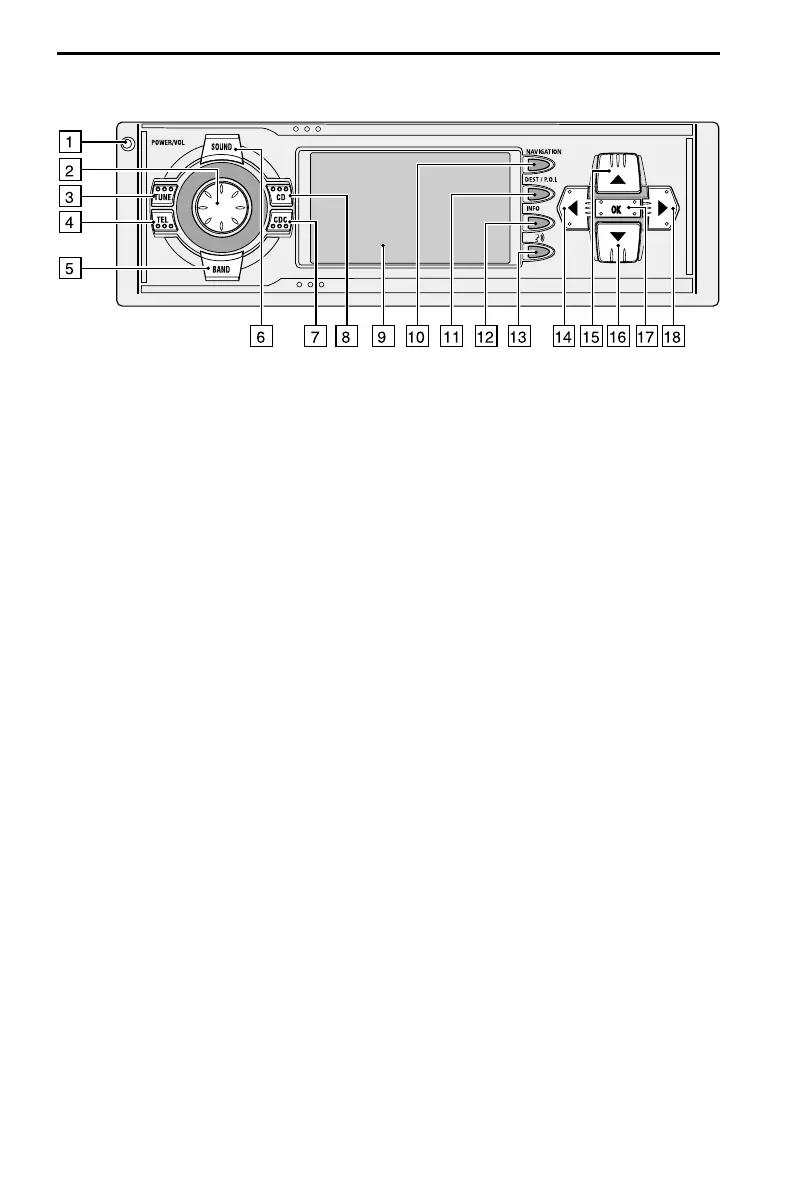
Control elements
1 REL . . . . . . . . . Release button for removable control panel
2 VOL/POWER . . Press: Switching on / off
. . . . . . . . . . . . Turn: Set volume
3 TUNE . . . . . . . Radio mode. ➽ Page 33
. . . . . . . . . . . . In radio mode: Opens the “RADIO” menu.
4 TEL . . . . . . . . With mobile telephone connected: Switch to telephone input
. . . . . . . . . . . . Without mobile telephone connected: Muting the system.
5 BAND . . . . . . . Opens the menu “BAND SELECTION“ (in radio mode). ➽ Page 32
6 SOUND . . . . . . Opens the “SOUND“ menu. ➽ Page 30
7 CDC . . . . . . . . CD changer mode. ➽ Page 38
✎ ✎ ✎ ✎ ✎ In CD changer mode: Opens the “CD CHANGER” menu.
8 CD . . . . . . . . . CD player mode. ➽ Page 36
. . . . . . . . . . . . In CD player mode: Opens the “CD” menu.
9 . . . . . . . . . . . . Display
0 NAVIGATION . Opens the navigation menu. ➽ Page 26.
q DEST/P.O.I. . . . Press once: Opens the list of addresses stored in the address book.
. . . . . . . . . . . . ➽ Page 58.
. . . . . . . . . . . . Press twice: Opens the “Info on car pos” menu.
. . . . . . . . . . . . ➽ Page 45.
w INFO. . . . . . . . Opens the “INFORMATION“ menu. ➽ Page 28
e
{ . . . . . . . . . Replay current direction and (if available) the current
. . . . . . . . . . . . TMC message. ➽ Pages 49, 50.
r 4 . . . . . . . . . . Moves the cursor to the left in the menus.
t 8. . . . . . . . . . Moves the cursor upwards in the menus.
z 2. . . . . . . . . . Moves the cursor downwards in the menus.
u OK . . . . . . . . . In menus: Confirm a selection.
. . . . . . . . . . . . For radio, CD player and CD changer: Switch search mode type.
i 6 . . . . . . . . . . Moves the cursor to the right in the menus.
22
OPERATION



 To Next Page