
 Need help?
Do you have a question about the Vello WIRELESS SHUTTRBOSS 4.0 and is the answer not in the manual?
Connect the transmitter to your camera using a cable for wired remote operation.
Change shooting modes by pressing the Mode button; cursor indicates selection.
Toggle audible tones for shutter release, timer start/stop via the Mode button.
Locks all controls by pressing and holding the lock button for 2 seconds.
Activate display panel backlight by pressing the button; remains lit for 10 seconds.
Navigate timer functions and time positions using directional arrows.
Captures a single exposure; press shutter release halfway to focus, fully to trigger.
Captures multiple exposures; press shutter release halfway to focus, fully to trigger.
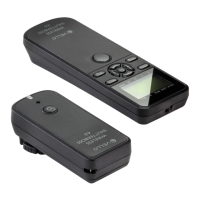
The Vello Wireless ShutterBoss 4.0 is an advanced remote timer designed for photographers seeking precise control over their camera's shutter functions, both wired and wirelessly. This device offers a comprehensive suite of timer functionalities, making it ideal for self-timed photos, long exposures, time-lapse photography, and use as an intervalometer. Its primary function is to program delayed shutter release times, lengthy exposure durations, and timed intervals between a sequence of shots, thereby expanding creative possibilities for photographers.
The ShutterBoss 4.0 operates as a versatile camera remote, offering both wired and wireless connectivity. In its core function, it allows users to trigger the camera's shutter manually, providing a simple and direct way to take photos without touching the camera. This is particularly useful for preventing camera shake during critical shots. Beyond manual control, the device excels in its timer capabilities. It features a "DELAY" function, enabling users to set a timed delay before an exposure or sequence of exposures begins, ranging from 0 seconds up to 99 hours, 59 minutes, and 59.9 seconds. This is perfect for photographers who need to get into a group shot or prepare for a specific moment.
The "LONG" exposure mode is a standout feature, allowing for exposure times far exceeding what most cameras can natively achieve. Users can set exposure durations from 1 second up to 99 hours, 59 minutes, and 59.9 seconds. For exposures of 1 second or longer, the camera should be set to Bulb mode, with the ShutterBoss precisely controlling the exposure length. This is invaluable for capturing star trails, light painting, or other long-duration photographic effects.
The "INTVL" (Interval) function transforms the ShutterBoss into a powerful intervalometer. It allows users to define the time between exposures in a sequence, with intervals ranging from 0.1 seconds up to 99 hours, 59 minutes, and 59.9 seconds. This is crucial for time-lapse photography, where a series of images are captured at regular intervals to create a video showing change over time, such as a blooming flower or a moving cloudscape. When using a flash, it's important to set an interval longer than the flash recycle time to ensure proper illumination.
The "N" (Number of Shots) feature complements the intervalometer function by allowing users to specify the total number of exposures in a sequence. This can be set from 1 to 199 shots, or even to infinite (--), providing flexibility for various time-lapse projects or continuous shooting scenarios. By default, there's a 1-second delay between exposures until a manual interval is set.
A unique and advanced feature is "BKLN" (Exposure Time Bracketing). This mode enables the ShutterBoss to take multiple shots at different exposure times, effectively doubling the exposure time for each subsequent shot in a sequence, up to 7 photos. This is useful for creating High Dynamic Range (HDR) images or for experimental photography where varying exposure times are desired. To use this, the camera must be set to Bulb mode, and the user sets a base "LONG" exposure time and the "N" number of shots for bracketing.
The device also includes a "2S" (Two-Second Delay Timer) mode, which delays the triggering of the camera by 2 seconds. This is a simple yet effective way to further minimize camera shake for single shots without needing to set a longer custom delay.
The ShutterBoss 4.0 is designed for intuitive operation, featuring a clear display panel and tactile buttons. The transmitter's display panel provides real-time feedback on all active timer functions, including delay, long exposure, interval, number of shots, and bracketing settings. It also shows indicators for low battery, wireless signal strength, lock status, and audio confirmation.
Powering On/Off: The transmitter and receiver are powered on by pressing and holding their respective power buttons for approximately 2 seconds. A confirmation LED on both devices flashes green and then red, and the transmitter's display lights up. To power off both devices simultaneously, the transmitter's power button is held for about 3 seconds until its display turns off and the receiver's LED stops flashing. Settings are saved upon powering off the transmitter.
Connecting the Remote: The ShutterBoss can be used as a wired remote by connecting the shutter release cable directly from the transmitter to the camera's remote socket. For wireless operation, the receiver is mounted onto the camera's hot shoe (or a bracket/cage via its mounting foot or 1/4-20 socket) and connected to the camera's remote socket with the provided cable. Both the camera and the ShutterBoss transmitter and receiver should be turned off before connecting cables.
Smart Code Setting: The device utilizes a "Smart Code" system that automatically selects the best frequency for communication between the transmitter and receiver. While preset for immediate use, users can reset the Smart Code or add additional receivers. This involves turning on both devices, pressing the receiver's code reset button with a pin (which makes its LED flash red and green for up to 25 seconds), and then pressing the transmitter's shutter release button. Once set, the receiver's LED will stop flashing red and green, returning to a steady green flash. A single transmitter can control multiple receivers, but each receiver can only receive signals from one transmitter.
Wireless Signal Indicator: The transmitter's display includes a wireless signal indicator that shows the connection status between the transmitter and receiver. Pressing the transmitter's shutter release button when both devices are on will make this indicator appear if they are within range. If out of range, the indicator will not appear.
Timer Functions (DELAY, LONG, INTVL, N, BKLN): These functions are accessed by pressing the Mode button until the cursor is above "TIMER" on the display. Each function's settings are adjusted using the directional pad and confirmed with the Set button. The time increments blink when engaged for adjustment.
The ShutterBoss 4.0 is designed for durability and ease of maintenance.
The Vello Wireless ShutterBoss 4.0 is a robust and feature-rich tool that empowers photographers with advanced control over their camera's shutter, enabling a wide range of creative photographic techniques.
 General
| Self-Timer Delay | 0 sec. to 99 hr. 59 min. 59.9 sec. |
|---|---|
| Exposure Time | 1 sec. to 99 hr. 59 min. 59.9 sec. |
| Interval Time | 1 sec. to 99 hr. 59 min. 59.9 sec. |
| Number of Shots | 1 to 199, infniite |
| Wireless Range | 196 ft. (60 m) |
| Power Source | Transmitter: 2 × AAA batteries (not included) Receiver: 2 × AAA batteries (not included) |
| Standby Time | 48 hr. |
| Operating Temperature | 14°F to 113°F (−10°C to 45°C) |
| Storage Temperature | 14°F to 140°F (−10°C to 60°C) |
| Dimensions (H × W × D) | Transmitter: 5.1 × 1.8 × 0.8 in. (130 × 46 × 21 mm) Receiver: 3.3 × 1.5 × 1.2 in. (85 × 37 × 31 mm) |
 Weight and Dimensions
| Weight | Transmitter: 2 oz. (56.5 g) without batteries Receiver: 1.4 oz. (40 g) without batteries |
|---|

 To Next Page