73110331-01 - 5/20
PHTM II
Installation, Operating & Service Instructions
19 Troubleshooting (continued)
D. Troubleshooting with Active Fault Code.
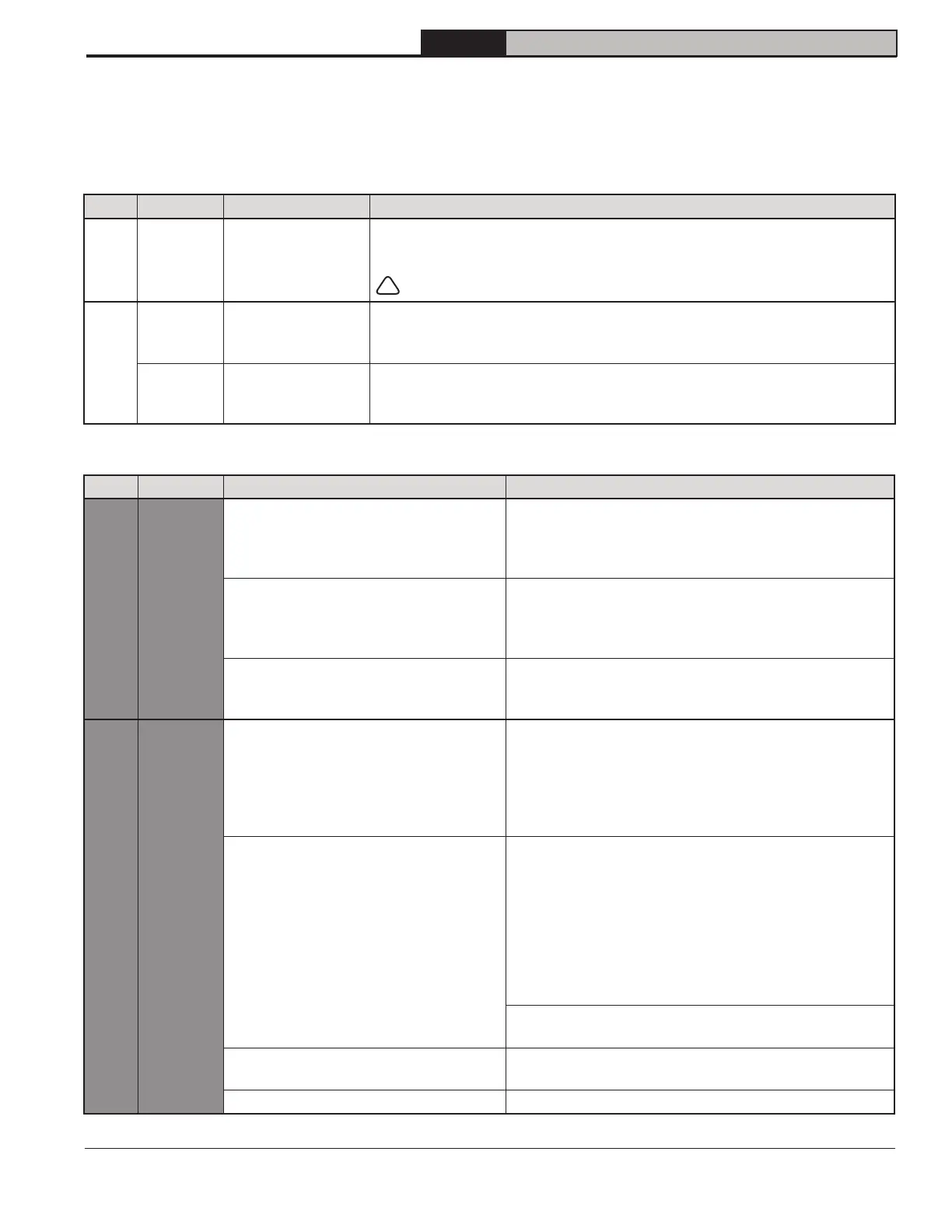
Control uses following codes to describe abnormal operation:
Table 19-4: Lockout/Hold/Warning Symbol Description
Code Type Boiler Status Description
E Lockout Shutdown
When a lockout occurs, boiler will shut down and event is stored in
history, b, menu. Once condition that caused lockout is corrected,
boiler remains shut down until a reset has been performed by pressing
!
reset button.
H
Hold Shutdown
When a Hold occurs, boiler will shut down. Event is stored in history, b,
menu. Boiler will automatically restart once condition that caused hold is
corrected.
Warning Free to operate
When a Warning occurs, an abnormal condition has affected boiler
operation and event is stored in history, b, menu. Boiler continues to
operate.
Table 19-5: Active Fault Code and Corrective Actions
Code Name Possible Causes Corrective Action
H01
Anti-
Short
Cycle
[1.0] Anti-short cycle boiler start delay,
while thermostat demand present,
boiler has cycled off and restart is
delayed.
Boiler will restart after minimum off time of 1 minute.
[1.1] Urgent calibration cooling delay
boiler start delay, urgent calibration
is present, waiting for supply
temperature to decrease.
Boiler will start after supply temperature drops below
95°F (35°C). Low supply temperature helps to ensure
a successful calibration.
[1.2] Flow switch closed delay boiler
start delay, flow switch is closed,
waiting for flow switch to open.
Boiler pump will start after flow switch open state is
proven. Maximum waiting time is 30s, otherwise E5.4
is set.
H02
Safety
Limit
Open
External limit.
If water temperature too high see H04/E04 for
corrective action.
• Check external limit setting, verify limit setting.
• Check external limit wiring.
• If external limit is not used, check jumper is installed
according to wiring diagram.
Optional (LWCO)
Check LWCO indications, if yellow light "On":
- Verify that system is full of water and all air has
been properly purged from system.
- Check automatic air vent is unobstructed and
properly functioning, a blocked air vent can result
in low water condition.
If yellow and green light "Off", check LWCO wiring
harness.
If LWCO is not used, check jumper is installed
according to wiring diagram.
Thermal Fuse.
Check thermal fuse for continuity. If "open" consult
manufacturer.
Loose wire. Check limit string wiring.


 To Next Page