12 VELUX VELUX 13
Enter Back
Menu
Locate
Enter Back
P1
P2
P1
P2
2
3
1
Menu
Locate
P1
P2
Menu
Locate
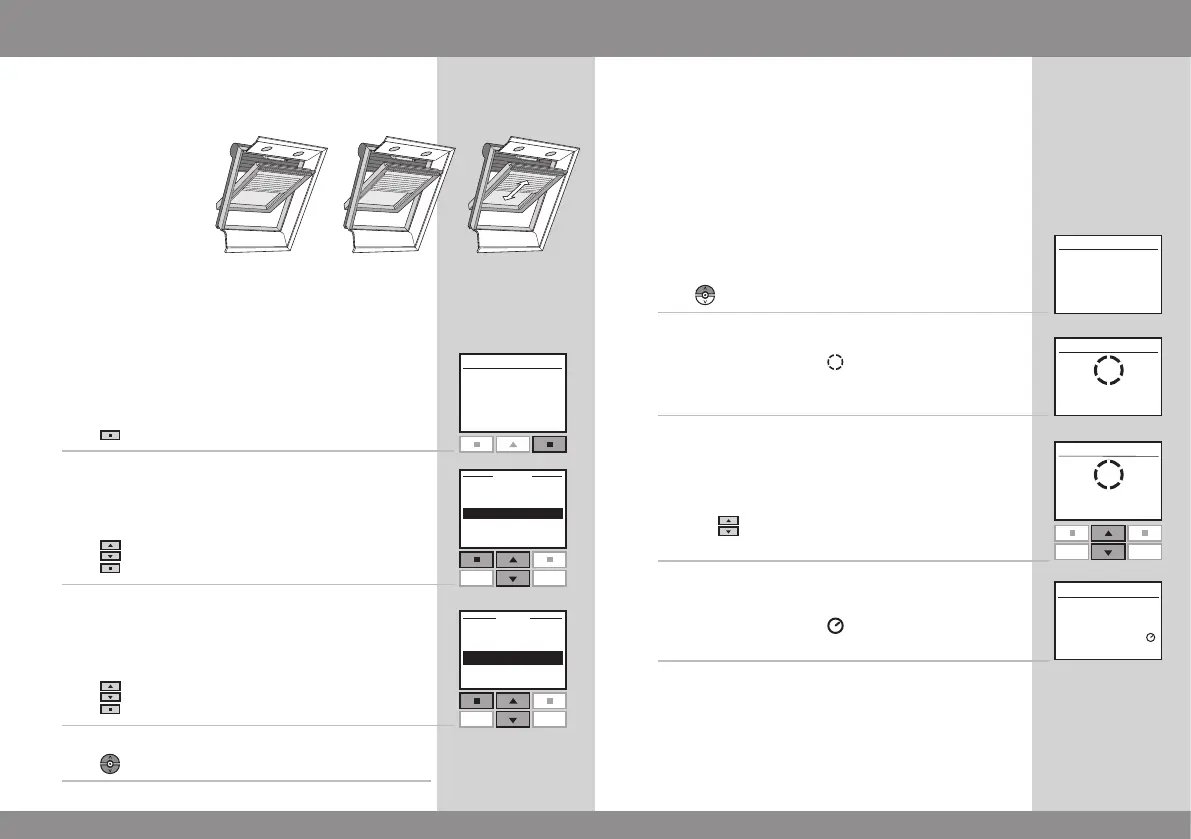
Locating and operating a product
More than one window
With additional electrical products
Three windows are each equipped with a window oper-
ator, a roller shutter, a blind and frame lights.
The example shows how to locate and operate blind No. 3.
1
Press "Locate".
2
Displays the list of product types within the area House.
Press to highlight "Blind".
Press "Enter".
3
Press to highlight blind "No. 3".
Press "Enter".
4
Press
to start operation.
Closing the window automatically
When a window has been opened with the remote control,
you can set it to close again automatically after a certain
time. For instance you might want to air your house briefly
when returning home. The possible settings are: O, 5 min,
10 min, 15 min, 20 min, 30 min, 45 min and 60 min.
The example shows how to time window No. 1 to close
after 10 minutes.
1
Locate window No. 1.
Press
to open the window.
2
The display shows the icon and the text "Auto-Close".
Start item 3 within 5 seconds, otherwise the window will
not close automatically.
3
Scroll via through the time options and choose
"in: 10 min".
4
The display shows the icon and counts down until the
window is closed.
If you close the window earlier than chosen, the function
will be cancelled.
Note: Registered sunscreening products can be set to
operate automatically via menu item Program settings.



 To Next Page
 Loading...