EasyManua.ls Logo

Verderflex Vantage 3000 P - Adjust Pump Speed; System Calibration

Default Icon
35 pages
Print Icon
To Next Page IconTo Next Page
To Previous Page IconTo Previous Page
Loading...
Vantage 3000 P Version 3.4v-01/2019
12 | Page
Description
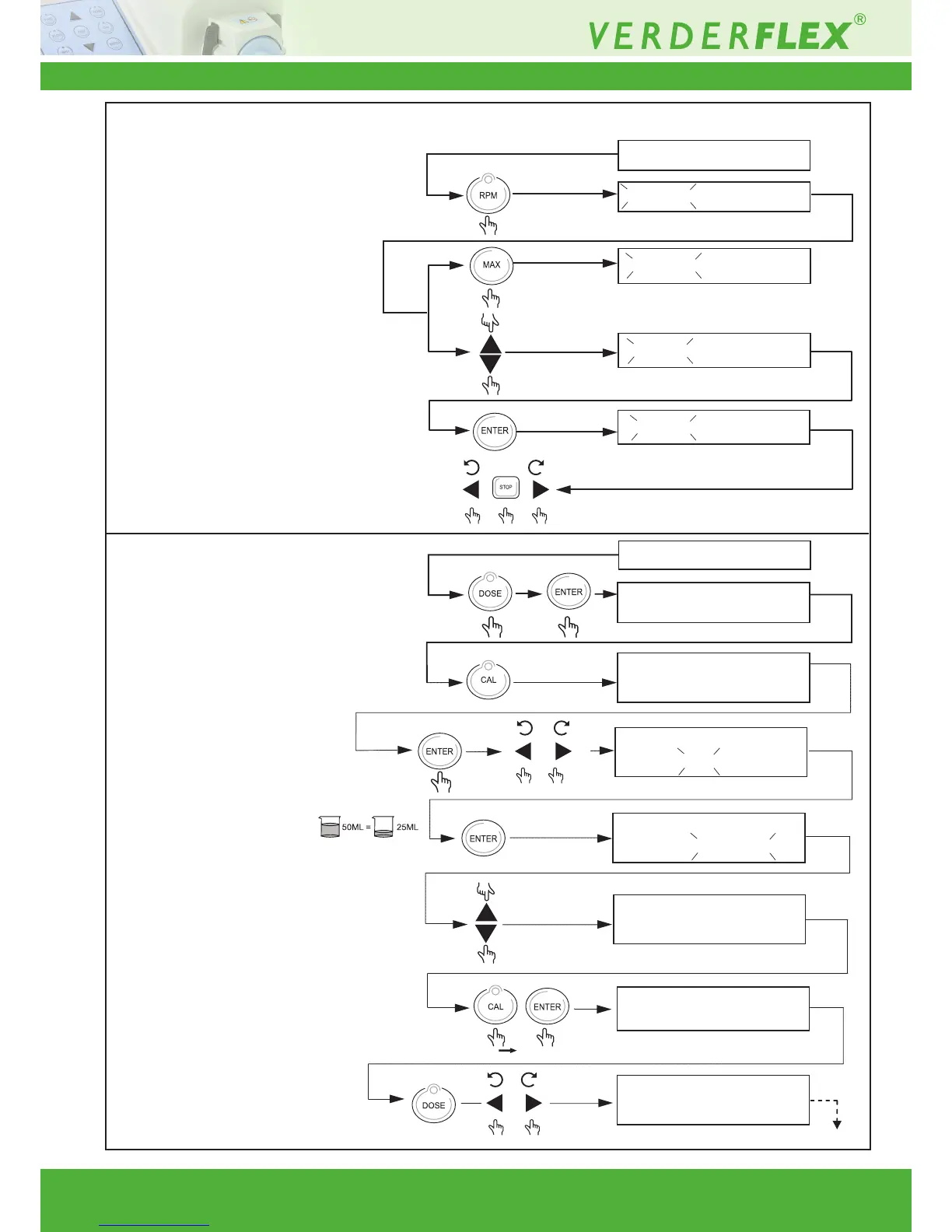
8.3 Adjust Pump Speed
8.4 System Calibration
Press “Calibrate button” to enter
calibration mode.
Measure uid dose manually.
If measured dose is
different from required,
enter the measured
value.
Press and hold Calibrate button
& then press “enter”.
Press dose button and then
run the pump to check
measured dose.
Key combination Display
100 RPM 80 525ML/MN
100 RPM 80 525ML/MN
250 RPM
80 525ML/MN
50 RPM
50 RPM
100 RPM 80 ---M L/MN
050.0 ML >>0 25.0 ML
100 RPM 80 525ML/MN
100 RPM 80 525ML/MN
050.0 ML >> 050.0 ML
100 RPM 80 525ML/MN
050.0 ML
>> 050.0 ML
100 RPM 80 525ML/MN
050.0 ML >> 050.0 ML
100 RPM 80 525ML/MN
050.0 ML >> 025.0 ML
100 RPM 80 ---M L/MN
050.0 ML >>0 25.0 ML
Pump calibrated
80 525ML/MN
80 525ML/MN
100 RPM 80 525ML/MN
ML 002.0 S INT
100 RPM 80 525ML/MN
050.
050.0
X 2
Press “Dose button” to enter
dose mode.
Note: Enter the volume to be dosed or
calibrated, with min. 2 sec interval.

Related product manuals