4 | Page
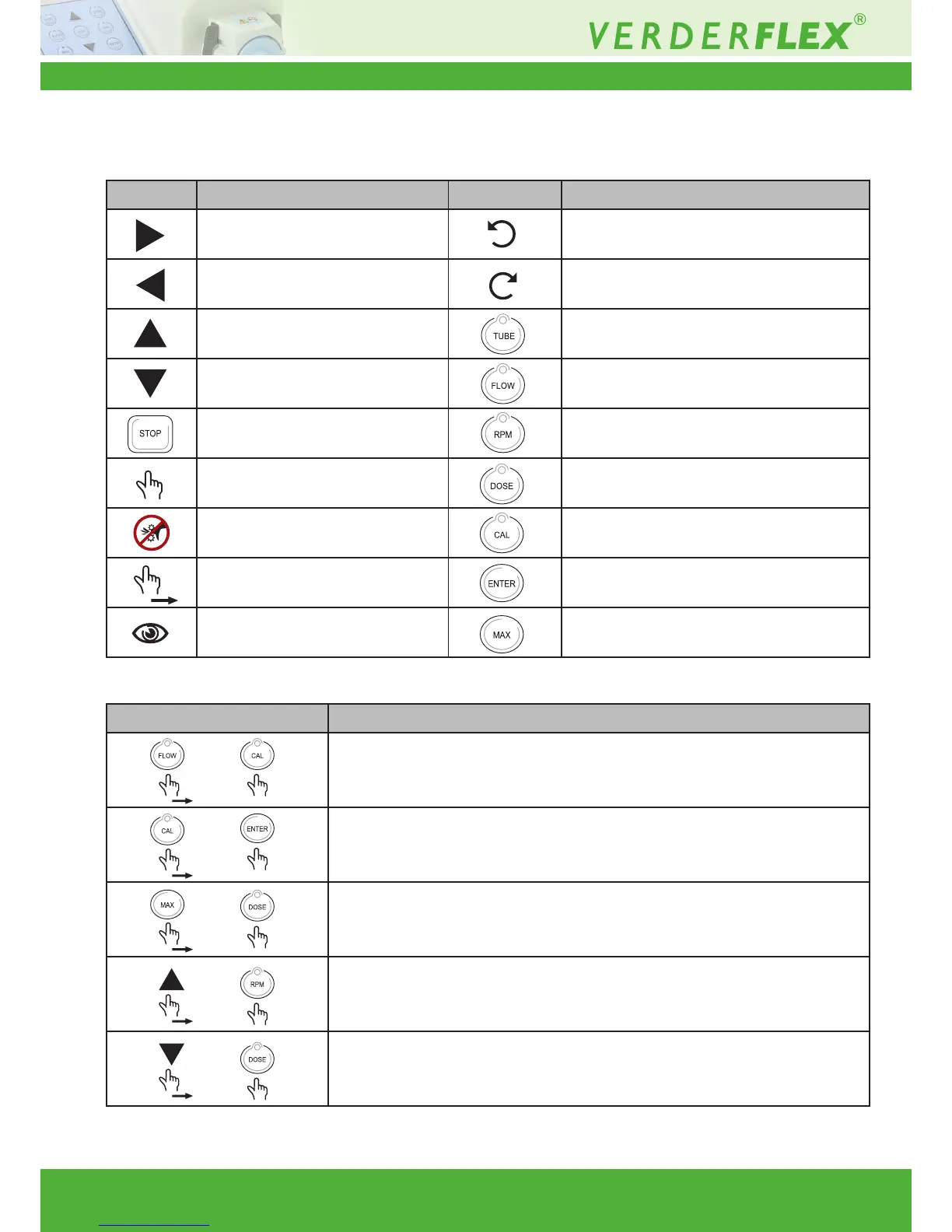
i Keypad Keys, Symbols and Key Combinations
Symbol Meaning Symbol Meaning
Start CW Counter clock wise
Start CCW Clock wise
Scroll up Select tube size
Scroll down Set ow rate
Stop Set RPM
Press Set dose parameters
Caution Calibrate
Press and hold down Enter
See Maximum
Symbol Meaning
Run Back (Anti-Drip) OFF/ON
Press and hold down FLOW then press CAL
Calibrate SAVE/RECALL
Press and hold down CAL then press ENTER
Batch Facility SET number of Doses Press
and hold down MAX then press DOSE
Speed Ramp OFF/ON
Press and hold down UP then press RPM
Save Dose settings
Press and hold down UP then press DOSE
Table 1 Keypad Keys and Symbols
Table 2 Keypad Key Combinations



 To Next Page