Software Upgrade
Vantage 5000
1.1v-09.2019 10 | Page
1.6 Restore the Jobs File/Settings File
1. Check the les on your computer before starting the restore
process.
2. Insert the USB into the USB port on the back of the pump.
3. Wait 30 seconds for the USB to be recognised.
4. To restore the jobs le/settings le, select the settings menu
from the main menu .
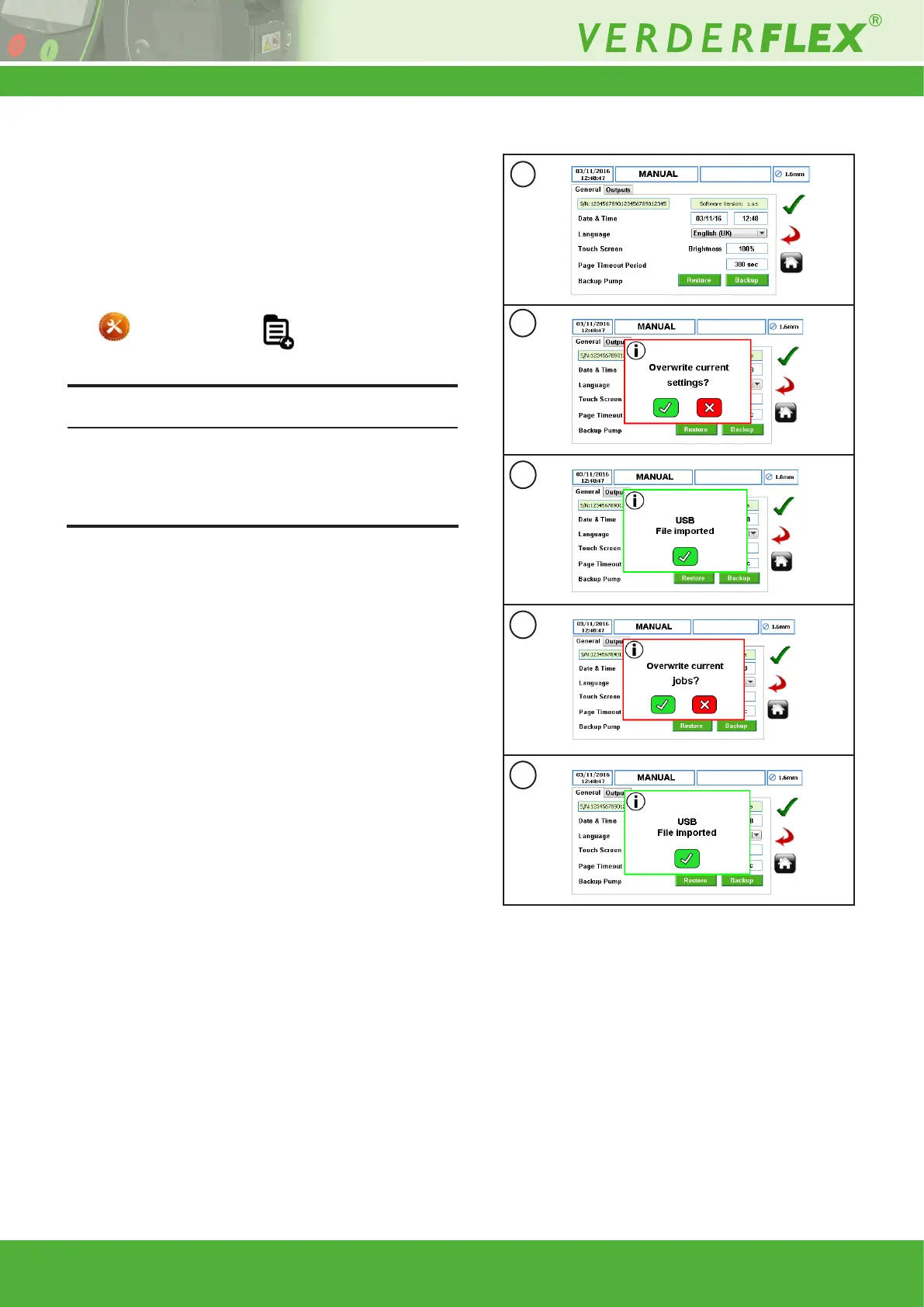
5. Select the restore icon to start the process.
If the USB already has job le/settings le imported before, the
user will be prompted to conrm overwriting these with current
job le/settings le as per Figure 11b and 11d. Press “p” to
overwrite SD job le/settings le or “x” to abandon the restore
process.
6. When the jobs le/settings le is imported, a pop-up no-
tication will conrm that job les have been imported as
Figure 11c and 11e. Press “p” to complete the restore pro-
cess.
Note
a
b
c
d
e
Figure 11 Restore the Jobs File/Settings File



 To Previous Page