SETUP
Examining Terminal Features
VX 685/VX 690 I
NSTALLATION GUIDE 15
V
E
R
I
F
O
N
E
C
O
N
F
I
D
E
N
T
IA
L
R
E
V
I
S
I
O
N
B
.
1
Examining
Terminal
Features
Before you continue with the installation process, familiarize yourself with the
terminal features:
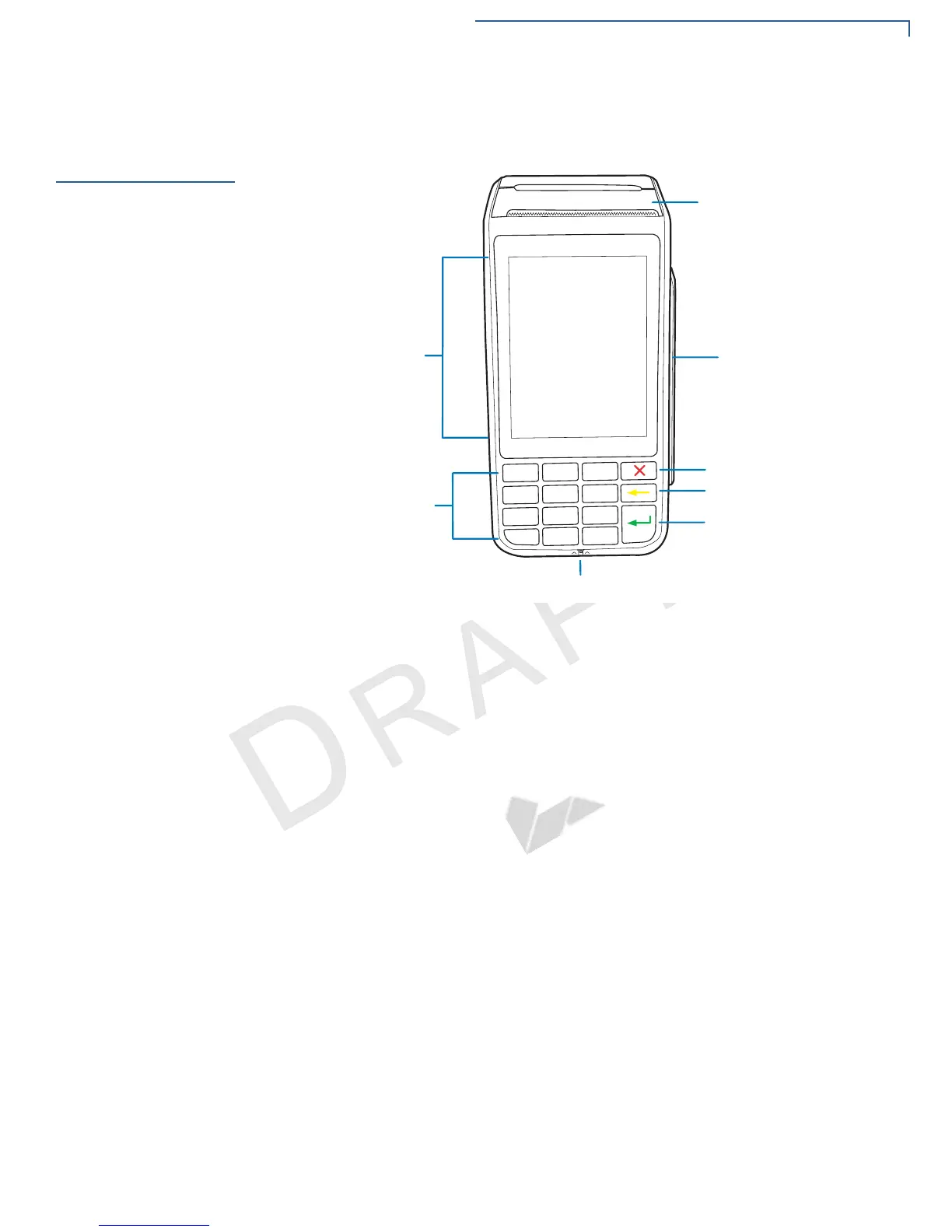
Figure 2 VX 685/VX 690 Features
Front Panel
The front panel offers the following features:
• A touchscreen display.
• A set of keys that include:
• A 12-key, telephone-style keypad (keypads may vary in style).
• Three color-coded function keys on the right side of the keypad (from
top to bottom: CANCEL, CLEAR, ENTER).
• A magnetic card reader, built into the right side. An icon shows the proper
swipe direction, with the stripe facing down and towards the keypad.
• A smart card reader, built into the unit’s front side. An icon indicates the
proper card position and insertion direction.
&$1&(/.(<
&/($5.(<
(17(5.(<
0$*1(7,&&$5'5($'(5
60$57&$5'5($'(5
7(/(3+21(67</(.(<3$'
49*$',63/$<728&+6&5((1
7+(50$/35,17(5


 To Next Page