SETUP
Powering Up the Base
28 VX 685/VX 690 INSTALLATION GUIDE
V
E
R
I
F
O
N
E
C
O
N
F
I
D
E
N
T
IA
L
R
E
V
I
S
I
O
N
B
.
1
Connecting External
Devices
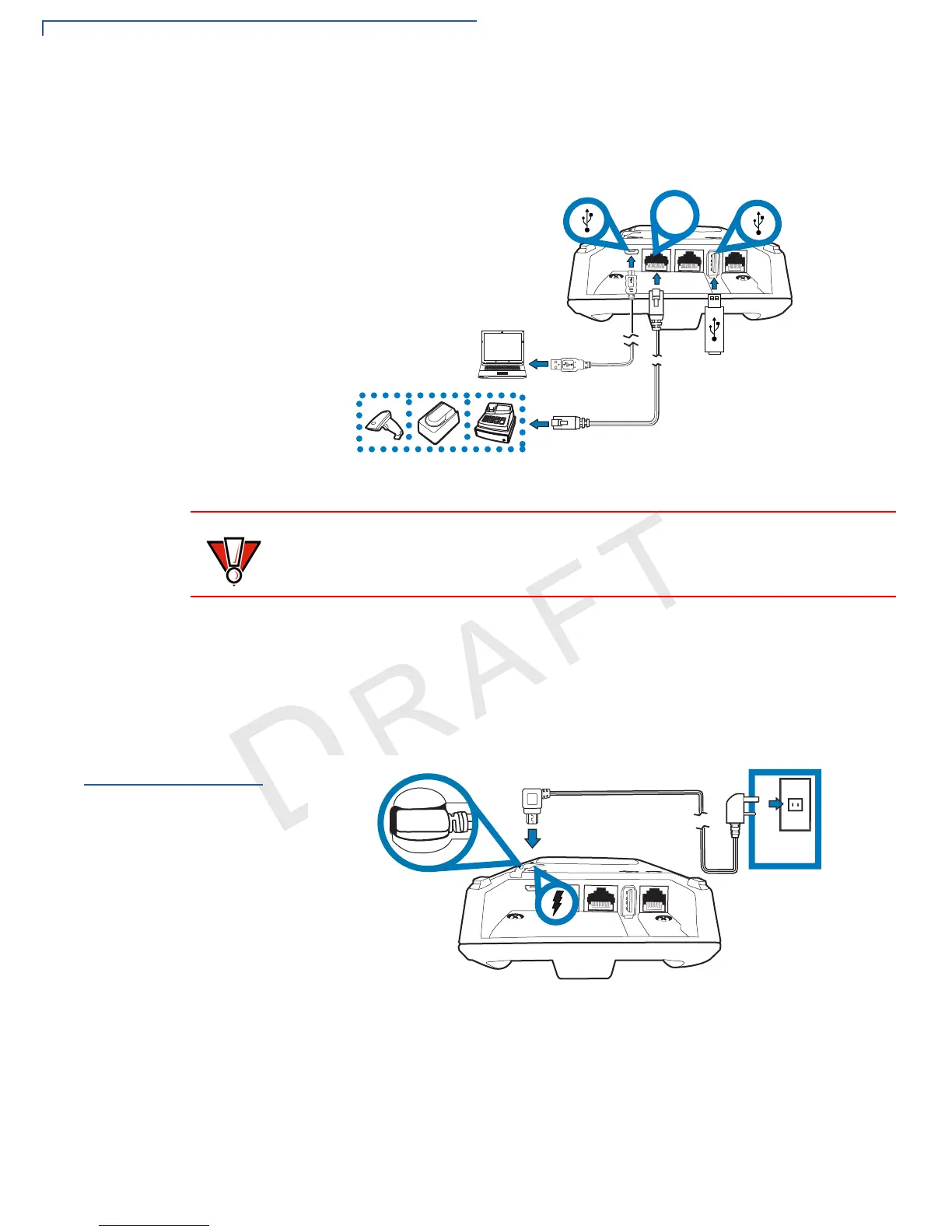
The base supports peripheral devices such as electronic cash register, check
reader, barcode reader, and biometric scanner through a serial connection. Micro-
USB port is for PC connection and USB Host port is for USB flash drive.
Figure 19 Connecting Peripheral Devices
To Connect
Peripherals/External
Devices
1 Connect the micro-USB/USB cable of the device to the micro-USB/USB port
of the base.
2 For complete information about the peripheral installation and use, refer to the
user documentation supplied with those devices.
Powering Up the
Base
Use the procedure below to connect the terminal to a power source.
Figure 20 Connecting Terminal to Power Source
To Power Up the Base
1 Insert the micro-USB plug into the micro-USB port on the base.
Before connecting any peripheral device, remove the power cord from the
terminal. Reconnect the power cord only after you are finished connecting the
peripheral device(s).


 To Next Page