SETUP
Using the Magnetic Card Reader
VX 685/VX 690 I
NSTALLATION GUIDE 35
V
E
R
I
F
O
N
E
C
O
N
F
I
D
E
N
T
IA
L
R
E
V
I
S
I
O
N
B
.
1
Using the
Magnetic Card
Reader
The terminal has a magnetic card reader that uses a triple track stripe reader. This
gives the unit greater reliability over a wide range of swipe speeds and operating
environments.
To Use the Smart
Card Reader (Credit/
Debit Card
Transaction)
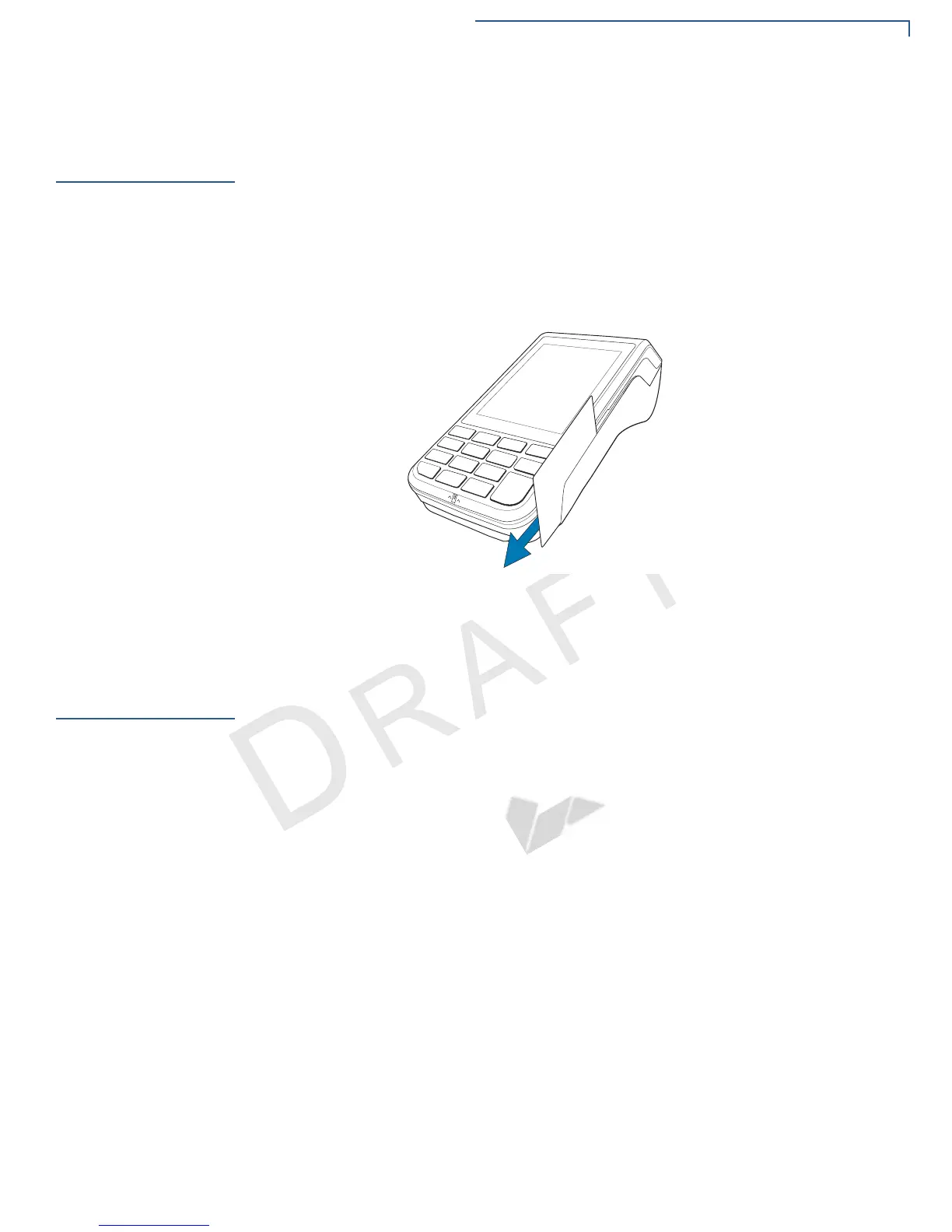
1 Position a magnetic card with the stripe in the card reader and facing the
keypad.
2 Swipe it through the magnetic card reader starting from the top of the unit
downward.
Figure 23 Using the Magnetic Card Reader
Performing a
Contactless
Smart Card
Transaction
The terminal supports contactless transactions through an integrated contactless
module. The terminal only becomes active for contactless smart card transactions
when initialized by an application.
To Perform a
Contactless Smart
Card Transaction
1 Gently tap the card onto or hold the card (within 4 cm) against the surface of
the RFID canopy.


 To Next Page