SETUP
Installing/Replacing MSAM Cards
VX 685/VX 690 I
NSTALLATION GUIDE 19
V
E
R
I
F
O
N
E
C
O
N
F
I
D
E
N
T
IA
L
R
E
V
I
S
I
O
N
B
.
1
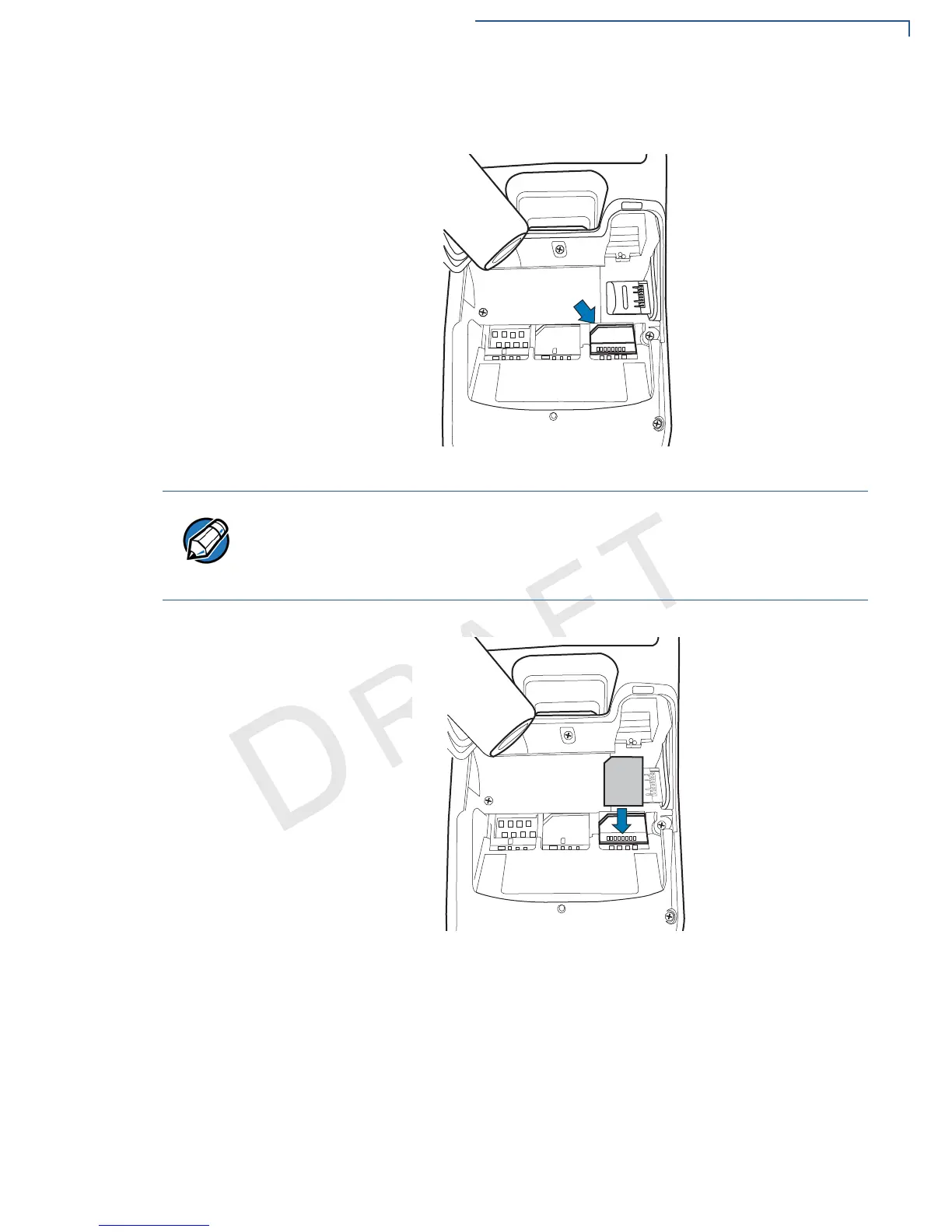
4 Lift the battery pack to expose the SAM slots. The slots are loacted just below
the micro SD card slot.
Figure 6 SAM Slots
5 Carefully slide the cards one at a time into the slots until fully inserted.
Figure 7 SAM Insertion
To replace, gently slide out the old SAM card before inserting a new one.
Position the card’s gold contacts facing away from you, toward the unit. The card
slot in the terminal has a set of contacts. The MSAM card has a notch on one
corner to ensure that it fits into the connector base in only one way.
The terminal supports two SAM cards.


 To Next Page