Need help?
Do you have a question about the Verizon ASK-MAE340 and is the answer not in the manual?
Details the physical ports and buttons on the MoCA Ethernet Adapter for connectivity and control.
Explains the meaning of various LED lights indicating the adapter's system and network connection status.
Guidance on optimal device placement and instructions for wall mounting the MoCA Ethernet Adapter.
Lists the essential system requirements, including router and computer specifications, needed for setup.
Step-by-step instructions for connecting the MoCA adapter to coaxial and Ethernet networks.
Instructions for accessing the adapter's web interface, including IP address and login credentials.
Configure MoCA, Device, and Security settings for the adapter.
View device status, network info, and PHY rates for performance monitoring.
Access advanced configurations and perform device reboot or factory reset.
Guidance on resolving problems encountered when trying to log into the device's web user interface.
Information on how to obtain additional support and help from Verizon customer service.
Details FCC Class B equipment compliance and declarations of conformity for USA users.
Critical safety warnings regarding coaxial cable grounding and power adapter requirements.
The MoCA Ethernet Adapter (Model: ASK-MAE340) is designed to leverage existing coaxial wiring in most homes to establish a high-speed Ethernet network connection. This device adheres to the MoCA 2.5 standard, enabling wired speeds of up to 2.5 Gbps over your home's coaxial infrastructure. With four Ethernet ports, the adapter facilitates simultaneous wired connections for multiple devices, including PCs, TVs, streaming devices, and gaming consoles, allowing for seamless content access.
The primary function of the MoCA Ethernet Adapter is to convert coaxial cable signals into Ethernet signals, effectively extending your home network using the coaxial cabling already present. This eliminates the need for new Ethernet wiring, making it a convenient solution for expanding network coverage to areas with coaxial outlets but no Ethernet ports. The adapter acts as a bridge, allowing Ethernet-enabled devices to connect to your MoCA network.
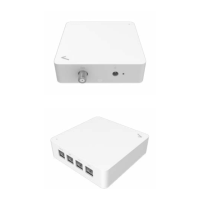
The device features a "Data" port for connecting to your existing coaxial network, a DC Port for power, and multiple RJ-45 Ethernet ports (one 2.5G RJ-45 port and three 1G RJ-45 ports) for connecting Ethernet devices. The 2.5G RJ-45 port is designed for high-bandwidth connections, while the 1G RJ-45 ports provide standard Gigabit Ethernet connectivity.
The MoCA Ethernet Adapter can be easily installed. For optimal performance, position the device where it can access both a power outlet and a coaxial source, and keep it away from direct sunlight. The device can also be mounted on a wall. The wall mounting process involves marking the desired location, pre-drilling a hole for the anchor, installing the anchor and screw, and then hanging the device onto the screw using its mounting hole.
To configure the adapter via a computer, you will need a router that supports RJ-45 LAN and MoCA LAN, a computer with an Ethernet RJ-45 (LAN) port (supporting 10Base-T/100Base-TX/1000Base-TX/2.5GBASE-T), and a web browser such as Internet Explorer, Firefox, Safari, or Google Chrome.
There are two primary ways to use the MoCA Ethernet Adapter:
As a connector between the coax outlet and your computer:
As a connector between your router and your coax outlet:
While the adapter works out-of-the-box without additional settings, you can configure advanced settings, such as the IP address, through the device's Web UI.
The LEDs on the device provide visual feedback on its status:
The Web UI provides a "Status" page to display current device status and configuration settings, including Firmware Version, My MoCA Version, Network MoCA version, IP Address, MAC Address, MoCA Link Status, Beacon Channel, Primary Channel, Secondary Channel, First Channel, Number of Channels, MoCA TX (total good, bad, and dropped packets in transmit direction), and MoCA RX (total good, bad, and dropped packets in receive direction). The "PHY Rates" page displays the transmit and receive MoCA PHY rates (in Mbps) between all MoCA devices in the network, showing average Tx and Rx data rates. It includes Unicast NPER (Non-Preemptive Ethernet Rate) and Unicast VLPER (Very Low Preemptive Ethernet Rate) in Mbps.
The "Advanced" section of the Web UI includes a "Reset" page with two options:
The manual provides guidance for common issues:
The device complies with FCC Class B Equipment regulations and Part 15 of the FCC Rules, ensuring it does not cause harmful interference and accepts any interference received. Users are advised to reorient or relocate the device, increase separation from other equipment, connect to a different circuit, or consult a technician if interference occurs. Any unauthorized changes or modifications could void the user's authority to operate the equipment.
 General
| General | ASK-MAE340 |
|---|---|
| Certificates | FCC, UL, MoCA 2.5 Certificate |
| MoCA Standard | MoCA 2.5 |
| Coax in Frequency | Extended D-Band |
| F-Connector | F-Connector * 1 (for Data) |
| Ethernet Ports | 2.5G RJ-45 * 1 1G RJ-45 * 3 |
| Power Adapter | 12V, 1A |
| Operating Temperature Range | 0 – 40 °C |
| Storage Temperature Range | -20 – 80 °C |
 Weight and Dimensions
| Dimension | 107 x 107 x 30.6mm |
|---|

 To Next Page