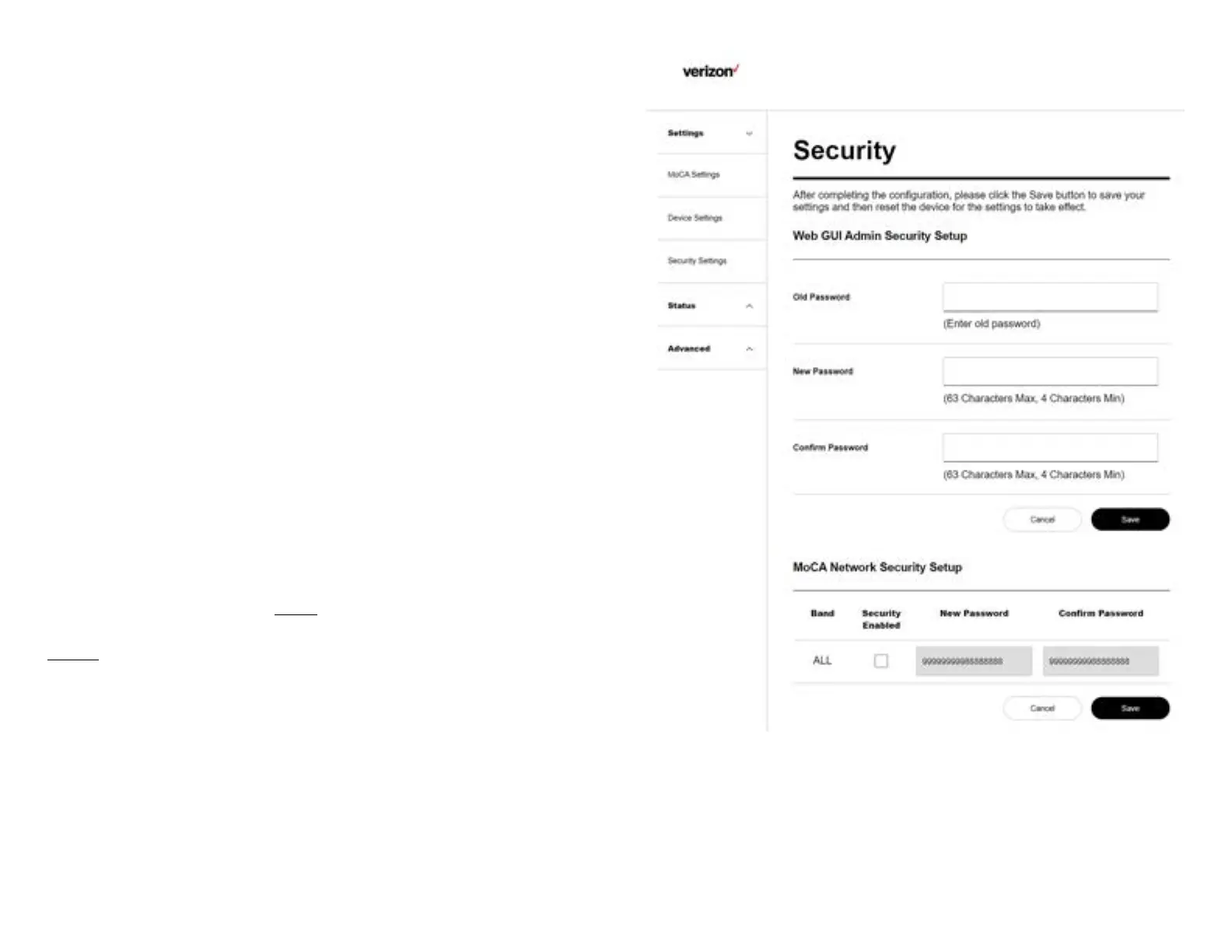
5.1.3 Security Settings
This page allows you to change the Administrator Security
and MoCA Network Security.
Administrator Security
The Administrator password is only used to log in to the
Web User Interface of the MoCA Ethernet Adapter. You can
nd the default password by scanning the QR code on the
product label in the back of the MoCA Ethernet Adapter. It is
recommended that you change the factory default password
to prevent the unauthorized access to the Web User Interface
of the device.
MoCA Network Security
The MoCA Network Security password allows you to control
which MoCA Ethernet Adapter can join your home MoCA
network. When it is enabled, all devices on your MoCA network
must use the password designated here to join the MoCA
network. By default, this setting is disabled. Note that all
devices on your MoCA network must have the same MoCA
Network Security setting.
Please ensure to click the Save button to save your settings
after making changes. After completing the conguration,
Reset the device for the settings to take effect (refer to
Section 5.3.2 on how to reset the device).
13


 To Next Page