EasyManua.ls Logo

Vertical Edge 120 - Page 3

Vertical Edge 120
70 pages
Print Icon
To Next Page IconTo Next Page
To Previous Page IconTo Previous Page
Loading...
Edge 120 Digital Executive Telephone User Guide Page 3
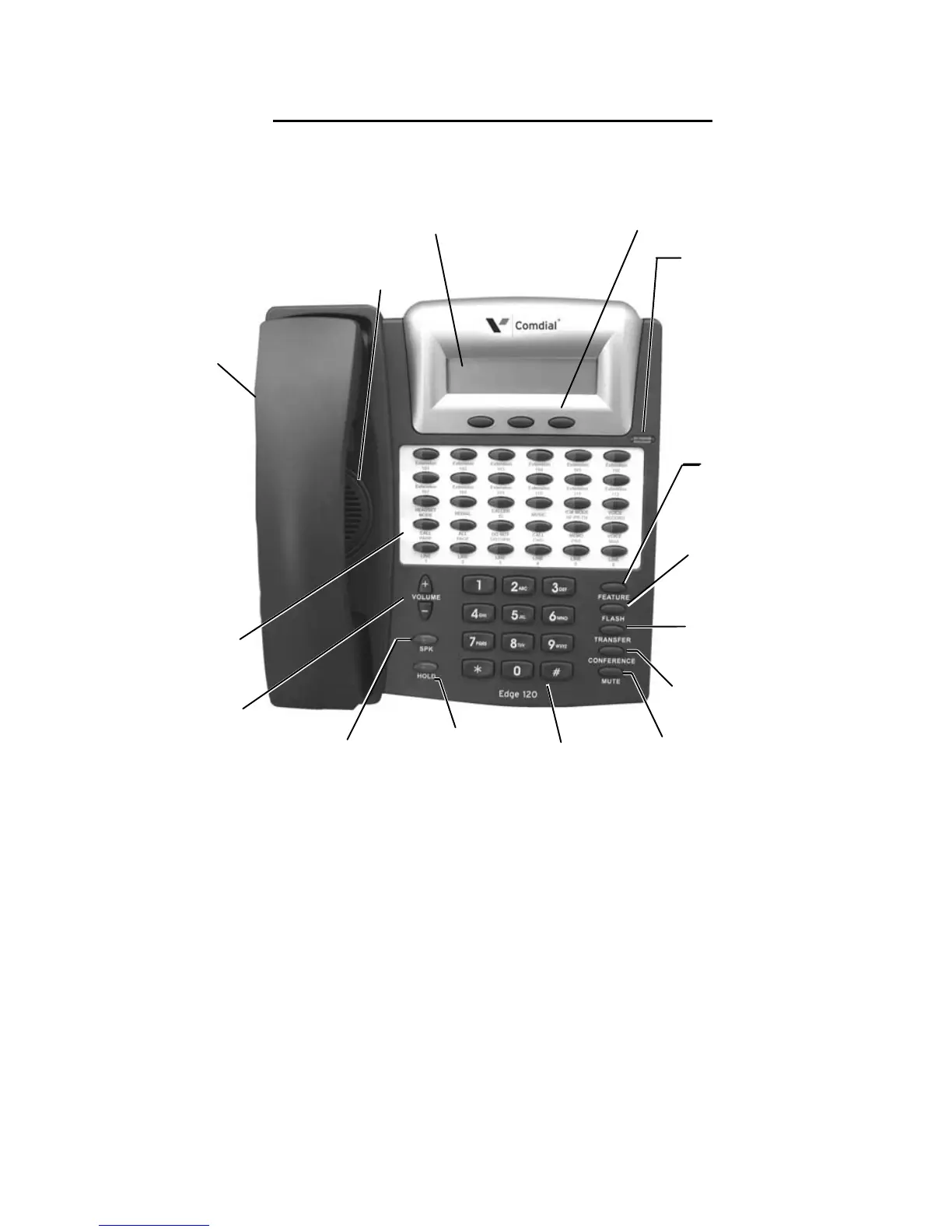
7260-00 Edge 120 Digital Executive Telephone
MUTE:
Disable the transmitter
CONFERENCE:
Build & Control
conferences
2-row, 16-column,
feature interactive
Liquid Crystal Display
3 Interactive buttons for
dynamic displayed feature
interaction
Status Lamp
indicates:
Headset /
Speakerphone
in use
Forward Mode
MSG Waiting
Mute Mode
CO Ringing
ICM Ringing
30 - User
Programmable
Features /
Resource Buttons
FEATURE:
Used to access all
system “Feature”
codes
VOLUME
TRANSFER:
Used to
tr
ansfer calls
SPK:
S
peakerphone / Handset
HOLD:
Place and retrieve
calls on hold.
Standard 12-key
Dial Pad
2.5mm
Headset
Jack
FLASH
used to generate a
hook-switch signal
Speaker

Table of Contents

Related product manuals