Page 62 Edge 120 Digital Executive Telephone User Guide
Messaging – Status Text FEATURE
You can invoke a display message to inform other users of the current
status of your extension. There are six programmed messages and
one custom message that you can use. Whenever another digital
speakerphone user calls an extension with an active Status message,
the message is displayed at the calling extension.
Operation – Setup
1. The extension must be idle.
2. Press FEATURE
. The display shows the first message
choice (custom):
EMPTY
store next chg
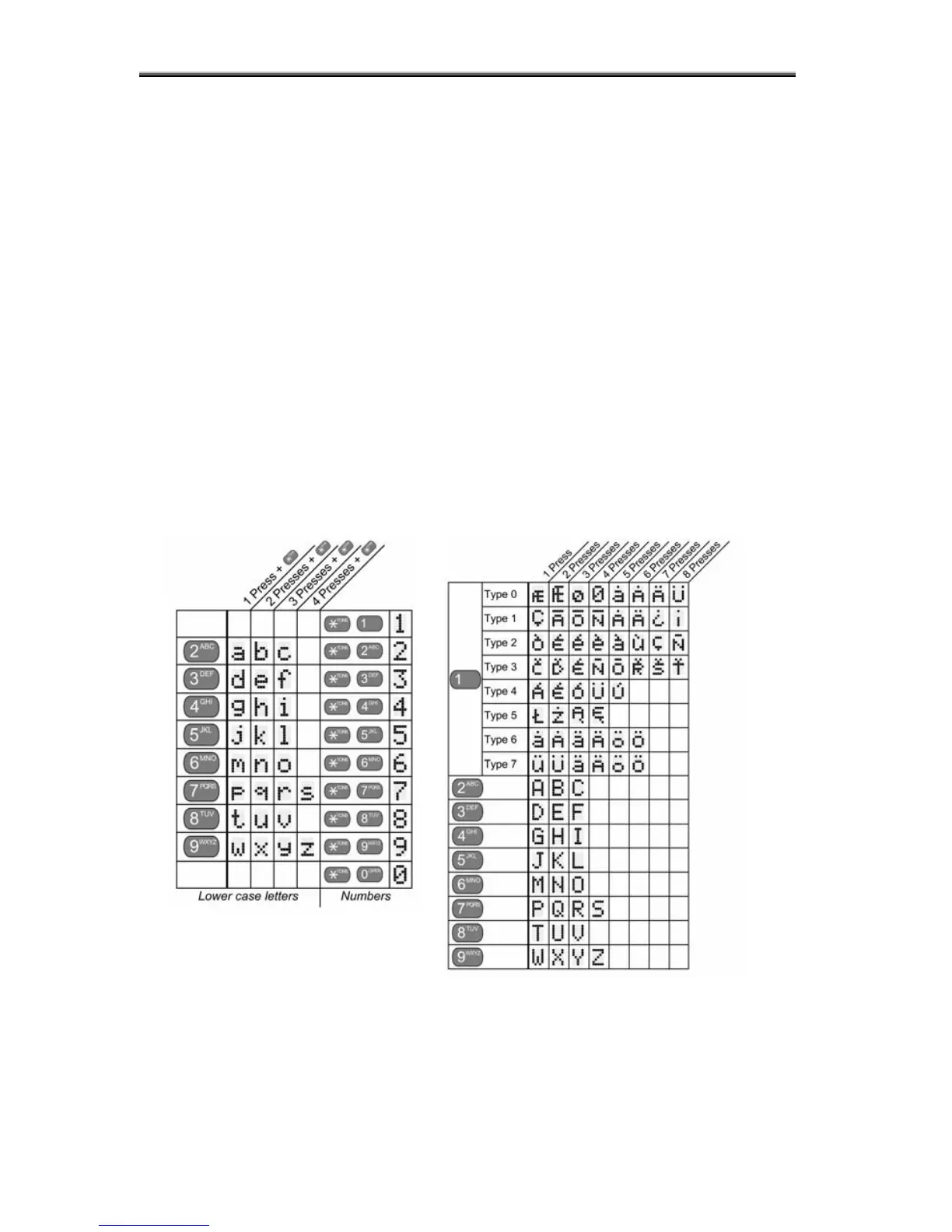
2.1. To input a custom message, press [chg] and then use the
alpha-numeric chart and dial-pad to write the message.:
3. Press
to advance to the next character position or to enter a
space.
3.1. Press [save].
3.2. Otherwise, press [next] until the appropriate pre-
programmed message displays.
4. To activate the message, press [store].
Number + = lower case letter



 To Next Page