Prefix key selection
User can define the desired hotkey initial sequence, X can be Scroll Lock,
Num Lock, Cap and L/R_Ctrl.
Several USB devices may be plugged in different consoles at the same time if the system structure is in the matrix.
To access the desired USB device, you may click this hotkey sequence.
7.2 OSD menu
Once you have completed the connection (refer to the chapter of connection diagram), press Scroll Lock + Scroll
Lock + Space to enter the control page from the console. Note: Press Ctrl + Ctrl as shortcut key to pop up OSD menu
directly.
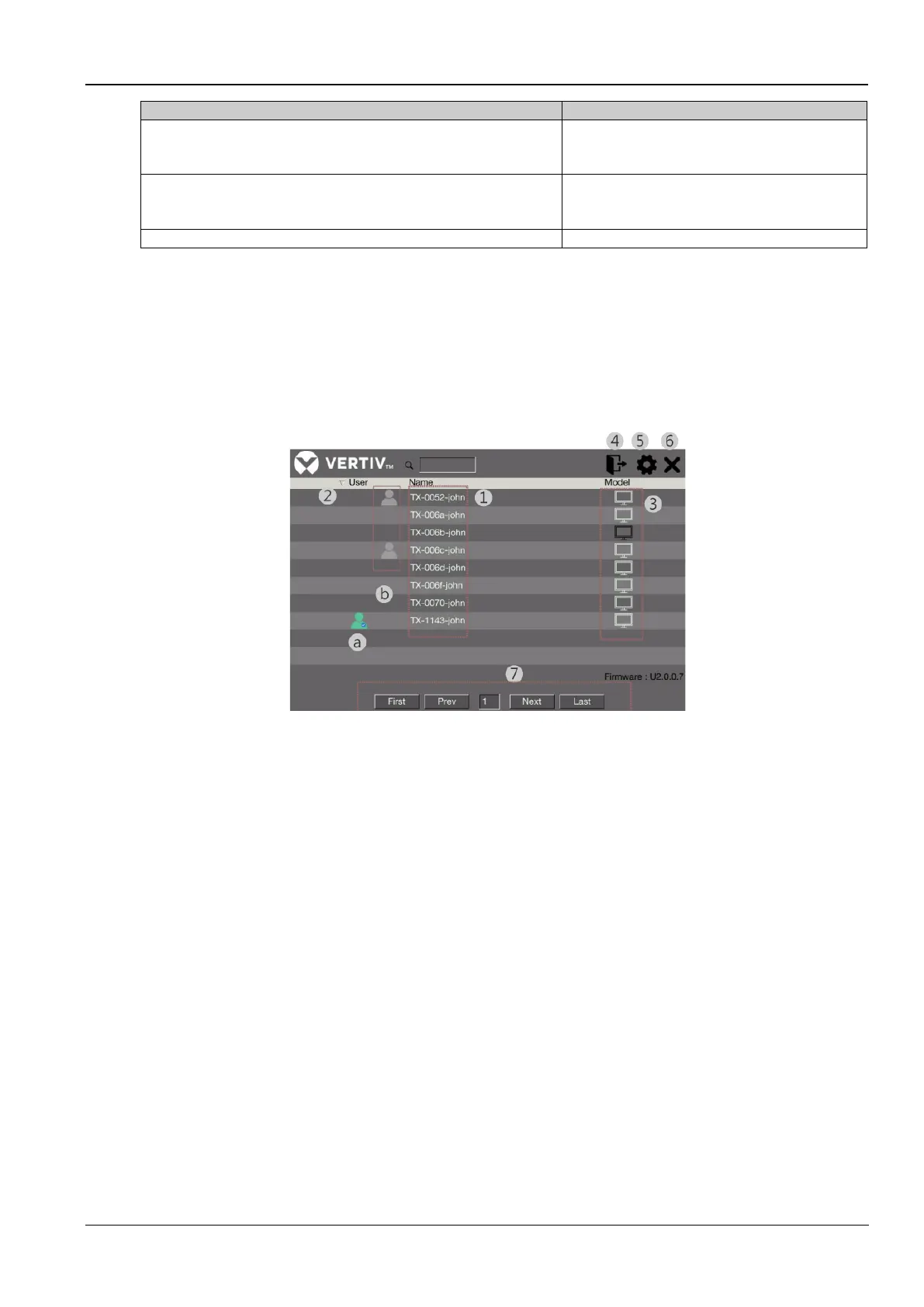
Figure 7-1 OSD control page
The annotations in the figure are as follows:
1. Click any name of the transmitter monitor you wish to access.
2. Show the status of all users
a.) The green user icon shows which transmitter is connected
b.) The gray user icon shows other users connecting to the group of transmitters.
3. Click any setting icon (monitor) to configure the transmitter. Refer to the chapter of Transmitter configuration.
4. The logout icon is reserved for admin users
5. Click the setting icon to configure the receiver. Refer to the chapter of Receiver configuration.
6. Click to exit the control page.
7. Find the all devices listed searching page by page
7.3 Receiver configuration



 To Next Page