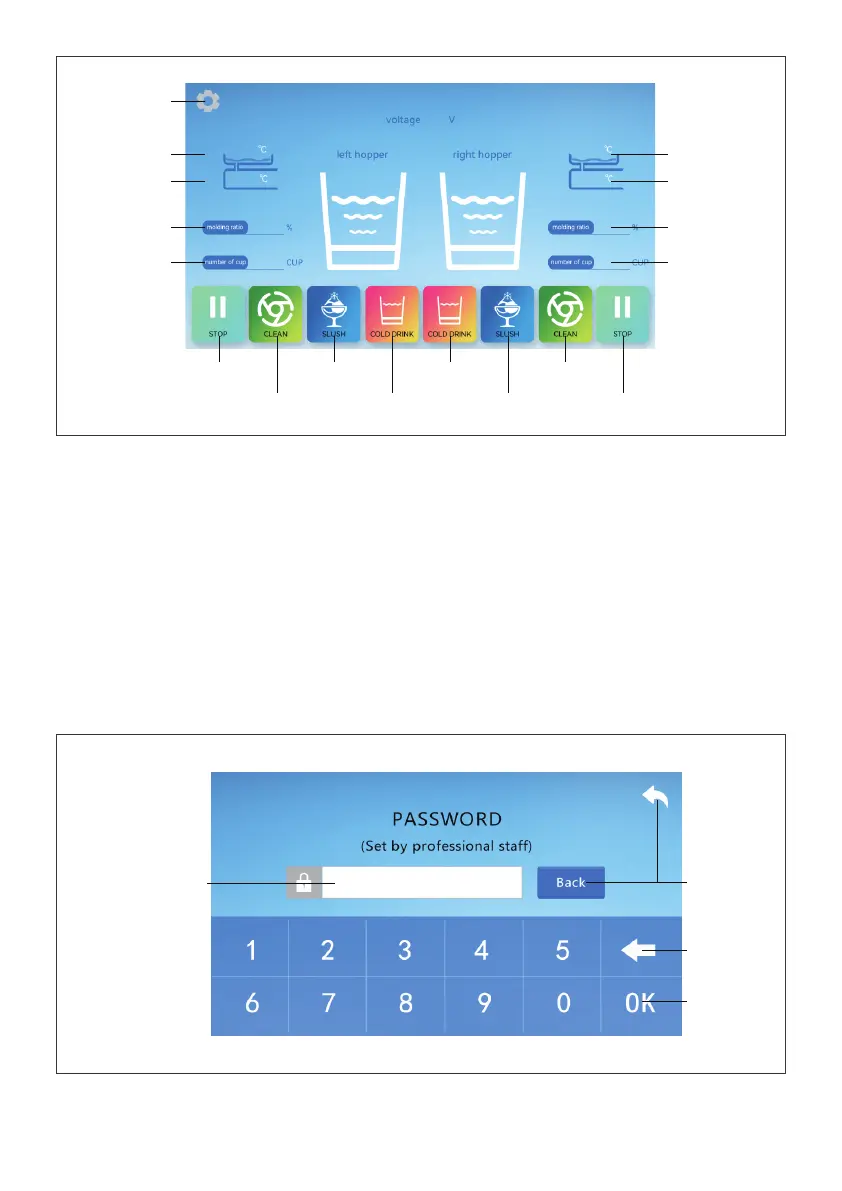
It is normal for the current temperature of the freezing cylinder to deviate from the actual tempera-
ture of the raw material in the cylinder. Freezing cylinder temperature is not involved in forming con-
trol when making slush.
Press "Stop", "Clean", "Slush" and "Cold Drink" on the touch screen to enter
the corresponding working mode.
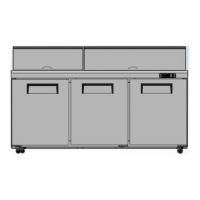
On the password input inteace, click the password input area and enter the password "666666" and
then click "OK" to enter the parameter setting inteace.
Password Input Inteace
Password input area
Return key
Delete key
Conrm key
09
Setting button
Left tank
Current temperature
Current temperature of
left freezing cylinder
Current percentage of
left cylinder forming
Number of feeding
cups of left cylinder
Current temperature
of right tank
Current temperature of
right freezing cylinder
Current forming
percentage of right
cylinder
Numbers of feeding
cups of right cylinder
Right stop button
Right cleaning
button
Right slush button
Right cold drink
button
Left cold drink button
Left slush button
Left cleaning button
Left stop button


 To Next Page