6
Calendar Screen / Standby Mode.
4. Battery indicator
Please refer to Section 7.1 for details.
5. If you failed to respond to the previous reminder event, then that
event will be shown in this area.
6. This icon appears when <Quick ECG> is enabled. Please refer to
Section 5.4 for details.
7. This icon appears if you have set reminder event.
When the device enters Calendar Screen, it also begins to work in Standby
Mode, which is an ultra-low power consumption mode. In Standby Mode,
the touch screen operation is invalid.
1.5 Result Screen
This device provides powerful measurement functionalities, including
Daily Check, ECG Recorder, Pulse Oximeter, Thermometer, Oxi Recorder,
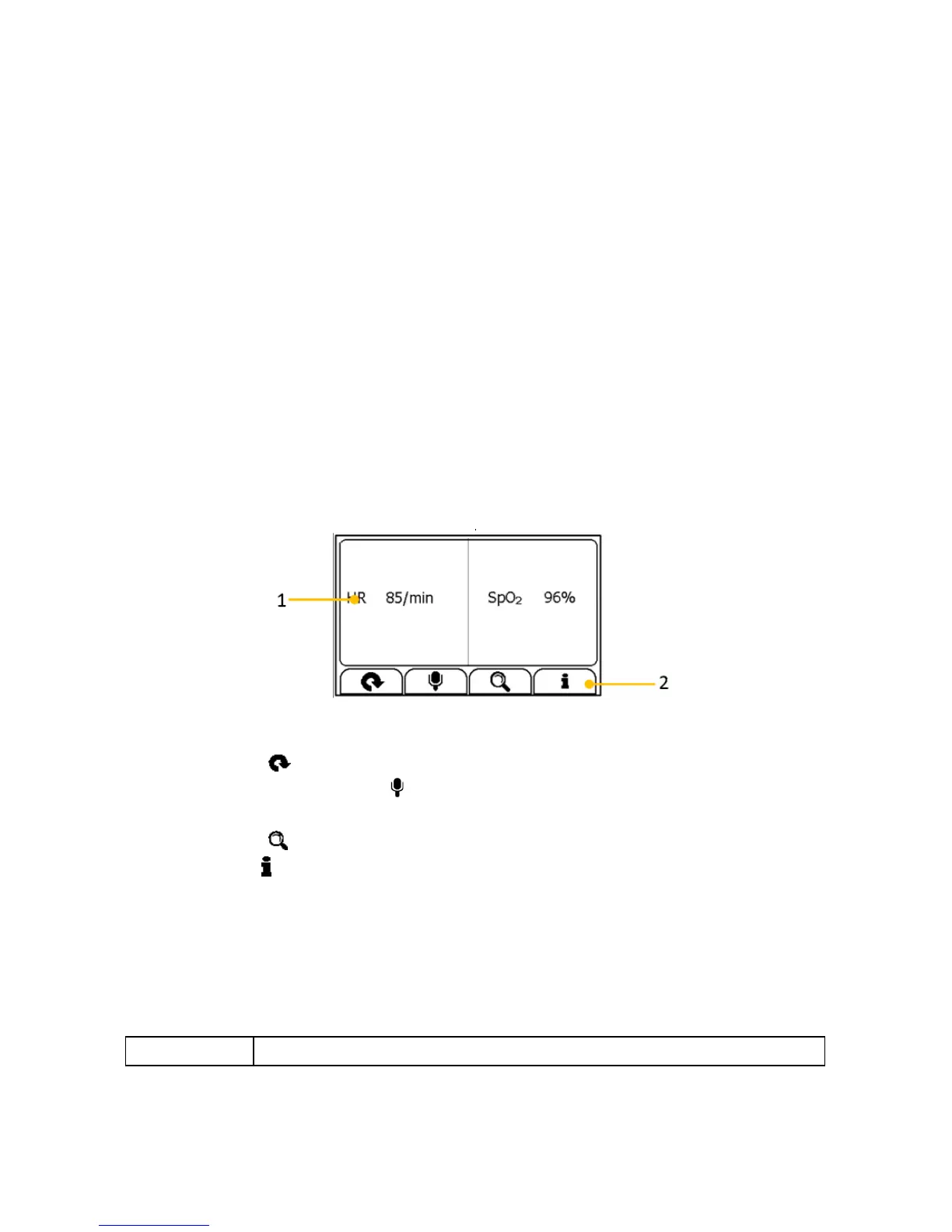
and Pedometer. For each measurement, a Result report will be provided
after the measurement is finished. An example is shown below.
1. Measured parameters and readings
2. Buttons
Select button to start a measurement again.
Press and hold the button to add voice memo. Voice memo is
only available for Daily Check and ECG Recorder measurements.
Select button to review previous results.
Press button to open the help information.
In the Result Screen, if there is no operation for 2 minutes, the device will
automatically returns to Stand by Screen.
1.6 Symbols


 To Next Page