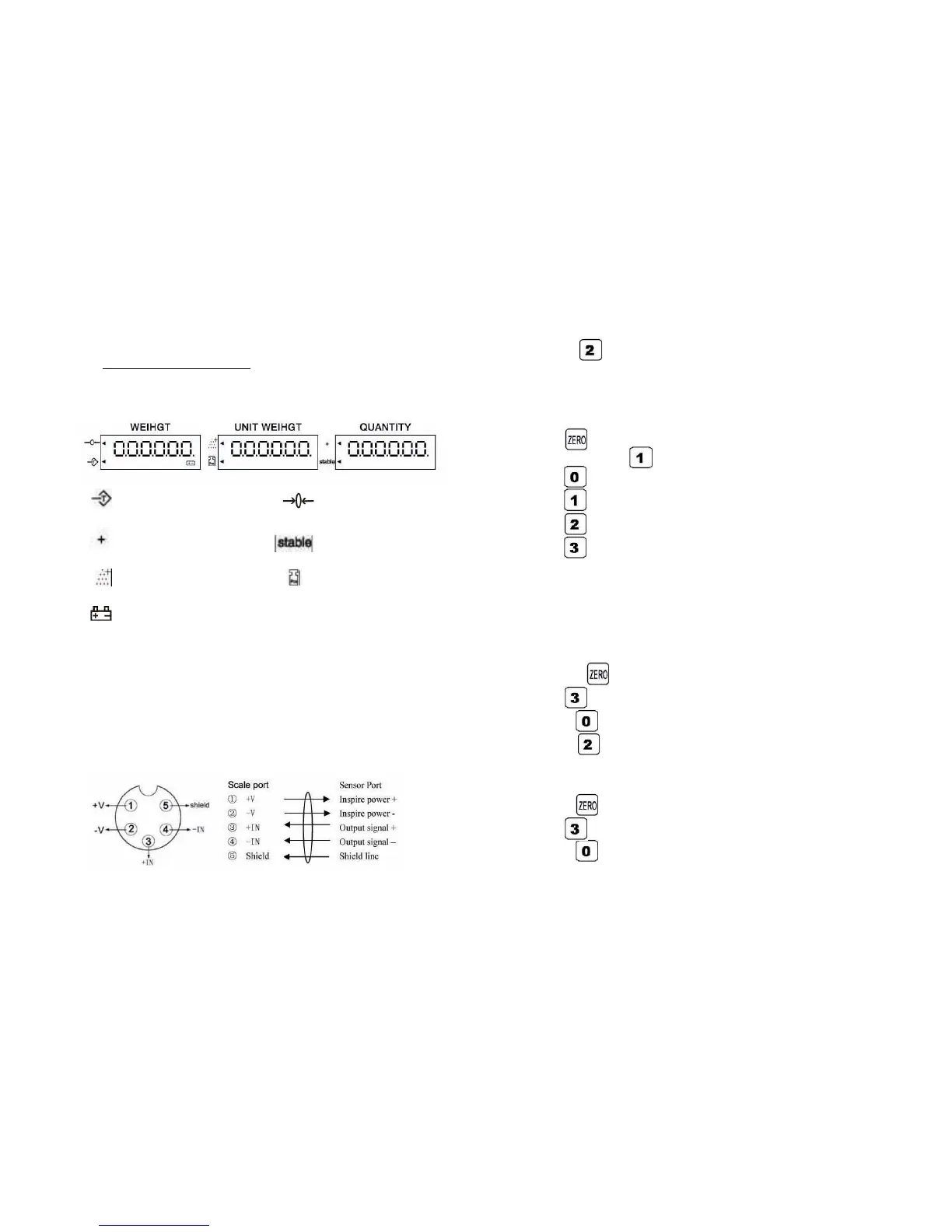
III. Display Explanation
:Tare indication : Zero indication
:Accumulating :Stable indication
:Sample too small :Unit weight too small
:Low battery indication
IV. Connection between Sensor and Instrument
Instrument and sensor are connected by the five core aviation
plug. The function of each pin is as follow:
2
press to show “Lo”, press numeric key to read the low
value.
This scale can save 5 set of high and low limit value.
V. Units Switch
Press twice to show “Centr “ and before it disappear ,press
to show “Unit”, then
Press to exit ,
Press to select unit g
Press to select unit lb
Press to select unit kg
Note: The units is confirmed when turn on the scale next time.
VI. Unit weight preset
(1) Save the unit weight
1.Under counting mode, the unit weight window shows the unit
weight value.
2. Press twice to show “Centr” and before it disappears,
press to show “Un S”, then
Press to exit
Press to show “SAVE”, press 1-5 numeric key to save the
value. .
(2) Read the unit weight
Press twice to show “Centr” and before it disappears, press
to show “Un S”, then
Press to exit
7



 To Next Page