028 -0427-15 _UI-V T8350_ A4 _ EN www.viconics.com June 2020
25
VT8350 [ User Interface Guide ]
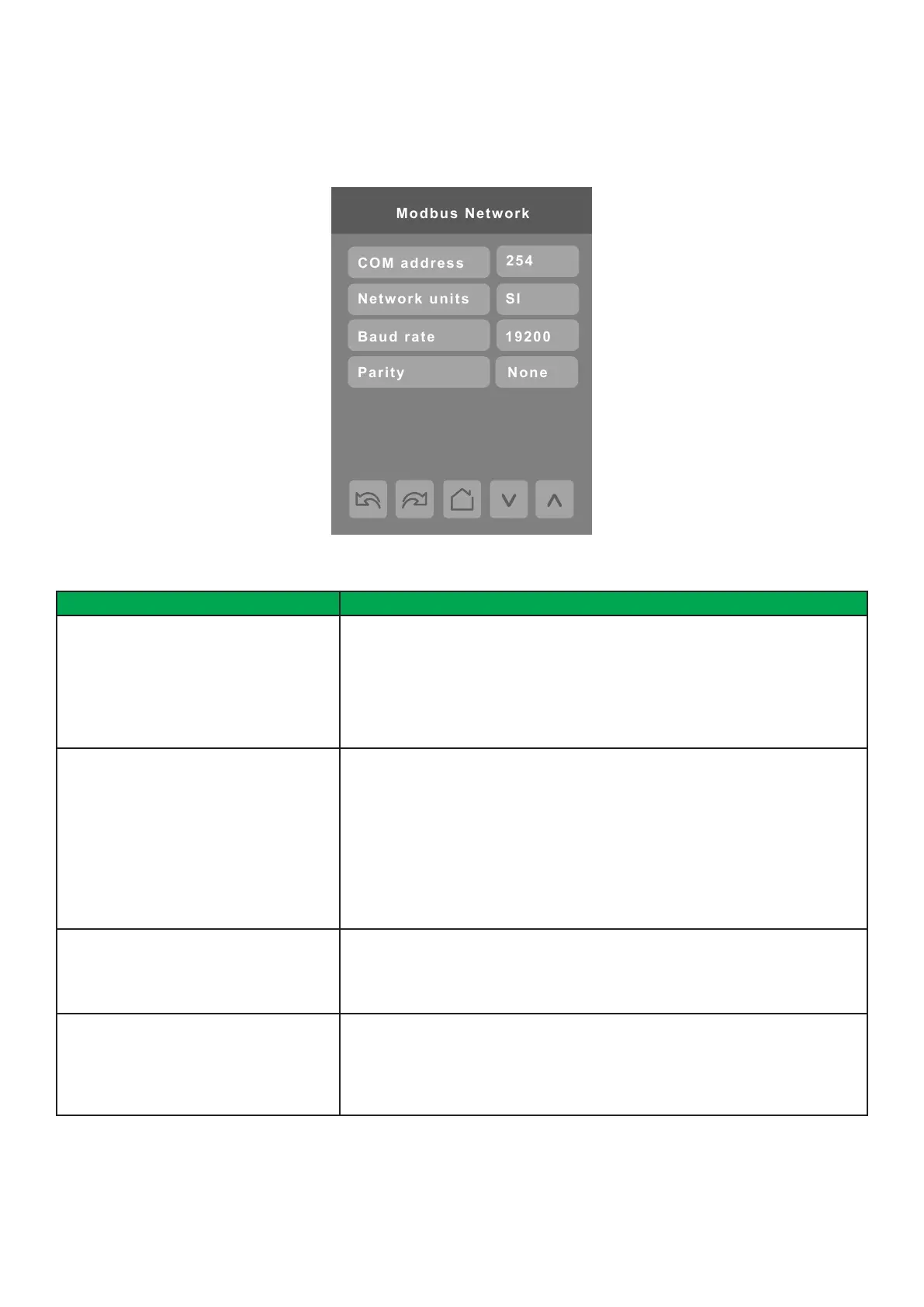
MODBUS NETWORK SETTINGS
Modbus network screen shows when Modbus is selected in wired protocol parameter.
PARAMETER DETAILS
Conguration Parameters Default Value Signicance and Adjustments
COM address
Default value: 254
Communication Address
Valid address range is set at 1 to 247 and each Modbus device must have a
unique address. Other values not recommended for Modbus.
Default value of 254 disables Modbus communication for the Room Controller.
Range: 0 to 254
Network units
Default value: SI
Measurement Units
Network units transmitted over the BACnet network.
NOTE: Use the Temperature scale parameter to change the display units locally
on the Room Controller.
Imperial: network units shown as Imperial units.
SI: network units shown as International Metric units.
Choices: Imperial or SI
Baud rate
Default value: 19200
Modbus Baud Rate
Automatically detects Modbus baud rate.
Choices: 57600, 38400, 19200, 9600 and 4800
Parity
Default value: Even
Parity
Determines how the parity bit of the character’s data frame is set to detect any
errors in the sent/receives frame.
Choices: None, Odd and Even


 To Next Page