028 -0427-15 _UI-V T8350_ A4 _ EN www.viconics.com June 2020
9
VT8350 [ User Interface Guide ]
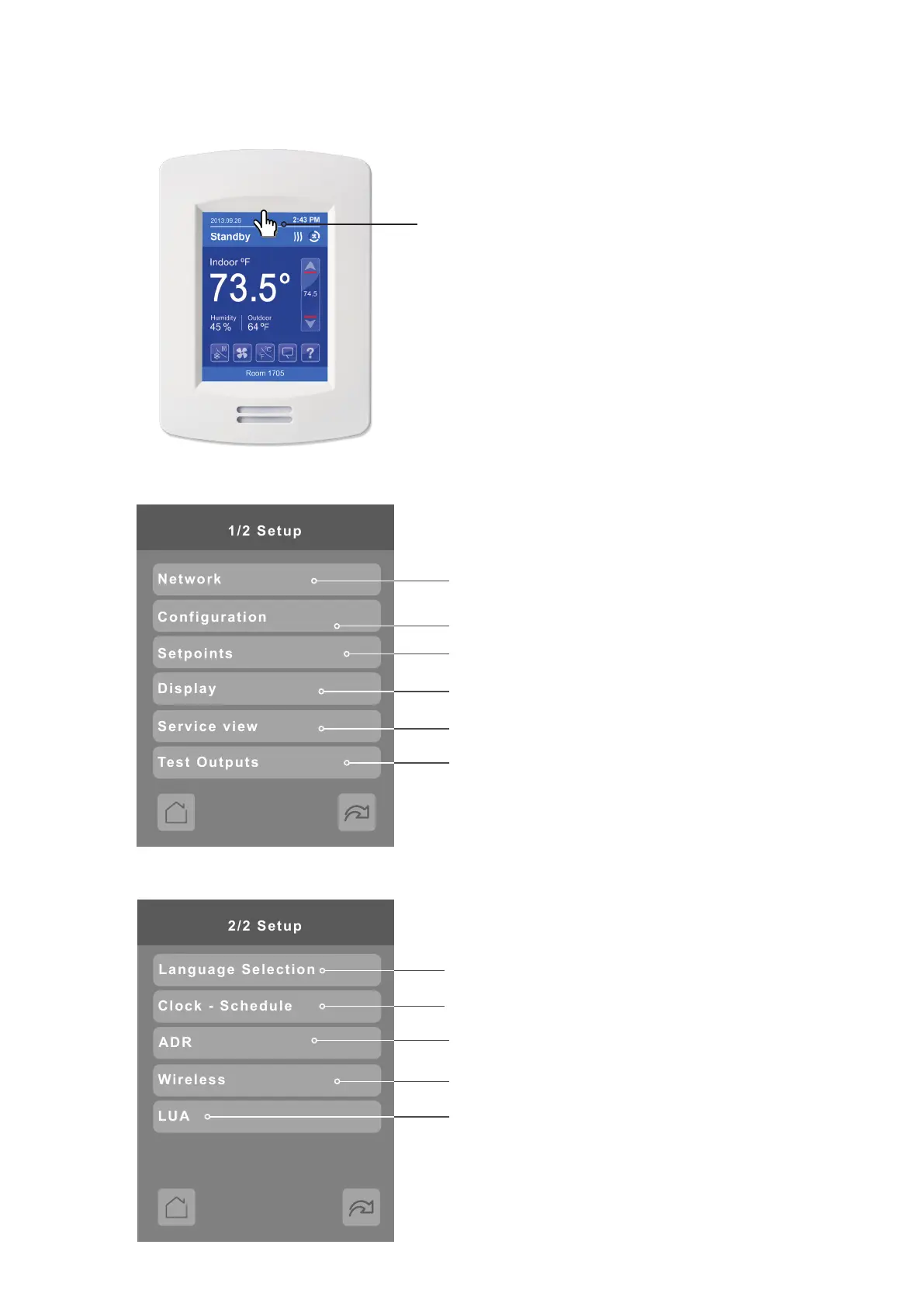
Enter Setup Screen
Touch and hold this point
for 3 seconds to enter setup mode
Note: If a conguration/installer
password is activated to prevent
unauthorised access to the
conguration menu parameters, a
password entry prompt shows to
prevent access to device
conguration components.
SETUP 2/2
SETUP 1/2
BACnet MS/TP, Modbus, ZigBee and Wi-Fi network settings
(ZigBee network settings appear only if ZigBee feature is
available)
Parameter conguration menu
Setpoint settings
Status display (Read Only)
Display settings
Test outputs settings
Automatic Demand Response
LUA scripting (shows only if LUA script uploaded)
Wireless Ecosystem settings (shows only if ZigBee
feature is available)
Select language
Set clock, schedule and occupancy



 To Next Page