EasyManua.ls Logo

Vicovation Vico Power-Plus - Power-PLUS Menu Configuration; Core Settings: Volt, Hour, Temp

Vicovation Vico Power-Plus
59 pages
Print Icon
To Next Page IconTo Next Page
To Previous Page IconTo Previous Page
Loading...
English
18
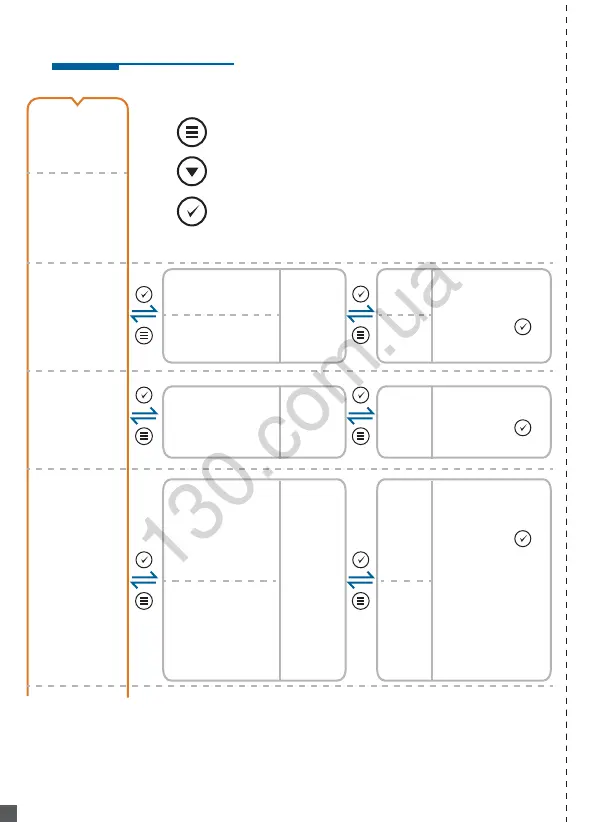
Power-PLUS Menu Configuration
13.2V
- Display Volt
- Display Hour
Hour
Volt
TEMP
- Display Temp.
29.c
11.6V ~ 12.4V
default as 12.0V
Enter / Confirm
Next option
Go back / Press+Hold 8 sec. will RESET to default
23.2V ~ 24.6V
default as 24.2V
After staying at this menu
for 15 seconds (time out),
it will display Input
display
previous
setting
50.c ~ 75.c
default as OFF
122.F ~ 167.F
default as OFF
display
previous
setting
2 hr ~ 72 hr
default as 6 hr
display
previous
setting
11.6V.
23.2V.
done setting, an
extra point
shown.
Blink three times
done setting, an
extra point
shown.
Blink three times
done
setting, an
extra point
shown.
Blink three
times
Choose
Celsius or
Fahrenheit
24 hr.
55.c.
131.F.
- Set
Temperature
Protection
- Display
setting
temp.
- Display
Input
Celsius or
Fahrenheit
by choice
- Set Low
Voltage
Protection
- Set Timer
Protection
Autogoods “130”
130.com.ua