
 To Next Page
C
curtis19Aug 15, 2025
What to do if my Victrola Turntable will not power on?
- VValerie ReyesAug 15, 2025
If your Victrola Turntable isn't powering on, the most likely cause is that it's not plugged in. Connect the unit to the AC power supply.

What to do if my Victrola Turntable will not power on?
If your Victrola Turntable isn't powering on, the most likely cause is that it's not plugged in. Connect the unit to the AC power supply.
Why won't my device pair with my Victrola Turntable via Bluetooth?
If you're having trouble pairing your device with your Victrola Turntable via Bluetooth: * First, confirm that your device is actually Bluetooth compatible. * If it is, the Bluetooth pairing may not have been successful. Try pairing the unit and your device again.
How to fix no sound output from Victrola AUSTIN Turntable speakers?
If you're not getting any sound from the speakers of your Victrola Turntable, here are a couple of things to check: * Make sure the volume isn't set too low. Adjust the volume to a suitable level. * Ensure the input selector matches the playback source. Select the correct input source.
Why is my Victrola AUSTIN sound garbled?
If the sound from your Victrola Turntable is garbled, it could be that the volume on your device or the unit itself is not adjusted properly. Try turning down the volume on your device/phone and the unit.
How to fix noise or distortion in Victrola AUSTIN Turntable sound output?
If you're experiencing noise or distortion in the sound output of your Victrola Turntable, it could be due to interference. The unit might be too close to a TV set or another device causing interference. Try turning off the TV or other appliance and relocating the unit.
What to do if my Victrola AUSTIN Turntable fails to respond?
If your Victrola Turntable stops responding, it might be due to external factors like electro-static discharge (ESD). Disconnect the power cord and any external audio devices. Then, plug the power cord back in after one minute.
What to do if there is no sound output with external audio device plugged into AUX in jack of Victrola AUSTIN?
If you're not getting any sound when an external audio device is plugged into the AUX in jack of your Victrola Turntable, make sure the unit is switched to AUX mode.
What causes decline in Victrola AUSTIN Turntable audio performance?
A decline in audio performance of your Victrola Turntable is often caused by a worn-out stylus. Replace the stylus to restore the audio quality.
What to do if Victrola Turntable cannot listen to any station, or signal appears weak?
If your Victrola Turntable can't pick up any stations, or the signal seems weak: * The station might not be tuned in properly. Make sure to properly tune in to the desired station. * A nearby TV set could be interfering with the radio reception. Try turning off any TV sets in the vicinity.
Overview of the front panel controls and features.
Identification of rear panel connections and the power cord.
Steps for initial setup, including needle cover and power connection.
How to turn on, adjust volume, and select audio sources.
Guidance on using the RCA LINE OUT for external amplification.
Instructions for tuning FM radio stations.
Steps to connect and play audio via Bluetooth.
How to connect and play audio via AUX-IN from external devices.
Detailed steps for playing vinyl records, including speed and tone arm handling.
Step-by-step guide for replacing the turntable stylus.







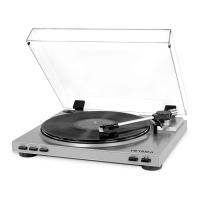
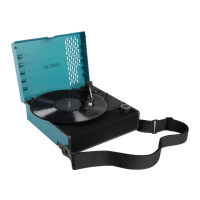
 General