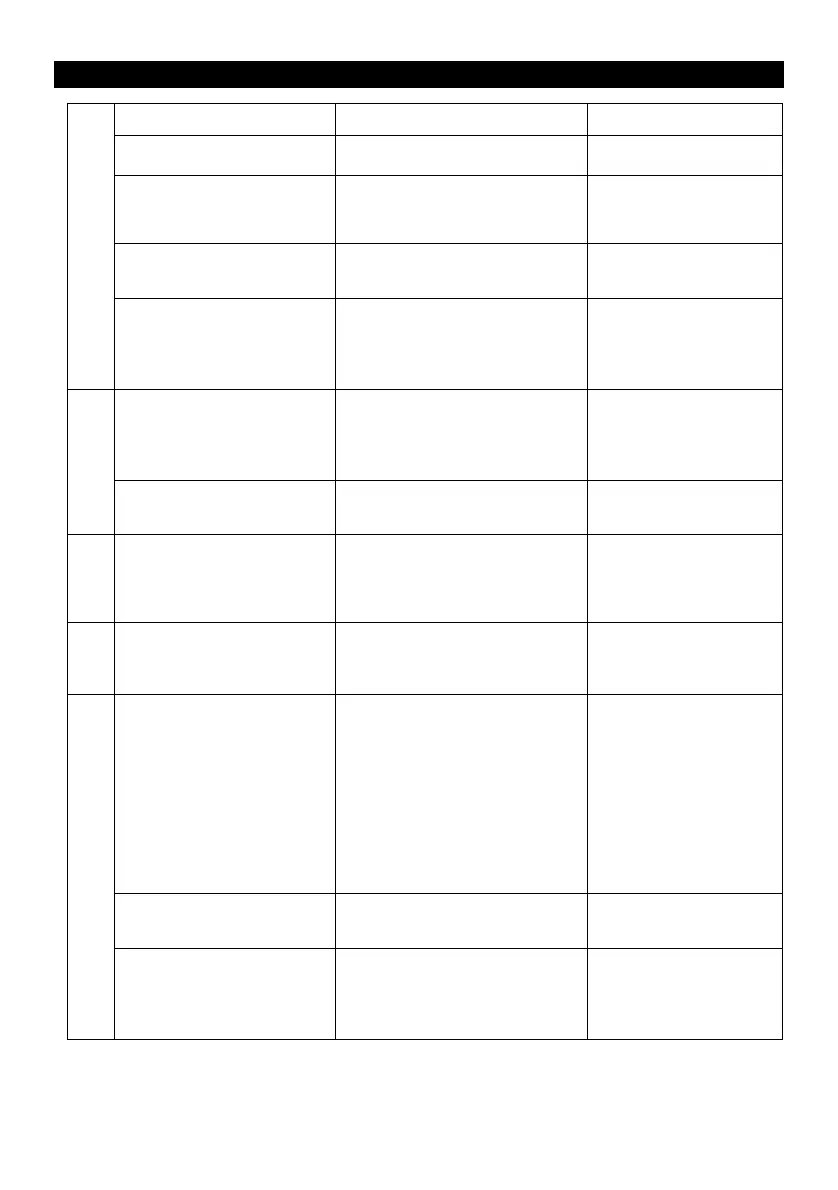
Troubleshooting Guide
• Unit will not power on.
• Connect the unit to the
AC power supply.
• No sound output from
speakers.
• The volume level is set too low.
• The input selector does not
match the playback source.
• Adjust the volume.
• Select the correct input
source.
• Noise/Distortion in sound
output.
• The unit is too close to a TV set
or another interfering device.
• Turn off the TV or other
appliance, and relocate
the unit.
• It might result from external
factors such as ESD (Electro-
static discharge).
• Disconnect the power
cord and external
audio device. Re-plug
the power cord after
one minute.
• Cannot listen to any
station, or signal appears
weak.
• The station is not tuned-in
properly.
• A TV set is being used nearby
and is interfering with the radio
reception.
• Properly tune-in the
desired station.
• Turn-off the interfering
TV set.
• The sound is distorted.
• The antenna is not oriented
properly.
• Re-orient the antenna
until reception
improves.
• Decline in turntable audio
performance.
• The turntable stylus is worn
out.
• No sound output with
external audio device
plugged into AUX in jack.
• The unit is not on AUX mode.
• Ensure the unit is
switched to AUX mode.
• The unit is not switched to
Bluetooth mode.
• Your de vice’s a nd/or the u nit’s
volume is not turned up.
• Your de vice is too far from th e
unit or there is some obstacle
between your device and the
unit.
• Ensure the unit is
switched to BT mode.
• Move your Bluetooth
device closer to unit.
• Turn up the volume on
your portable device
and/or the unit.
• Turn off your Bluetooth
device and unit then
power them both back
on.
• Your de vice’s a nd/or the u nit’s
volume is not adjusted
properly.
• Turn down the volume
on your device/phone
and the unit.
• Unable to pair with a
Bluetooth device.
• Your de vice doesn ’t hav e
Bluetooth connectivity.
• The Bluetooth pairing is not
successful.
• Confirm that your
device is Bluetooth
compatible.
• Pair the unit and
device again.











 To Next Page