Product Overview
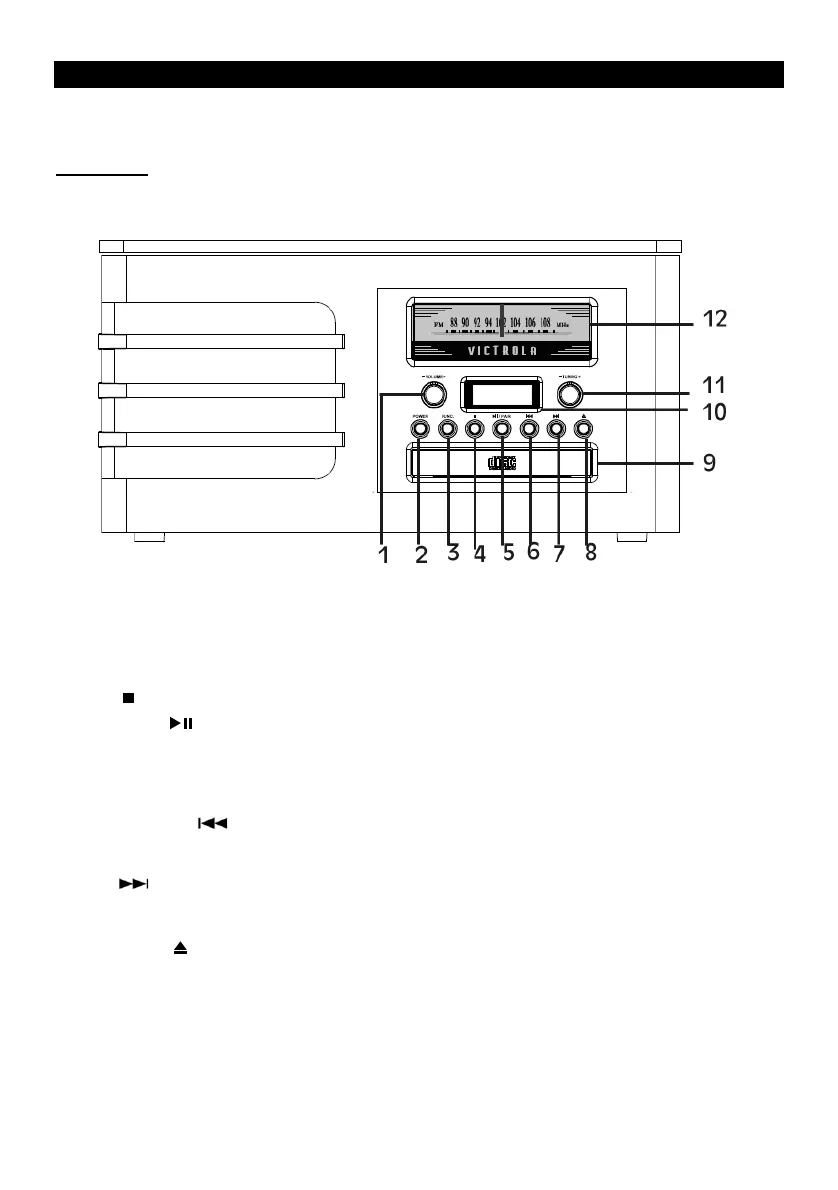
Front View
1. Volume Button: Turn to adjust volume
2. Power: Press to turn the unit on or off
3. Function Selection Button: FM, CD, Bluetooth, AUX, PHONO
4. Stop ( ): In CD mode, press to stop playback.
5. Play/Pause ( ) and Bluetooth Pairing:
In CD mode: press to play CD, press again to pause.
In Bluetooth mode: press to pair to Bluetooth.
In FM/CD/AUX/PHONO mode: press and hold to begin Bluetooth streaming (to any external
Bluetooth speaker or headphone.)
6. Previous Track ( ):
In CD & Bluetooth mode: press once to replay current track;
In CD mode: press and hold to rewind current track.
7. Next ( ):
In CD & Bluetooth mode: press once to skip the current track;
In CD mode: press and hold the button to fast forward current track.
8. Open/Close ( ): In CD mode: use to open and close the disc tray
9. Disc Tray
10. LED Display
11. Tuning Dial: In FM mode, turn to tune in a station.
12. Tuner











 To Next Page