SIMPLE SETUP
GETTING STARTED
Remove the needle cover, by gently pulling towards the front of the unit.
Carefully plug in the unit, install platter and tone arm weight.
Note: It is recommended that this product should be operated only from
the type of power source indicated on the rating label. This unit uses AC power and
is powered by a standard wall outlet.
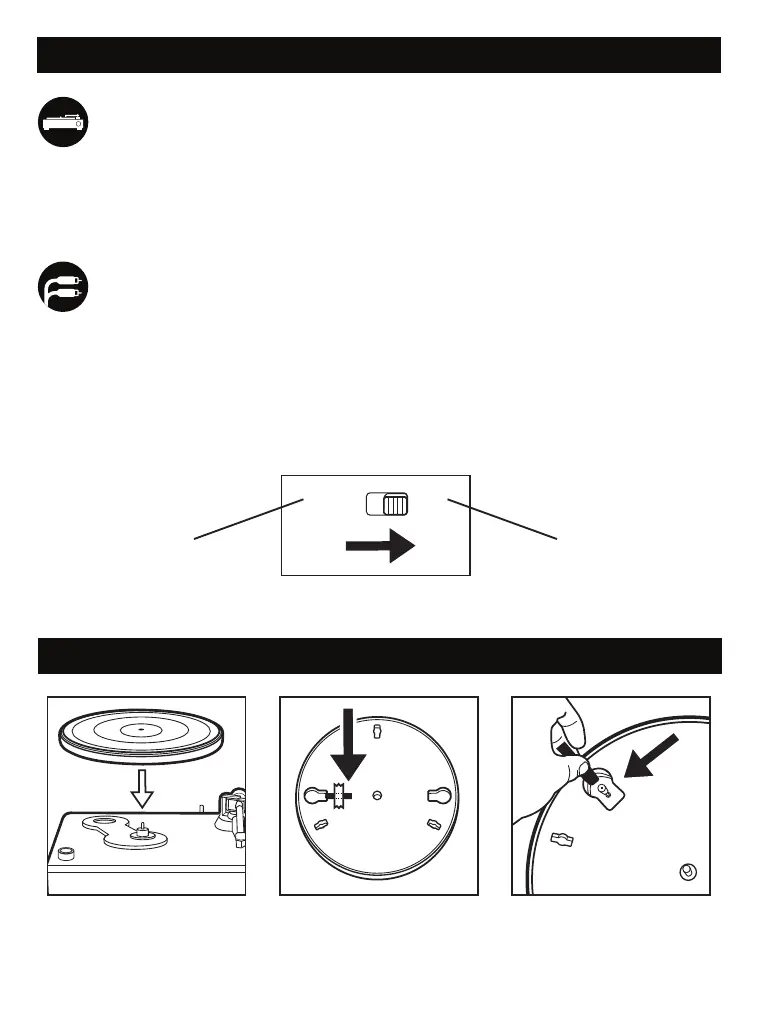
Phono Line
RCA LINE OUT: Use the red & white plugs on the back of the unit and included
RCA cables to connect to an amplier/stereo device. Once connected, switch ON
the unit and the amplier device you connected. Then adjust the volume on the
amplier device.
SWITCHABLE PHONO PRE-AMP
: This switch allows the internal stereo phono
pre-amp to be bypassed when the turntable is used with equipment that has
magnet phono inputs. Unless you are using equipment with magnetic phono
inputs, the switch should be set to “LINE”. Improper setting of the switch may
lead to no sound or loud unwanted feedback.
For equipment
that has magnetic
phono inputs
For equipment
that utilizes the
internal stereo pre-amp
PLACE THE PLATTER ON
THE TURNTABLE. THE BELT
IS PRE-INSTALLED
UNDER THE PLATTER
FIND THE GUIDE STRING TAPED
TO THE PLATTER AND
CAREFULLY REMOVE THE TAPE
WHILE HOLDING THE STRING
USE THE STRING TO PULL THE
BELT OVER THE MOTOR PIN -
ONCE BELT IS ON MOTOR PIN,
DISCARD THE GUIDE STRING
PL AT TER INSTALL ATION
CONNECTING THE SPEAKERS:


 To Next Page