Chapter 3. Basic Function Operating
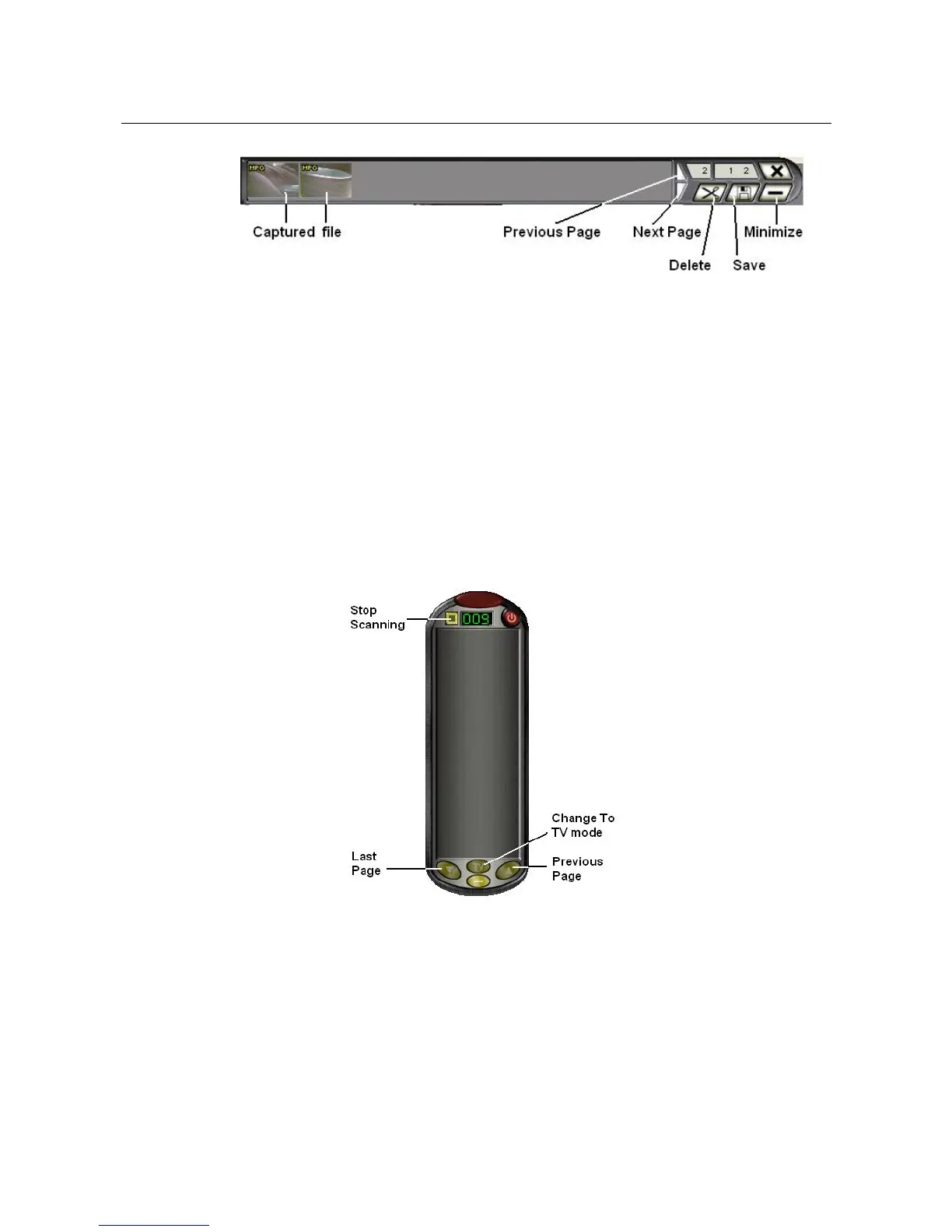
you can select a file and select “Delete” or “Save” function.
3.6. Record : When you click “Record ”, it starts to record video,
the recording video resolution depend on preview resolution,
but MPEG4 file(ASF) resolution is 320x240 in NTSC and
352x288 in PAL.
※ In order to make smooth recording, we recommend you
do not move the mouse during recording
3.7. TV/Composite/S-video display : Click to select which input video
you want display
3.8. Channel Scan : Scan all channel in your area
3.8.1. Stop Scanning : Click to stop scanning
3.8.2. Change To TV mode : Click to change to TV display
3.8.3. Previous/Last Page : Show Previous/Last page channel(if channel
number more than one page)
3.9. Channel Click : Push channel number digit button directly
_____________________________________________________________
10


 To Next Page