Chapter 2. Installation
Please make sure your computer has USB2.0 port correctly installed
and functioning !! ( We strongly recommend updating your WinXP to
SP1 or Win2000 to SP4 and updating USB2.0 host driver before
installation to make sure computer’s USB2.0 port is correctly
functioning )
Steps: (1) Install AP software (see 2.2)
(2) Install Driver (see 2.3)
(3) Plug XTV hardware (see 2.3)
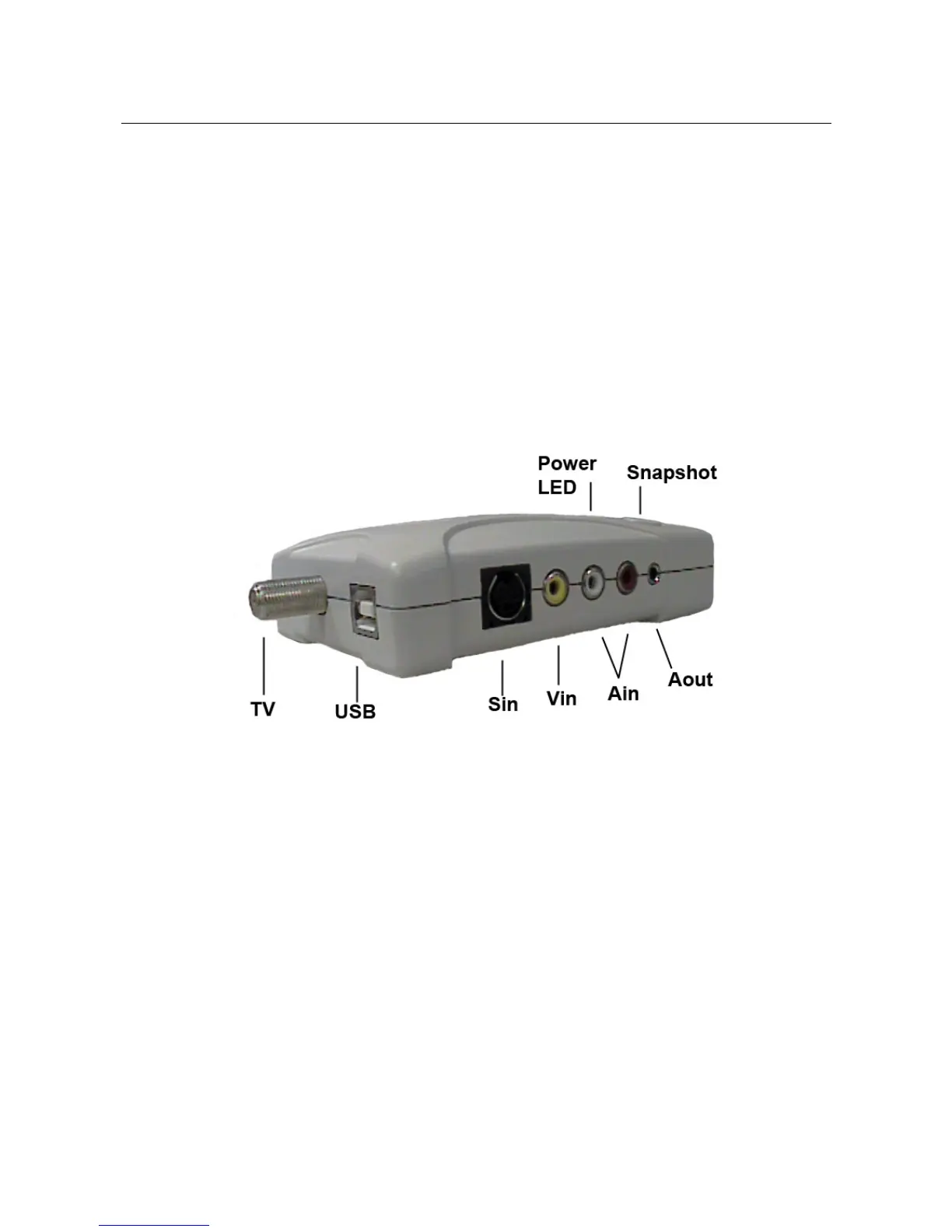
2.1 Hardware device description
TV : Connect to TV antenna/cable
USB : Connect use bundled USB cable connect to USB 2.0 port of your
computer
Sin : S-Video input from external A/V device(e.g.VCR)
Vin : Composite video input from external A/V device(e.g.VCR)
Ain : Audio L/R input from external A/V device(e.g.VCR)
Aout : In WinXP, not required in XP O/S
In Win2000, please connect bundled stereo cable to line-in
of Sound card
Snapshot : Instantaneous still image capture
Power LED : Power on indicator
_____________________________________________________________
3


 To Next Page