5840 711 - 01
16
Vitoconnect OPTO2 Installation and Operating
Restarting the Vitoconnect
Resetting to Factory Settings
Troubleshooting
After rectifying the fault, the Vitoconnect has to be
restarted.
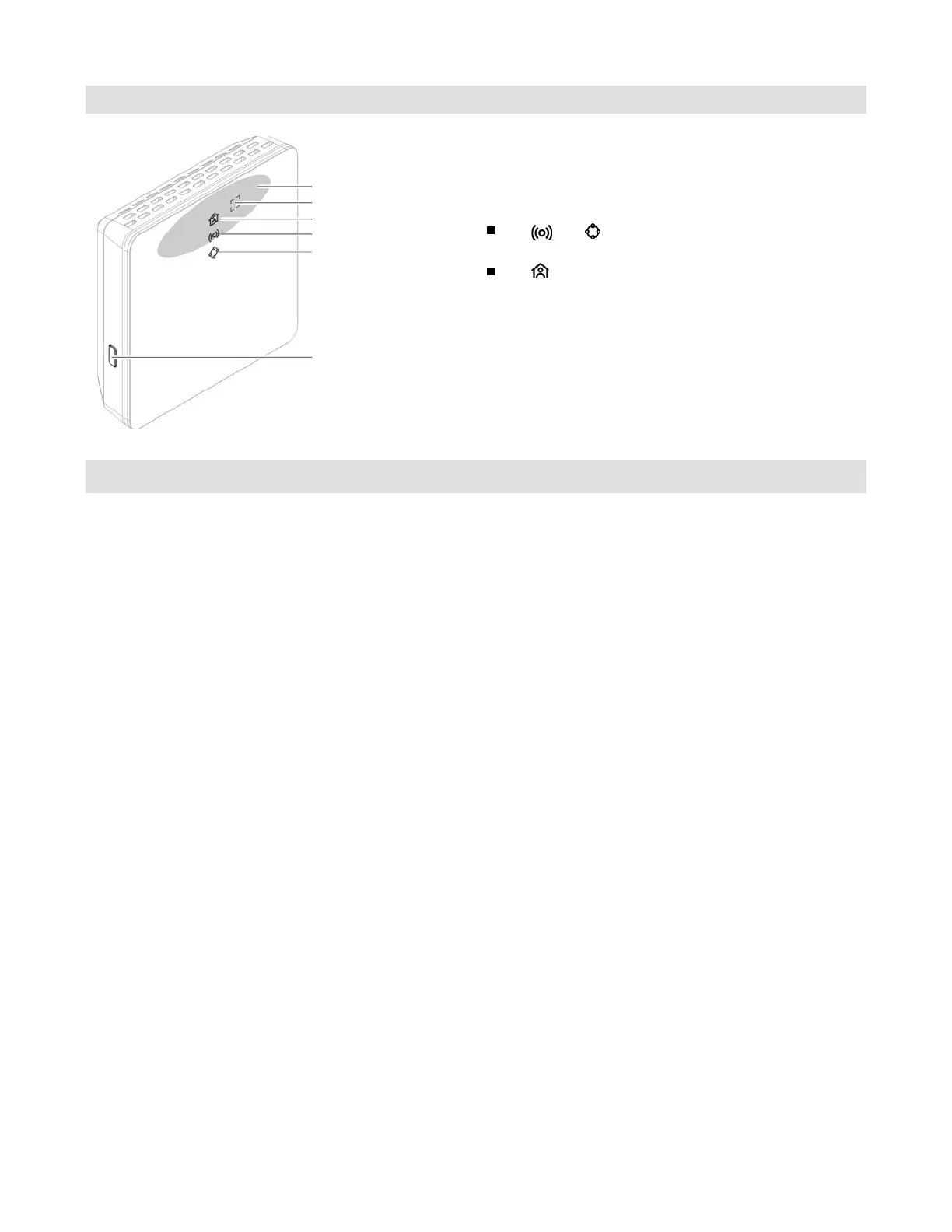
Simultaneously press the Reset button and the operating
button for approx. 15 seconds:
LED
and
illuminated in green: The start-up phase
can last up to 2 minutes.
LED illuminated in white: Vitoconnect is ready.
You can reset all changed values to their factory settings.
1. Press the Reset button (see above) for at least
30 seconds:
LED flashes red.
2. Press the Reset button (see above) once again
within 5 seconds.
LED no longer illuminated.
Vitoconnect restarts.
Reset button
Operating button
Operating status LED
Operating button area
Communication LED
System function LED









 To Next Page