9
5840 711 - 01
Vitoconnect OPTO2 Installation and Operating
Overview Steps for Installation and Commissioning
Installation
Work steps Responsible party Type OPTO2 on page
Installation
1 Check the system requirements. Heating contractor
IT professional
7
2 Install the wall bracket for the Vitoconnect. Heating contractor
IT professional
9
3 Connect the Vitoconnect to the heat generator. Heating contractor
IT professional
10
4 Insert the Vitoconnect in the wall bracket. Heating contractor
IT professional
9
5 Set up the Vitoconnect power supply connection. Heating contractor
IT professional
10
Commissioning
1 Check the network settings. IT professional 13
2 Register the user and set up the heating system. Heating contractor
System operator
13
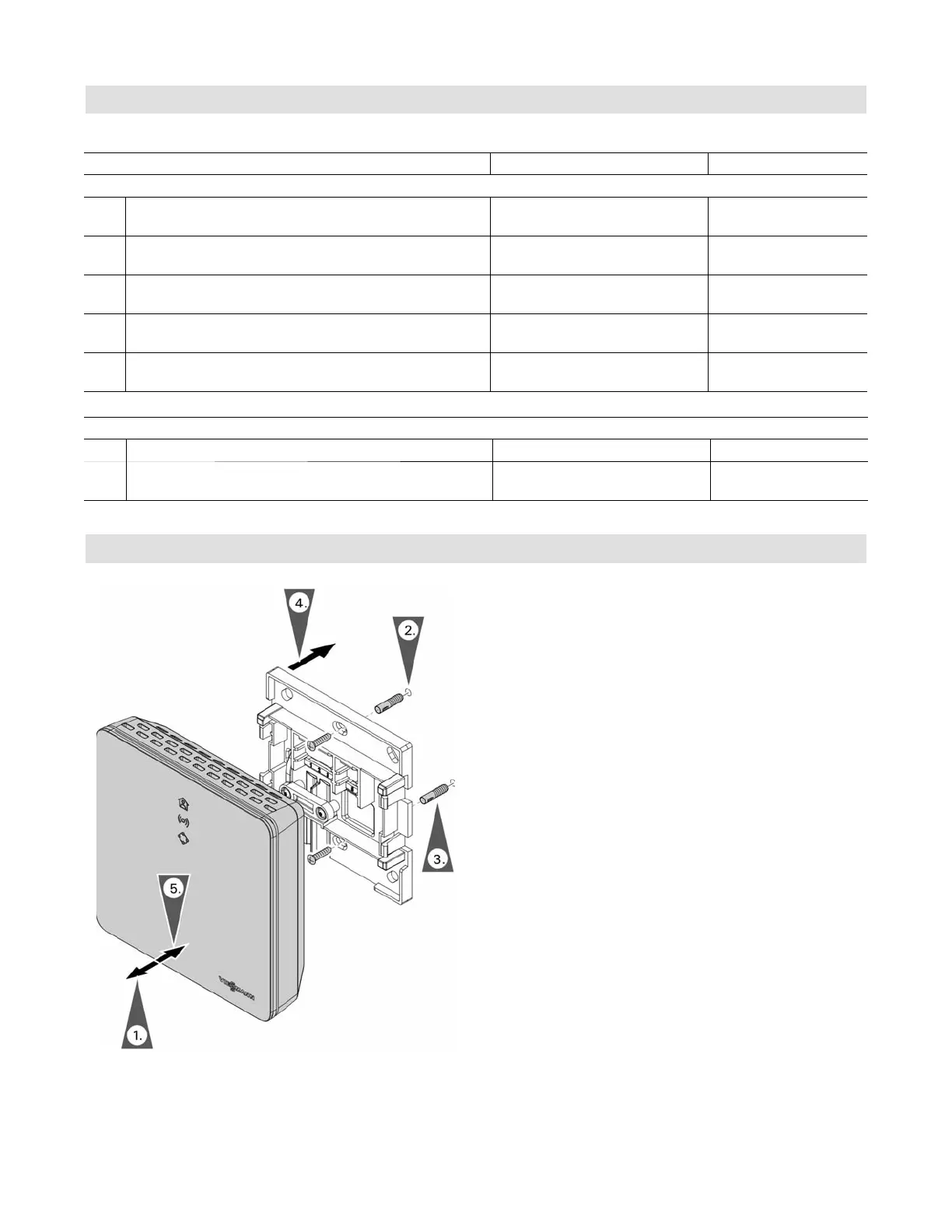
Installing the Vitoconnect Wall Bracket
1. Remove the front cover from the back plate.
2. Drill a hole for the wall plug using a 7 3/16 in. (5 mm)
drill.
3. Insert the wall plug.
4. Mount the back plate to the wall.
5. Snap the front cover to the back plate.









 To Next Page