Conguring Client Settings
Conguring Service Access Settings
82
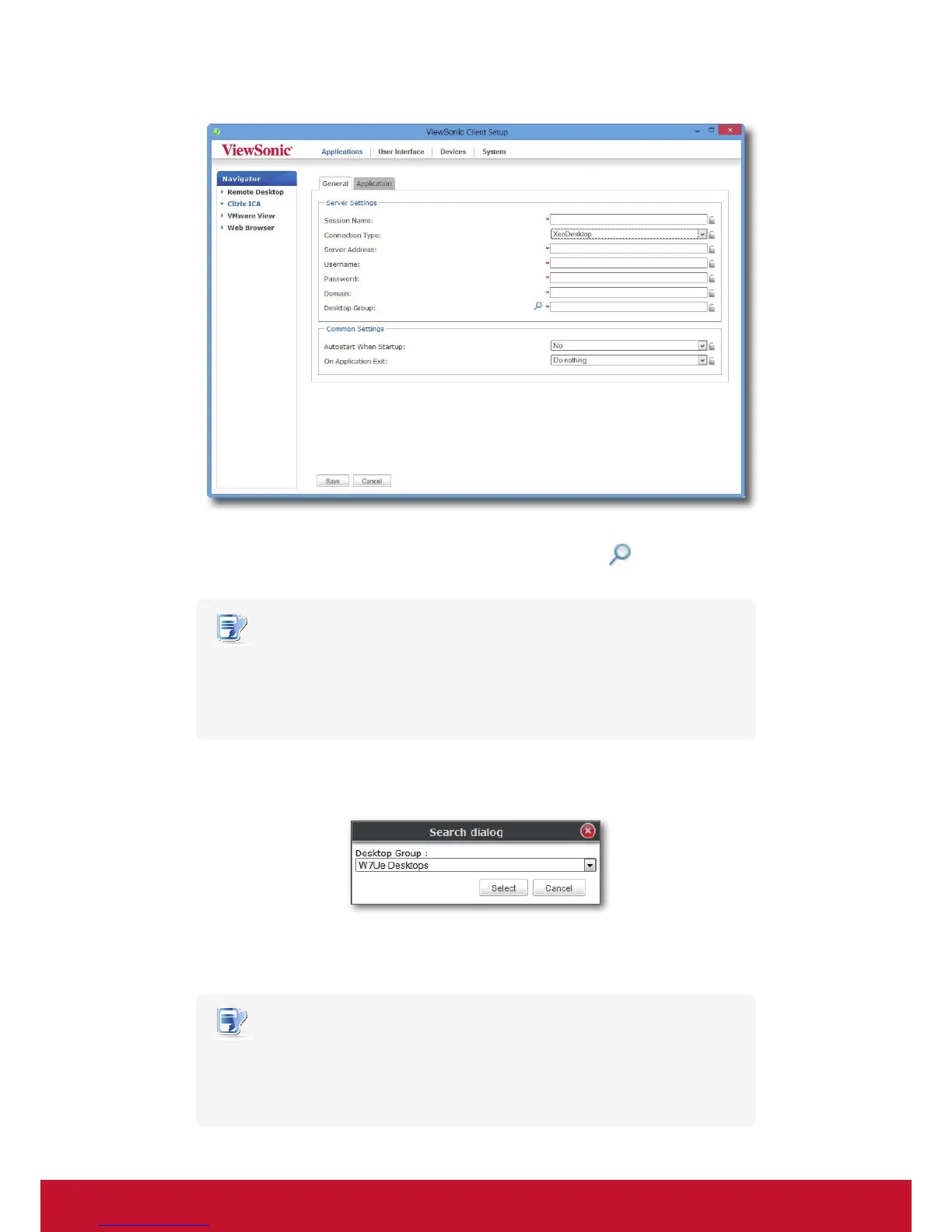
5. Type the session name, the IP address / FQDN of the server through which XenDesktop is accessible,
user credentials, the domain of the server, and then click the Search icon
to discover available
desktop groups.
NOTE
• The applicable or best suitable information type of the server side may vary with
your Citrix environment. Consult your IT administrator for more information.
• The Search icon works only when required data (elds marked with a red asterisk)
have been provided.
6. Upon completion, the Search Dialog window appears for you to select the desktop group. Click the
drop-down menu to select the desired desktop group, and then click Select to conrm.
7. The selected desktop group name automatically appears in the Desktop Group eld.
8. Click Save to conrm. The access shortcut will be created automatically on the desktop.
NOTE
• Depending on your plan of service delivery and the conguration of your server(s),
you may need to congure other advanced ICA connection settings for service
access. For more information on other available settings, please refer to section
“4.5.8 Conguring Advanced ICA Connection Settings” on page 94.


 To Next Page