The VINKA DR23 is an intelligent LCD display designed for e-bikes, offering a comprehensive interface for riders to monitor and control various aspects of their electric bicycle system.
Function Description
The DR23 display serves as the central hub for interacting with the e-bike's electrical system. It provides real-time information and allows for the adjustment of several parameters to enhance the riding experience. Key functions include:
- Intelligent Battery SOC Indication: Displays the battery's state of charge, allowing riders to keep track of remaining power.
- Motor Output Power Indication: Shows the current power output from the motor.
- Assist Level Selection and Indication: Enables riders to choose between different levels of pedal assistance (0 to 5) and indicates the currently selected level. Level 0 provides no output power, while Level 5 offers maximum power.
- Speed Indication: Displays current speed, maximum speed, and average speed.
- ODO and Trip: Tracks total distance traveled (ODO) and trip distance (Trip).
- Push-Assistance Function and Indication: Activates a push-assistance mode, propelling the e-bike at a uniform speed of 6 km/h, useful for walking alongside the bike.
- Trip Time Indication: Shows the duration of the current trip.
- Backlight ON/OFF and Indication: Controls the display backlight for visibility in different lighting conditions.
- Error Code Indication: Alerts the rider to any detected errors within the e-bike system by displaying specific error codes.
- Various Parameter Settings: Allows for the configuration of parameters such as wheel diameter, speed limit, battery power bar, assist level, and current limit.
- Recover Default Settings: Provides an option to revert all settings to their factory defaults.
Important Technical Specifications
The DR23 display is designed for robust performance in various conditions:
- Power Supply: Operates on a 36V/48V power supply.
- Rated Working Current: 10mA.
- Maximum Working Current: 30mA.
- Off-state Leakage Current: Less than 1μA, ensuring minimal battery drain when the system is off.
- Working Temperature: -20°C to 60°C.
- Storage Temperature: -30°C to 70°C.
- Wheel Diameter Settings: Settable values include 12, 14, 16, 18, 20, 22, 24, 26, 700C, 28, and 29 inches, with a default of 20 inches.
- Maximum Speed Limit: Settable range from 5 to 46 km/h.
- Push Assistant Speed Settings: Settable range from 3 km/h to 6 km/h.
- Backlight Levels: 5 settable levels, from darkest (1) to brightest (5), with 3 being standard.
- Unit Exchange: Supports both metric (km/h and km) and imperial (MPH and miles) units, with metric as the default.
Usage Features
The DR23 display is designed for intuitive and user-friendly operation:
- Button Interface: Features three buttons (ON/OFF, UP, DOWN) for navigation and control.
- Switching E-bike System ON/OFF: A 1-second press of the ON/OFF button turns the e-bike system on or off. The system automatically switches off after 15 minutes of inactivity.
- Display Interface Cycling: Pressing the ON/OFF button cycles through various display functions: ODO, Trip, Motor Power, Max. Speed, and Avg. Speed.
- Push-Assistance Activation: Press and hold the DOWN button for 1 second to activate push-assistance at 6 km/h. Releasing the button deactivates it. This function is intended for use when pushing the e-bike, not while riding.
- Lighting Control: A 1-second press of the UP button turns the headlights on or off, simultaneously adjusting the display backlight brightness.
- Assist Level Adjustment: Use the UP/DOWN buttons to switch between assist levels (0-5) while riding.
- General Settings Access: Pressing the ON/OFF button from the wheel diameter setting interface accesses the speed limit setting.
- TRIP Clear Function: In TRIP mode, pressing the UP and DOWN buttons simultaneously for more than 1 second clears the trip data.
- Settings Confirmation and Exit: Short pressing the ON/OFF button confirms input in settings interfaces. Holding the ON/OFF button stores settings and exits the current setting.
Maintenance Features
The DR23 display incorporates features and guidelines to ensure its longevity and proper functioning:
- Error Code Indication: The display continuously monitors e-bike system components and indicates errors with specific codes (e.g., Torque Zero Error, Speed Sensor Error, Battery Low Voltage). Users are advised to have the display inspected and repaired by an authorized bicycle dealer when an error code appears.
- Connection Layout: The display uses a Julet Male 6-pin connector for secure and reliable connection to the e-bike system. The wire sequence table provides details for BAT (Battery power), GND (Ground), DTX (Data transmission), DRX (Data receiving), ON-OFF (Controller power control), and Walk (Push control).
- Water-proof Connectors: The display's wire connections are equipped with water-proof connectors, preventing users from seeing the pin wire colors but ensuring protection against moisture.
- Warranty Scope: A 24-month warranty is provided for products used under normal conditions, starting from shipment or delivery.
- Exclusions from Warranty: The warranty does not cover damages resulting from demolition, wrong installation or operation, broken shell after leaving the factory, broken cables, expiry of the warranty period, or force majeure events (e.g., fire, earthquake).
- Warnings: Users are cautioned to use the display with care, avoid connecting/disconnecting when the battery is powered on, prevent hitting the display, refrain from modifying system parameters to avoid disorder, and seek repair when error codes appear.
- Software Versions: The display shows both controller software version (CLS) and display software version (DPS). The controller version is reported by the controller and cannot be adjusted from the display, while the display software version is also not adjustable and is determined by the software itself.
The VINKA DR23 is a robust and feature-rich e-bike display designed to provide riders with essential information and control, enhancing both safety and enjoyment of their electric bicycle.

 Need help?
 General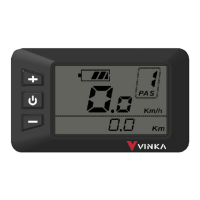

 To Next Page
