- 17 -
I/R remote controller
The user may use I/R remote controller to control the digital video/audio recorder.
PTZ Cameras
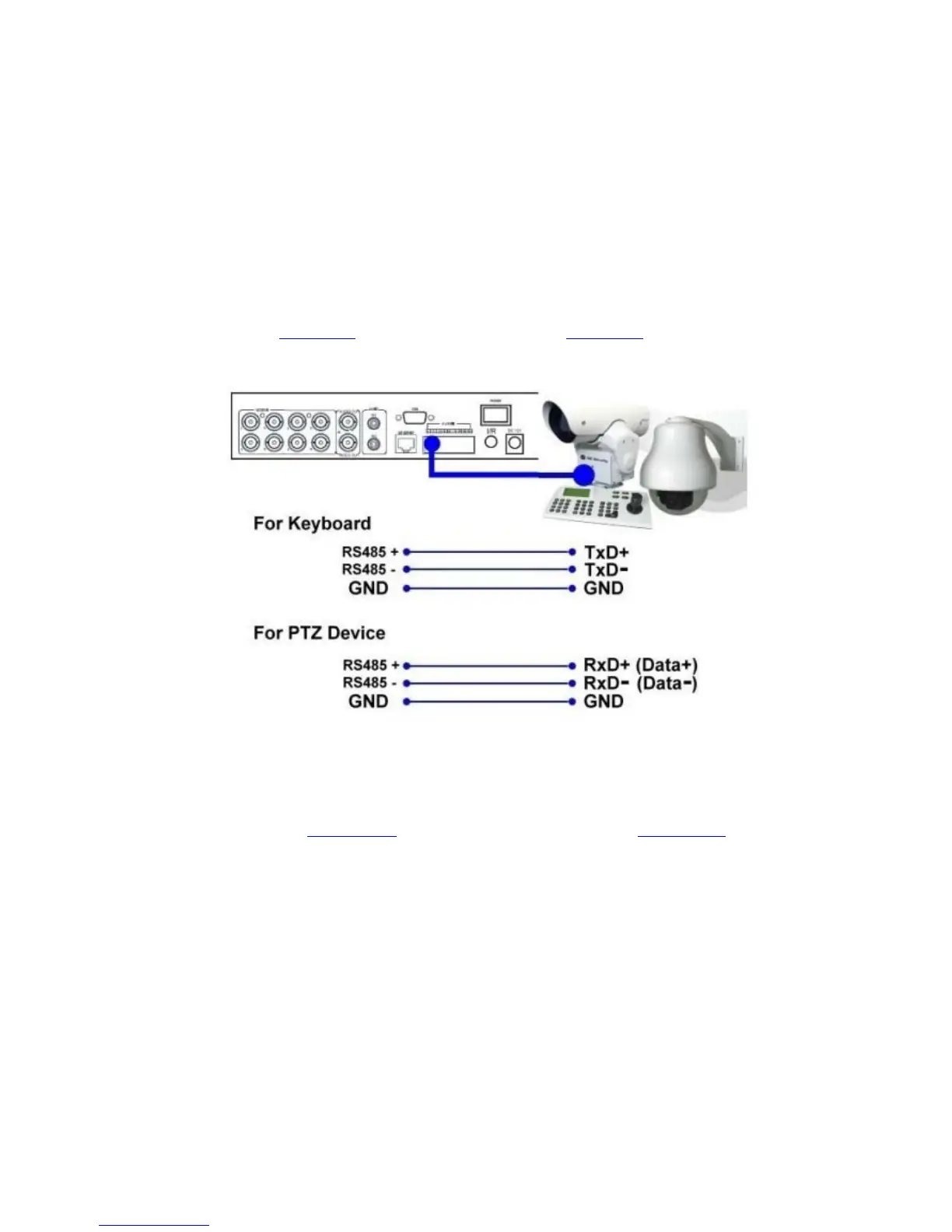
Connect the RS-485 connector to PTZ camera(s) via the appropriate cable. The
system supports a variety of different PTZ cameras, including Pelco D protocol
Dome, SamSung SCC-641P, Kalatel Cyber Dome, Bosch AutoDome, etc. But
different PTZ cameras can coexist in a system only if they support the same
protocol. Please make sure to set the PTZ ID of the camera(s), and setup the
camera (Section 6.1
), and RS-232 or RS-422/485 (Section 6.9) accordingly.
RS-485 keyboard or Terminal
Connect the RS-485 connector to a RS-485 keyboard controller or VT-100
terminal via the appropriate cables. Please refer to the diagram above for the
correct connection. Please make sure to setup the RS-422/485 configurations as
described in Section 6.9
accordingly. Please refer to Appendix D for the
Keyboard Control Protocol for the digital video recorder.


 To Next Page