- 30 -
5.5 Backup Device
In Menu display, press ▲▼◄► to change the highlighted option to Backup Device,
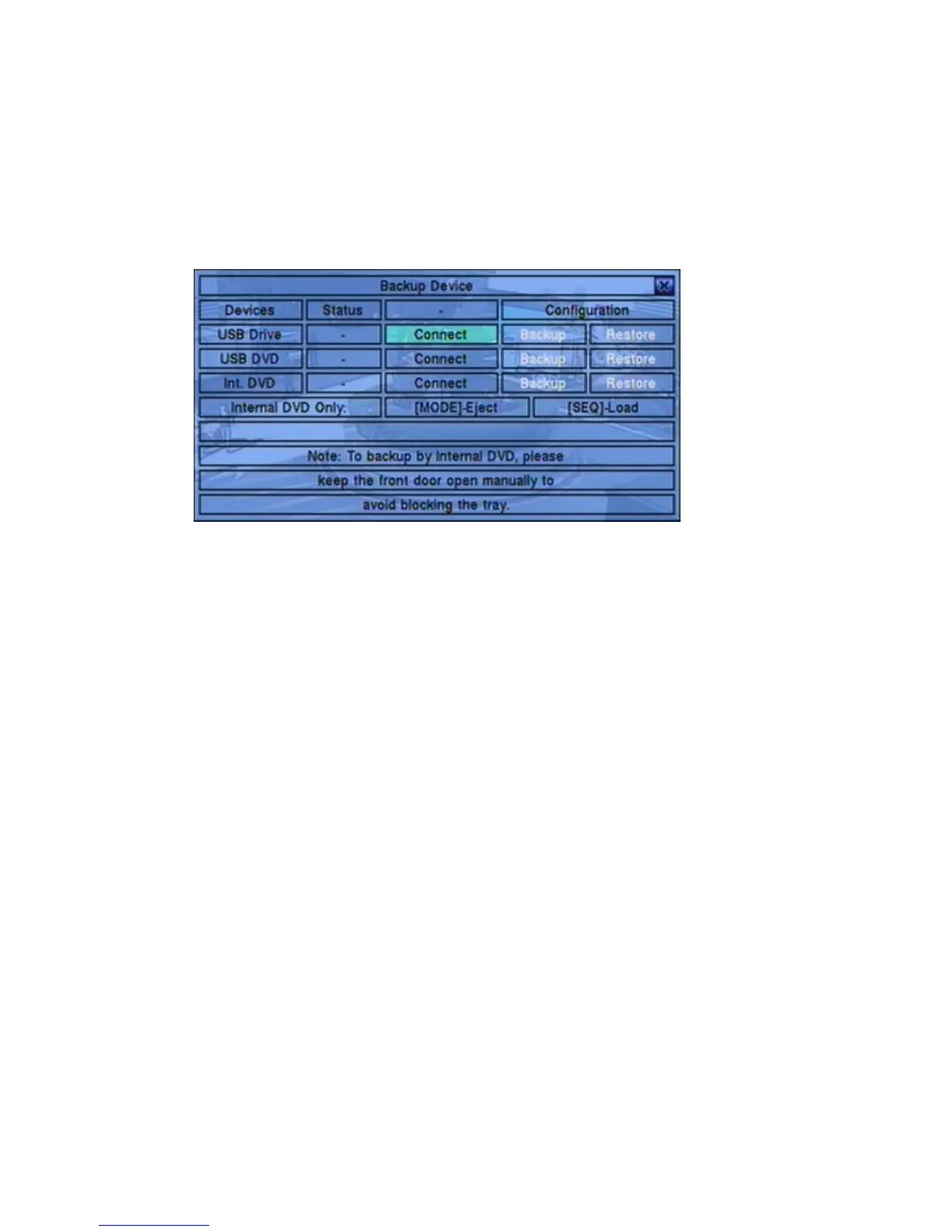
and then press ENTER to call up Backup Device display as shown below.
The system supports internal DVD for Internal DVD models and a variety of USB
2.0 storage devices, including Storage Disk such as USB 2.0 storage disk drives and
DVD Disc (including DVD+RW, DVD+R, and DVD-R). (DVD-RW is not
supported.) The operations are as below:
▲▼◄►
Press these buttons to select the items.
ESC (Mouse: Right Click)
Press this button to escape from this screen, and return to previous display.
MODE
Eject the tray and disconnect. (for Internal DVD only)
SEQ
Load the tray and connect. (for Internal DVD only)
Connect/Disconnect – If the backup device is disconnected (as shown in Current
Status), please plug the device in the USB port and/or insert a DVD for DVD
device, and then press ENTER (Mouse: Left click) to command the system to
connect with the device. If the device is already connected (EX. Read/write, as
shown in Current Status), please press ENTER (Mouse: Left click) to
command the system software to disconnect with the device, and then unplug the
backup device from the backup port.
Note 1: DO NOT format the DVD disc for better performance and compatibility.


 To Next Page