- 42 -
The general operations are as below:
▲▼ (Mouse: Left click)
Press these buttons to select the items.
Numeric
Press these buttons to select the camera.
COPY (
)
Press this button to copy the Motion settings, including Detection settings, of the
focus camera to all the following cameras. (EX. focus camera is 1, its Motion
settings will be copied to those of cameras 2-8/4.)
ESC (Mouse: Right Click)
Press this button to escape from this screen, and return to Camera Setup display.
If the Save dialog is shown, press ENTER to exit and save, ESC (Mouse:
Right Click) to exit without saving.
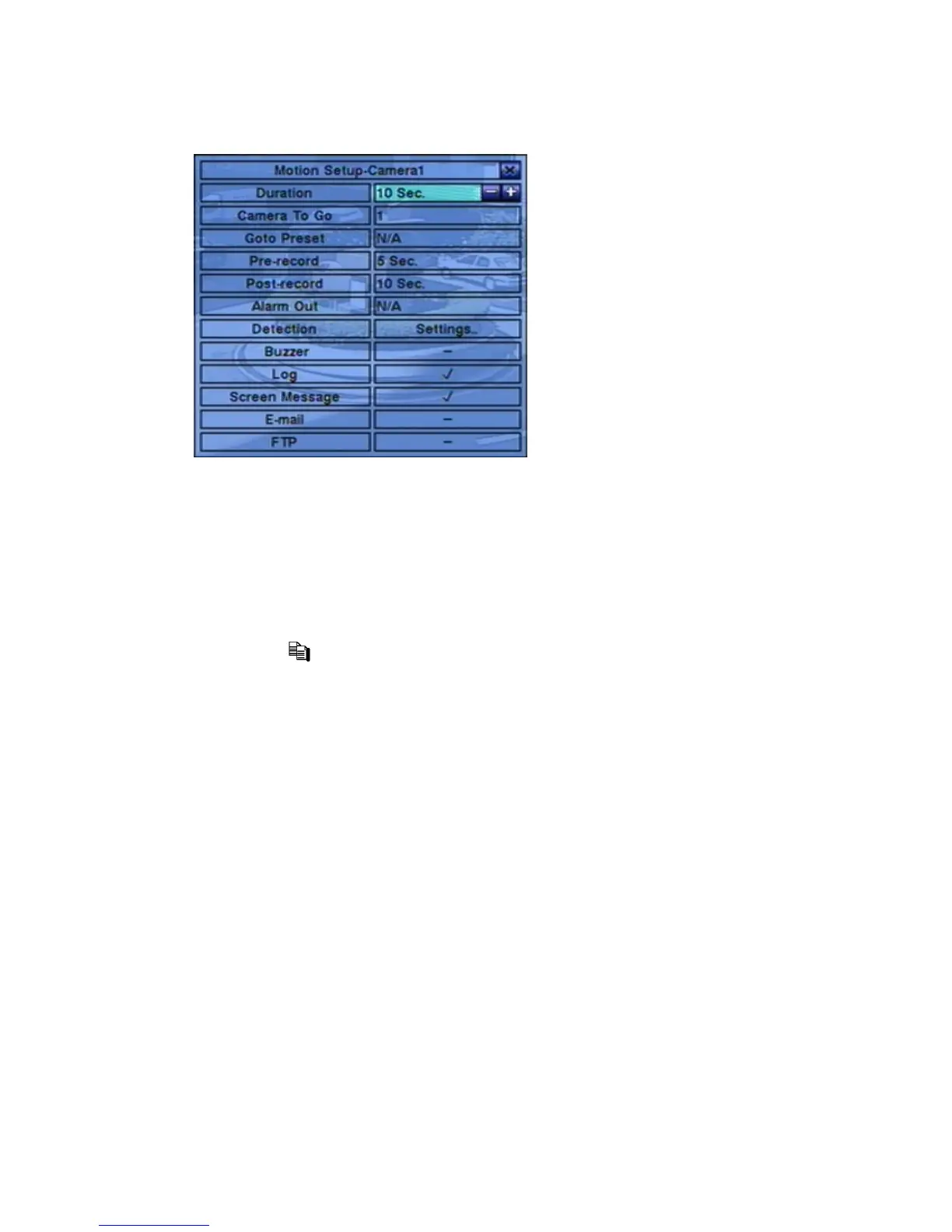
Following is a brief description for each item and its specific operations:
Duration – response duration to define at most how long (in seconds) the Alarm
Out relay and the Buzzer will keep being triggered after motion is detected for
this camera. However, the Alarm Out relay and the Buzzer will be reset
immediately once the camera returns to normal. Press +/- buttons to adjust the
value (3 seconds - 60 minutes, discrete, ‘-‘ for ‘Forever’).
Camera to go – the camera to go to the preset position in next field after motion
is detected for this camera. “Camera to go” camera must be a PTZ camera.


 To Next Page