- 93 -
9. Please go to Start->Setup->Control, select Display->Settings, and set the Screen
Resolution to at least 1024x768 and Color to 32-bit.
Firefox
To use Firefox to access the DVR, please do the followings:
1. Launch Firefox.
2. Visit the web site "http://ietab.mozdev.org
" to download and install IE Tab Plugin.
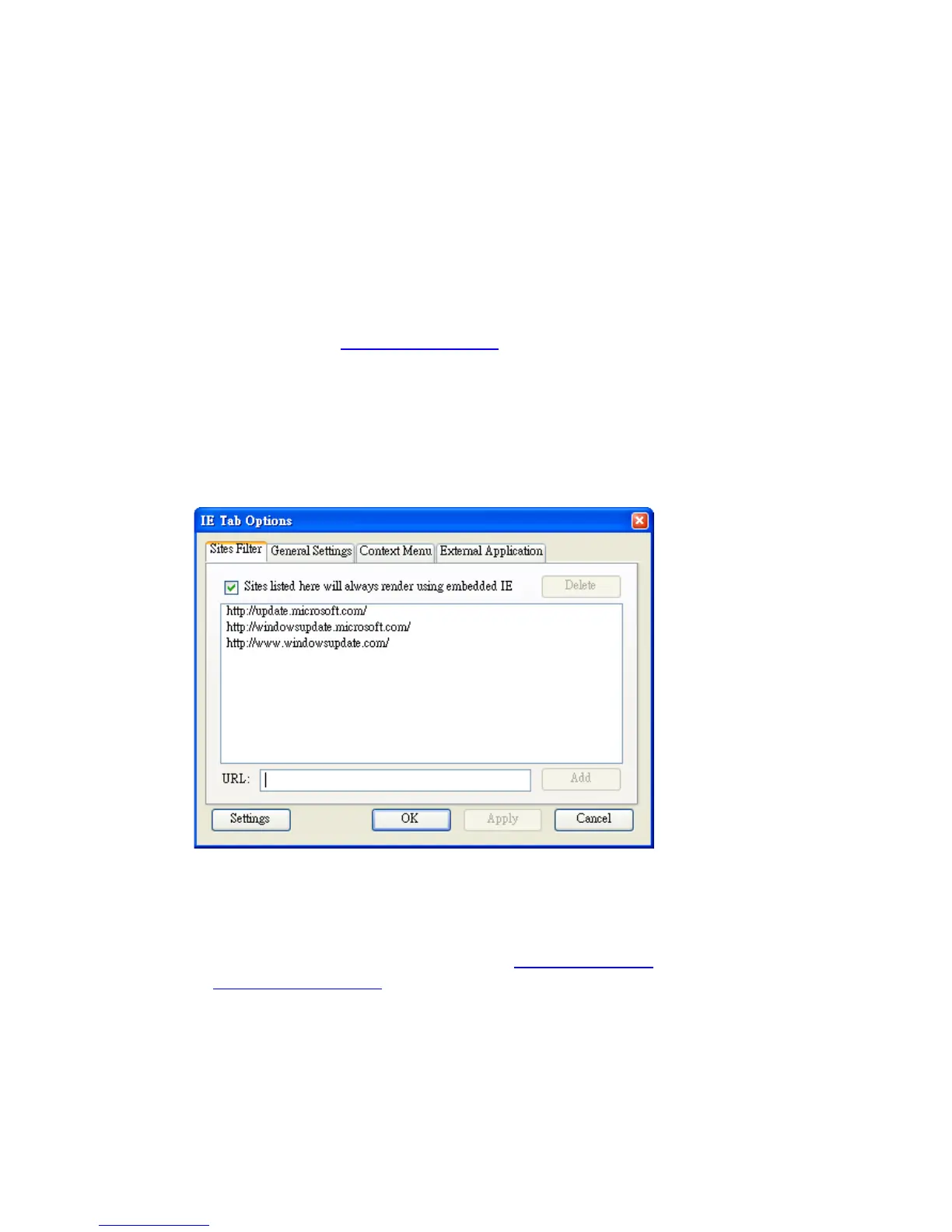
1. Select Tools->IE Tab Options.
2. Select Sites Filter.
3. Check the option "Sites list here will always render using embedded IE", and add
DVR's URL into sites list.
Logon
After the above-mentioned items have been done correctly, restart your web browser
and enter the domain name or IP address (EX. http://192.168.1.100
if HTTP port is 80,
or http://192.168.1.100:800
if HTTP port is 800) of the digital video/audio recorder in
the Location/Address field of the web browser. The plug-in software in the system
will be downloaded and run automatically in the web browser. Please note that up
to 6 users can logon this DVR simultaneously.


 To Next Page