38
© 2002 directed electronics, inc.
table of zones
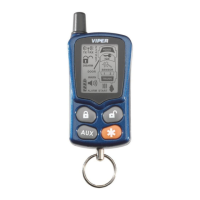
A zone is represented by the LED flashes and remote control LCD
icons used by the system to identify a particular type of input.
Standard input assignments are listed in the following table.
ZONE
(Number of
LED Flashes) DESCRIPTION LCD Icon
1 Instant trigger - trunk pinswitch 19
2 Shock trigger (-) - Full trigger and 17
Warn Away
®
of Sensor 1
3 Door switch trigger 9
4 Optional Sensor (-) - Full trigger and 18
Warn Away
®
5 Ignition trigger 15
6 hood pinswitch 14
interpreting zone diagnostics
Warn Away responses are not reported by the arming or
disarming diagnostics. If you receive a Bypass notification when
arming or a Tamper Alert notification when disarming, look at
the LED or remote control LCD. Active or triggered zones will
be indicated by a pattern of blinks by the LED or the remote
control icon will indicate the triggered zone.
Example
If Zone 3 was active or triggered, the LED will blink three times
with a two-second pause. Then it will blink three times again,
➜
➜



 To Next Page